Python简易代码画呼拉圈_颜色列表与求余练习

"""
    画呼拉圈.py
     
"""
import turtle

colors = ['red','orange','yellow','green','cyan','blue','magenta']
amounts = len(colors)

screen = turtle.getscreen()    # 得到屏幕
screen.delay(0)                # 延时为0
screen.bgcolor('black')        # bgcolor 背景颜色
screen.title("Python简易代码画呼拉圈")

turtle.shape('turtle')
turtle.pensize(40)
turtle.goto(-100,100)         # 到坐标
 
for x in range(360):
    ys =  colors[x % amounts ]
    turtle.color(ys)
    turtle.fd(2)
    turtle.right(1)


发表在 python, turtle | 留下评论

python生成PPT幻灯片程序

"""
   生成PPT幻灯片程序.py
   本程序把images下面的0.png,1.png,2.png.....都添加到一个PPT幻灯片文件中.
   pptx模块安装:pip3 install python-pptx
"""

import os
import pptx
from pptx.util import Inches
from random import randint,choice

letters = [chr(x) for x in range(48,127)]

def autostring():
    """自动生成一个字符串"""
    s = ''.join([choice(letters) for i in range(1,randint(10,1000))])
    return s

def make_images_pptx(image_path,out_path):
    """
    生成幻灯片文件,插入很多图片后加上随机字符串防大数据识别发同一文件
    """
    pptFile = pptx.Presentation()
    # 交换纵横比,相当于设置成纵向幻灯片
    pptFile.slide_width,pptFile.slide_height = pptFile.slide_height,pptFile.slide_width
     
    # 按图片编号顺序导入
    for index in range(15):
        fn =  path + os.sep + str(index) + ".png"
        # 添加一个幻灯片
        slide = pptFile.slides.add_slide(pptFile.slide_layouts[1])

        # 命令格式: add_picture(image_file,left,top,width,height)
        slide.shapes.add_picture(fn, Inches(0), Inches(0), Inches(7.5), Inches(10))

    slide= pptFile.slides.add_slide(pptFile.slide_layouts[1])

    body_shape = slide.shapes.placeholders          # body_shape为本页ppt中所有shapes
    body_shape[0].text = '请忽略以下\n自动生成内容'  # 在第一个文本框中添加文字
    body_shape[1].text =  autostring() # 在第二个文本框中文字框架内添加文字

    pptFile.save(out_path)

path = os.getcwd() + os.sep + "images"
out = os.getcwd() + os.sep + "out" + os.sep


for i in range(100):
    make_images_pptx(path,f'{out}Python创意编程汇编之turtle篇.pptx_{i}.pptx')


发表在 python | 留下评论

均分Python列表两个函数

def splitlist(biglist,number):
    """number是要分成的份数"""
    retlist=[]
    listlen=len(biglist)
    everyamounts=listlen//number
    slicelist=[]
    for i in range(number):
        start=i*everyamounts
        end=(i+1)*everyamounts
        if i==(number-1):          # 加这句是让最后的列表把剩余的也包括进去。
            end=listlen
        slicelist=biglist[start:end]
        retlist.append(slicelist)
    return retlist


def splitlist2(biglist,number):
    retlist=[]
    listlen=len(biglist)
    everyamounts=listlen//number
    slicelist=[]
    for i in range(number):
        start=i*everyamounts
        end=(i+1)*everyamounts
        slicelist=biglist[start:end]
        retlist.append(slicelist)
    if end<listlen:              # 把剩余的形成一个列表。
        slicelist=biglist[end:listlen]
        retlist.append(slicelist)
        
    return retlist


alist=[3,2,7,6,8,9,10,"a","b","abd",0,3,77,9,6,888,678]
s=splitlist(alist,3)
print(s) 


发表在 python | 留下评论

正常

想像 = """
今天要上一天课,没有时间原创程序了,抓紧时间想像了一下,文字如下:

从前从前从前,没有电,是正常的。
从前从前,没有电,是不正常的。
从前,没有网络,是正常的。
现在,没有网络,是不正常的。
将来,没有现金,是正常的。
将来将来,有现金,是极不正常的!
将来将来将来,在火星上有房产是正常的。
将来将来将来将来,在太空种植是正常的。
将来 * 5,人离开网络就不能生存是正常的。
将来 * 6,离开网络的人竟然还能生存是不正常的。
将来 * 7, 靠自然怀孕生下来的人是不正常的。
将来 * 7,男人“能生育”,是正常的。
将来 * 8,反抗人工智能的人是不正常的。
将来 * 9,作为人工智能的宠物的人是正常的。
将来 * 10,还能跑步的人是不正常的。
将来 * 11,还能啃得动骨头的人是不正常的。
将来 * 12,有多个肉身的人是正常的。
将来 * 13,天天生活在虚拟数字世界的人是正常的。
将来 * 14,还生活在实体社会中的人是不正常的。
将来 * 15,还能看得到这篇文章的人是极不正常的!
"""
print(想像)


发表在 杂谈 | 留下评论

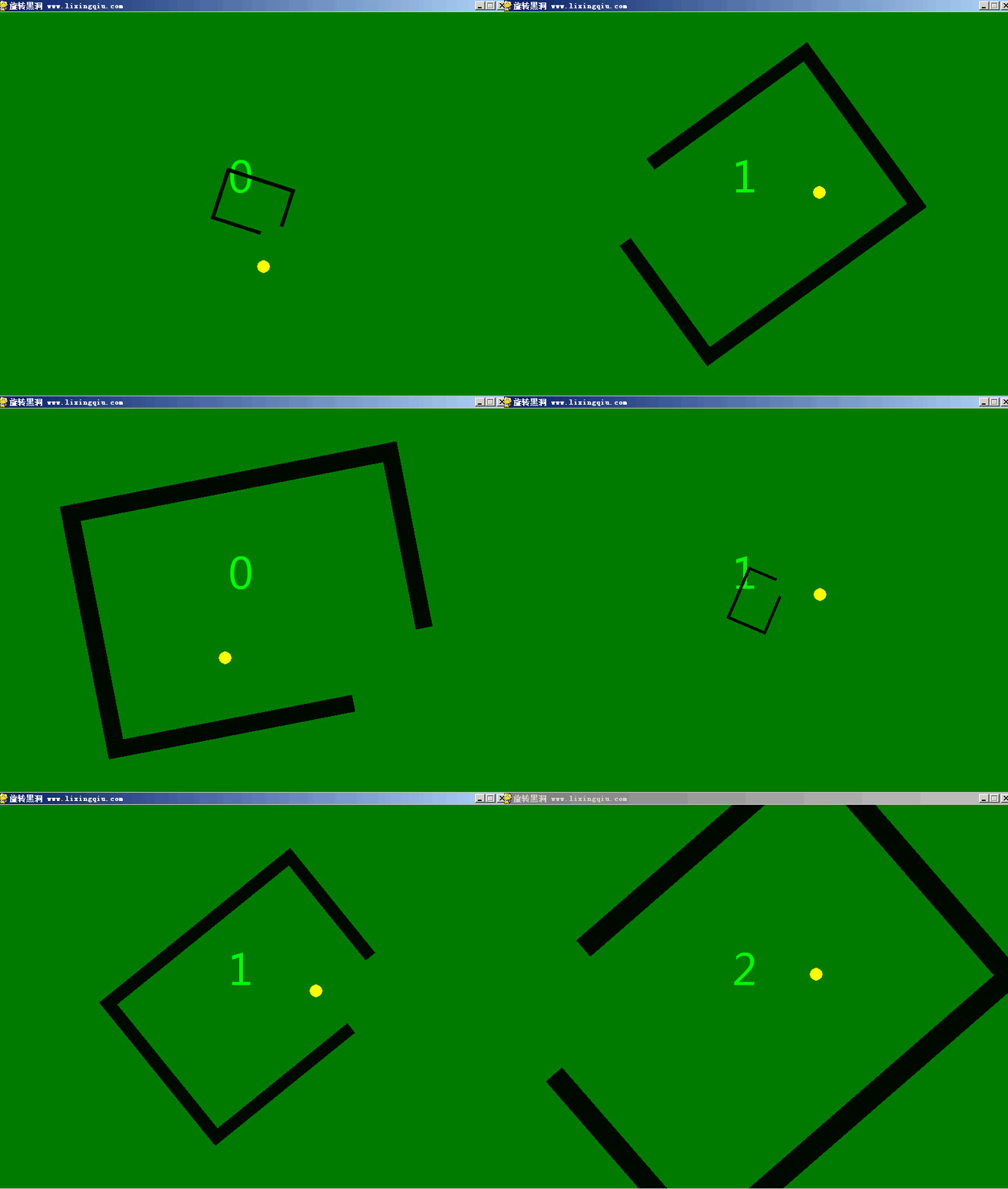
旋转黑洞游戏python pygame rotate black hole

旋转黑洞python pygame rotate black hole
根据4399上面的一个类似的游戏编写的,下面是部分代码预览:

"""
   旋转黑洞.py
   按左右键操作小球逃出黑洞,碰到了黑洞的边框,那么计数器就会清零。
   
"""
import pygame
from pygame.locals import *

width,height = 800,600
title = "旋转黑洞 www.lixingqiu.com"

pygame.init()
screen = pygame.display.set_mode((width,height))
pygame.display.set_caption(title)

clock = pygame.time.Clock()
running = True
while running:
    for event in pygame.event.get():
        if event.type == QUIT:running = False

    旋转子.update()
    frame.update()

    # 更新后进行基于mask的碰撞检测
    if pygame.sprite.collide_mask(旋转子,frame):
        print("飞天")
        frame.counter = 0
        frame.reset()

pygame.quit()

如需要查看完整源代码,请

成为会员后,登陆才能继续浏览!联系微信scratch8即可办理会员。
(会员专属:能浏览所有文章,下载所有带链接的Python资源。)

发表在 pygame, python | 旋转黑洞游戏python pygame rotate black hole已关闭评论

Python创意编程汇编turtle篇的目录

第1例:样本程序8例     …………………….     8

第2例:海龟的小伙伴们   ……………………..    13

第3例:棕色海龟是傀儡   ……………………..    15

第4例:碰到边缘就反弹   ……………………..    17

第5例:定时器与弹球类   ……………………..    19

第6例:鼠标控制长矩形   ……………………..    21

第7例:动态音乐梦幻空间  …………………….    25

第8例:酷炫效果同心圆    …………………….    26

第9例:时光倒流的向日葵  …………………….    28

第10例:漂亮的八字彩环   …………………….    30

第11例:酷炫彩圆盘       …………………….    32

第12例:超速画莲花       …………………….    33

第13例:趣味3D红框      …………………….    35

第14例:方形炫彩螺       …………………….    37

第15例:三叶炫彩扇       …………………….    39

第16例:纯色滚动圆环     …………………….    40

第17例:字母排列组合游戏 …………………….    42

第18例:模拟3D星空      …………………….    46

第19例:幸运大抽奖      …………………….    48

第20例:奔跑吧小猫      …………………….    51

第21例:一束火红鲜花    …………………….    53

第22例:雪花飞舞的日子  …………………….    55

第23例:中秋仙女送月饼  …………………….    59

第24例:生机勃勃的农场  …………………….    62

第25例:海龟画图保存为png  ………………….    70

第26例:海底世界章鱼哥  …………………….    73

第27例:倾巢出动_敌机类 …………………….    77

第28例:昨夜星辰_北斗七星版 …………………    80

第29例:单摆模拟        …………………….    86

第30例:turtle版打地鼠  …………………….    88

第31例:单击球小游戏     …………………….    91

第32例:多彩3D弹球      …………………….    95

第33例:保护环境人人有责 …………………….    98

第34例:温度计模拟显示器 …………………….    101

第35例:针眼画师的功夫   …………………….    107

第36例:新年快乐贺卡发财中国年 ………………..   113

第37例:雷电简单模拟     …………………….    119

第38例:星际赛车游戏     …………………….    127

第39例:turtle射击游戏基础  ………………….    135

第40例:大鱼吃小鱼简易版 …………………….    138

第41例:酷酷的爆炸效果    …………………….    145

第42例:360度旋转图像角色 …………………….    147

第43例:8字图章小海龟     …………………….    150

第44例:贪吃蛇图章版       …………………….    152

第45例:贪吃蛇列表版       …………………….    157

第46例:按键检测探秘       …………………….    160

第47例:可爱的金币天使     …………………….    162

第48例:菜根谭小猫         …………………….    165

第49例:花框音乐盒         …………………….    170

第50例:生命模拟turtle版  …………………….    174

第51例:坦克大战turtle版  …………………….    178

第52例:抢收成语方块类     …………………….    187

第53例:后羿射日之前       …………………….    191

第54例:老鼠过街           …………………….    194

第55例:冒泡排序彩柱图演示 …………………….    200

第56例:泡泡摸奖系统       …………………….    203

第57例:太空出租箭关卡设计器  ………………….    212

第58例:太空出租箭          ……………………    216

第59例:解放军VS木马炮弹类 …………………….   225

第60例:向后滚动背景       …………………….    244

第61例:相声《大数据》     …………………….    246

第62例:哪吒拼图核心       …………………….    258

第63例:编程娃娃格子海龟  …………………….    262

第64例:螺旋的世界        …………………….    265

第65例:打砖块小游戏      …………………….    267

第66例:切片教学演示动画   …………………….   274

第67例:矩形抽象画         …………………….   278

第68例:模拟时钟程序       …………………….   281

第69例:神笔马良之旋转雪花  …………………….  284

第70例:砸蛋小游戏        …………………….    286

第71例:飘移粒子效果      …………………….    290

第72例:小女孩的舞蹈      …………………….    293

第73例:正弦字画程序      …………………….    295

第74例:海龟入门学习器核心 ……………………    297

第75例:猴子穿衣装扮游戏  …………………….    302

第76例:怦然心动          …………………….    305

第77例:动态情景配音春晓  …………………….    308

第78例:迪迦奥特曼动画演示 ……………………    310

第79例:太空入侵者        …………………….    312

第80例:简易画板          …………………….    318

第81例:超级玛丽接金币    …………………….    321

第82例:微重力方块        …………………….    326

第83例:保卫公主行动      …………………….    328

第84例:跳跃方块游戏      …………………….    340

发表在 python, turtle, 杂谈 | Python创意编程汇编turtle篇的目录已关闭评论

Python创意编程汇编之turtle篇的简介

Python是一种高阶计算机语言。它更接近自然语言,学习成本低,开发效率高。可以预见,全民会Python的日子不久就会到来。在Python的普及过程中,海龟模块(turtle)将会功不可没。它来源于上个世纪60年代的logo计算机语言,就是通过指挥一只小海龟移动,来教少年们进行计算机编程入门。相当多的教授计算机编程入门的语言都有“海龟”的影子,如Scratch的绘画功能。一些编程教育机器人或编程教育软件也有相应的“海龟”指令指挥角色移动。也有人给C++、C#、java、javascript等开发了相应的海龟模块,让人们学习这些计算机语言的编程入门。无论采用哪种计算机语言,海龟编程方式的基本理念和大致方法都是一样的。正所谓万变不离其踪,编程的原理都差不多。如果把其它计算机语言看成是Python的方言,那么只要把Python的海龟模块学精了,学习其它计算机语言是相当容易的,很快就能入门。通常人们是用turtle模块进行绘画。不过本书早已跳出了这个范畴。用turtle模块制作游戏和动画,当然绘画也有,但都是别具一格的。
本书汇集了李兴球先生近年来用turtle模块编程制作的精华之作共80多个。 前面几个较为简单,但总体上并没有按从简单到复杂排序。每个创意程序都是用turtle模块为主开发制作的。有些作品由于配音等的需要,需要导入其它模块,如pygame模块。所以运行程序之前需要先安装好pygame模块。方法是在命令提示符下输入pip install pygame –user。为了让一些绘画效果更加酷炫,作者开发了一个叫coloradd的模块。它能让颜色增加,就像美国麻省理工学院的Scratch中的颜色增加命令一样。这样能让绘画作品产生颜色渐变效果。本模块已放到了pypy中。读者只要在cmd窗口里输入pip install coloradd即可安装。
作品都是精心挑选,以期与众不同的,并且遵循Python的设计哲学。大多数代码有注释并力求对齐。极少数程序提供的是一个核心或者说叫雏形,用来抛砖引玉。所有作品为李兴球原创,可提供技术支持。本书适合于有一定Python基础的培训机构教师与程序员等爱好者阅读。

发表在 python, turtle, 杂谈 | Python创意编程汇编之turtle篇的简介已关闭评论

跳跃方块游戏turtle版_jump square game

跳跃方块游戏turtle jump square python
turtle制作的跳跃小游戏,下面是部分代码预览:

"""
   跳跃方块游戏.py
   屏幕右下方会不断地冒出尖峰,如果小方块碰到尖峰就会“死去”。
   按空格键可避开类峰。这个游戏没有设计封面和结尾,也没有配音。
   这里提供的代码只是抛砖引玉,读者可以脑洞大开,把它制作成一个完整的小游戏。 
"""

Class Square(Turtle):
     pass

class Spike(Turtle):
    pass

def overlape(spike,square):
    """spike只是一个三角形,这个函数判断
       spike的三个点是否在矩形中
    """
    
width,height = 800,600

screen = Screen()
screen.delay(0)
screen.setup(width,height)
screen.bgcolor("cyan")
screen.bgpic("blue sky.png")
screen.title("跳跃方块游戏 www.lixingqiu.com")

square = Square(4,'orange')

spawn_spike()
screen.listen()
index = 0
running = True
screen.mainloop()       

下载完整源代码与素材,请

成为会员后,登陆才能继续浏览!联系微信scratch8即可办理会员。
(会员专属:能浏览所有文章,下载所有带链接的Python资源。)

发表在 python, turtle | 跳跃方块游戏turtle版_jump square game已关闭评论

微重力方块游戏源码


小方块在太空中失重了。这是一个用turtle制作的小游戏雏形。你可以方便地把它扩展成一个有趣味的小游戏。下面是部分代码预览:

"""
   微重力方块.py
   程序运行后,按上下左右键操作小方块,它好像在太空中一样。
   一不小心就会在惯性的作用下一直滑动。读者可以把本程序改造成一个小游戏。
"""

from turtle import *

class Square(Turtle):
    def __init__(self,keys,colour):
        """keys:按键列表,colour:颜色"""
        Turtle.__init__(self,shape='square')
        self.keys = keys   # 上下左右键
        self.color(colour)
        self.penup()
        self.dx = 0
        self.dy = 0

if __name__ =="__main__":

    screen = Screen()
    screen.delay(0)
    screen.bgcolor("black")    
    screen.title("微重力方块")

    keys = ['Up','Down','Left','Right']
    square = Square(keys,'cyan')

    screen.listen()
    screen.mainloop()      


下载完整源代码与素材,请

成为会员后,登陆才能继续浏览!联系微信scratch8即可办理会员。
(会员专属:能浏览所有文章,下载所有带链接的Python资源。)

发表在 python, turtle | 微重力方块游戏源码已关闭评论

保卫公主行动全套源码与素材

保卫公主行动之封面

保卫公主行动之穿越隧道

从前,有个国王生了好多女儿。她们都长大了。这一天,她们要穿过山洞去学习雷锋做好事。可是阴森的山洞里有鬼。请用鼠标碰撞这些鬼,帮公主们安全穿过山洞,只要有一位公主碰到了鬼,保卫公主行动就失败了哦! 这个游戏有5个模块组成。其中名为保卫公主行动.py文件是封面。当双击这个程序时有剧情和游戏操作说明,按空格键会启动main.py程序。这个main模块才是主要框架。它会从random_path模块导入insert_point函数。它是用来在两个坐标点之间线性插入中间点的。还会导入random_path函数。这个函数的用途是生成一个随机路径。main.py运行的时候还会从princess模块导入Princess类和从ghost模块导入Ghost类。下面是封面的源代码,即保卫公主行动.py的封面程序的源代码。
以下是部分源码预览:

"""
   保卫公主行动.py
   这是一个封面程序,按空格键后才会启动
   main.py程序,它是主要框架。

"""
import os
import pygame
from turtle import *

pygame.mixer.init()
pygame.mixer.music.load("bg1.wav")
pygame.mixer.music.play(-1,0)

start_flag = False

def start_game():
    global start_flag
    start_flag = True
    pygame.mixer.music.stop()
    screen._root.destroy()
    # 按空格键后启动主要框架程序
    os.system("main.py") 
.................
screen.mainloop()

下载完整源代码与素材,包括所有子模块,请

成为会员后,登陆才能继续浏览!联系微信scratch8即可办理会员。
(会员专属:能浏览所有文章,下载所有带链接的Python资源。)

发表在 python, turtle | 保卫公主行动全套源码与素材已关闭评论

保卫公主行动之Princess类

python princess class 公主类

python princess class 公主类

"""
   princess.py
   本模块是作品《保卫公主行动》的公主类。公主实例化后会按路径移动。
   路径是随机的,由另一个模块产生。
   保卫公主行动的灵感来源于一位女大学生让我制作一个塔防游戏....
   故事也是我自己编的。从前一位国王生了很多女儿。她们要穿越山洞去朝圣,在穿越过程中,有小鬼出没。
   在游戏中,你需要单击鼠标把消灭这些小鬼。
   这个只是其中的一个模块。供有需要的人士。
"""

import time
from turtle import *

class Princess(Turtle):
    group = []
    amounts = 0
    success_counter = 0
    def __init__(self,image,cors,sound=None):
        """image:造型,cors:路径上所有坐标点"""       
            
if __name__ == "__main__":

    screen = Screen()
    screen.bgcolor("white")
    screen.title("保卫公主行动之公主类")
    
    cors = [(-133, 40), (-130, 42), (-127, 43), (-125, 44),
            (-122, 45), (-119, 46), (-116, 47), (-114, 49),
            (-111, 50), (-108, 51), (-105, 52), (-103, 53),
            (-100, 54), (-97, 56), (-94, 57),(-92, 58),
            (-89, 59), (-86, 59), (-83, 59), (-80, 60),
            (-77, 60), (-74, 60), (-71, 60), (-68, 61),
            (-65, 61), (-62, 61), (-59, 61), (-56, 62),
            (-54, 61), (-52, 59), (-49, 57), (-47, 56),
            (-45, 54), (-42, 52), (-40, 50), (-38, 48),
            (-35, 46), (-33, 45), (-30, 43), (-28, 41),
            (-26, 39), (-23, 37), (-21, 35), (-19, 33),
            (-17, 32), (-14, 31), (-12, 30), (-9, 29),
            (-6, 27), (-3, 26), (-1, 25),(1, 24), (4, 22),
            (7, 21), (9, 20), (12, 18), (15, 17), (17, 16),
            (21, 15), (24, 14), (27, 14), (30, 13), (33, 13),
            (36, 13), (39, 12),(42, 12), (45, 12), (48, 11),
            (51, 11), (54, 11), (57, 10), (60, 10),(63, 9),
            (66, 9), (69, 9), (72, 8), (75, 8), (78, 7),
            (81, 7), (84, 7),(87, 6), (90, 6), (93, 5),
            (95, 5), (98, 4), (101, 4), (104, 4), (107, 3),
            (110, 3), (113, 3), (116, 3), (119, 2), (122, 2),
            (125, 2), (128, 2),(131, 2), (134, 2), (137, 1)]
    
    image = "princess.gif"
    screen.addshape(image)
    
    def make_princess():
        Princess(image,cors)
        screen.ontimer(make_princess,400)
    make_princess()
    
    screen.mainloop()


如需要查看完整源代码,请

成为会员后,登陆才能继续浏览!联系微信scratch8即可办理会员。
(会员专属:能浏览所有文章,下载所有带链接的Python资源。)

发表在 python, turtle | 保卫公主行动之Princess类已关闭评论

八大行星_星球大爆炸_turtle eight planet solar system


用海龟画图模块模拟的星球大爆炸景像。下面是部分代码预览:

"""
   星球大爆炸.py
   这是用海龟画图模块制作的一个八大行星动画。不过,有一天闯入
   了一个流浪星球,它不受太阳引力,莽撞地随机移动,碰到行星就把
   它吞噬掉。为了拯救太阳系,你需要尽快用鼠标指针单击它,然后它就会
   爆炸,否则如果太阳系只剩下三颗行星的活,整个恒星系将会发生大爆炸。
"""

import math
import pygame
from turtle import *
from random import randint,choice

class Demon(Turtle):
    def __init__(self,images,pos,bomb):
        Turtle.__init__(self, shape='d.gif',visible=False)
        self.bomb = bomb
        self.screen_width = self.screen.window_width()
        self.screen_height = self.screen.window_height()

    def move(self):
        if not self.dead:
            pass

    def explode(self,x,y):
        """单击后它会爆炸"""
        print("单击中了")
        self.bomb.play()
        self.dead = True
        self.pu()
        self.ht()
        self.sety(self.ycor()+60)
        self.animate()
        
    def animate(self):
        """切换爆炸帧图"""
        self.shape(self.images[self.count])
            
    def set_speed(self):
        self.xspeed = choice([-9,-8,-5,-2,2,4,7,8,9])/5
        self.yspeed = choice([-9,-8,-7,-4,-2,2,4,7,8,9])/5
        
 
class Planet(Turtle):
       pass
       

class Star(Turtle):
       pass
        
def main():

    pygame.init()
    pygame.mixer.init()
    bomb = pygame.mixer.Sound('sound/bomb.wav')
    pygame.mixer.music.load('sound/backsound.mp3')
    pygame.mixer.music.play()

    screen = Screen()
    screen.setup(1350,780)
    screen.bgpic('bg.png')
    screen.delay(0)
    screen.title("turtle星球大爆炸_作者:李兴球")

    images = []                        # 漫游者爆炸造型表
    for i in range(1,56):
        path = "explosion/" + str(i)+'.gif'
        screen.addshape(path)
        images.append(path)

    sunimages=[]                       # 太阳造型表
    for i in range(27):
        path = 'sun/' + str(i) + '.gif'
        screen.addshape(path)
        sunimages.append(path)         

    e_images=[]                        # 太阳爆炸造型表
    for i in range(39):
        path = 'end/' + str(i) + '.png'
        e_images.append(path)        
        
    screen.addshape('d.gif')           # 邪恶星球的造型

    d = Demon(images,(-500,0),bomb) 

    planets=['m.gif','v.gif','e.gif','mars.gif','j.gif','s.gif','u.gif','n.gif']
    pos=[(0,80),(0,100),(0,130),(0,160),(0,200),(0,270),(0,320),(0,380)]
    period=[87.7,-224.7,365,687,4332.6,29.5*365,-84*365,164.8*365]
    ps = []                           # 行星表
    for i in range(8):
        screen.addshape(planets[i])
        ps.append(Planet(planets[i],pos[i],period[i],d))

    Star(sunimages,e_images,(0,0),ps,d)

    screen.mainloop()


if __name__ == '__main__':

    main()

下载完整源代码与素材,请

成为会员后,登陆才能继续浏览!联系微信scratch8即可办理会员。
(会员专属:能浏览所有文章,下载所有带链接的Python资源。)

发表在 python, turtle | 八大行星_星球大爆炸_turtle eight planet solar system已关闭评论

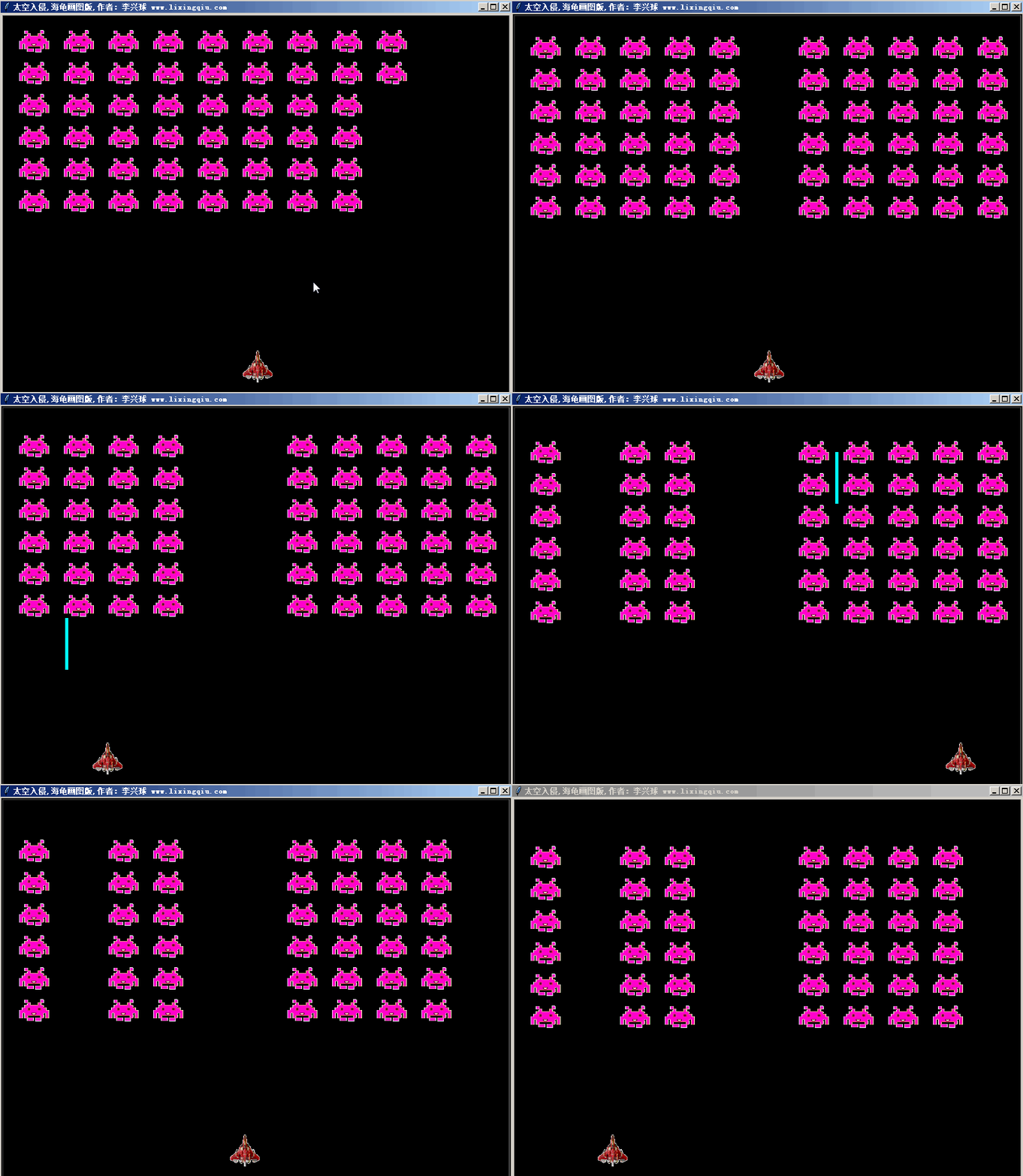
太空入侵者turtle游戏 ,space invader made by turtle module

python太空入侵space invader turtle

有一款最伟大的游戏,那就是太空入侵者,它的英文名为space invader。自1978年发售已来,不知被移植,模仿多少遍。游戏的剧情很简单,一群邪恶的异星人,有组织有秩序地排成了一个大方阵,向地球袭来.玩家的目标就是在它们冲到屏幕底端前消灭它们。太空入侵者的成功是空前绝后的。.在日本,机厅里摆放的除了<太空入侵者>还是<太空入侵者>,而生意照样异常火爆。这个游戏甚至导致了日圆硬币的短缺,以致于日本政府不得不将日圆硬币的流通量加大了四倍! 下面只是用海龟画图模块稍微模拟一下。
下面是部分代码预览:

"""
   太空入侵者.py
   2019年6月17日版。
   space invader是一个经典的街机游戏,这里用turtle模块稍微模拟了一下。
   本人3年前采用turtle模块,使用面向过程的方法编写过这个游戏。
   这是采用面向对象方法,全部重新编程的更新版本。
   这一版本的激光威力更大哦,能直接穿透任何物体。
   
"""

import time
from turtle import Turtle,Screen
from winsound import PlaySound,SND_ASYNC

def write_result(string):
    """当游戏胜利或失败的汉字"""
    tmp = Turtle(visible=False)
    tmp.penup()
    tmp.color("yellow")
    tmp.write(string,align='center',font=('',32,'normal'))
            
class Laser(Turtle):
    """激光类,继承自海龟,实例化后会自行在定时器作用下移动"""
    group = []
    def __init__(self,position):
        pass

    def move(self):
        """不断地移动"""
        self.fd(10)             
            
class Alien(Turtle):
    """外星飞船类,实例化后会每隔2秒向下移动,超过玩家飞船的坐标
       则游戏失败!所有飞船被消灭则游戏成功!
    """
    beyond = False
    group = []
    def __init__(self,image,position,player):
        """image:造型,position:坐标"""
        Turtle.__init__(self,shape=image,visible=False)
        self.penup()
        self.player_top = player.ycor()+25
        self.goto(position)
        self.st()
        self.movedown()
        Alien.group.append(self)   # 加入到组中

    def movedown(self):
        """不断地向下移动"""

        
class Plane(Turtle):
    """玩家飞船类"""
    发射声音='laser.wav'
    def __init__(self,image,position,keys):
        """image:造型,position:坐标,keys:按键表"""
        pass

    def move(self):
        """不断地在水平方向上移动"""
        pass
        
    def moveleft(self):
        self.dx = -5
        
    def moveright(self):
        self.dx = 5        

    def bounce_on_edge(self):
        """中心点碰到屏幕边缘就反弹"""
        if abs(self.xcor()) > self.sw//2:
            self.dx = -self.dx
        
    def shoot(self):
        """如果超过上次发射的时间则发射"""
        pass

    def _delay(self):
        """超时才可以再次发射"""
        if time.time() - self.start_time > self.shoot_interval:
            self.can_shoot = True
            self.screen.onkeypress(self.shoot,self.keys[2])
        else:
            self.screen.ontimer(self._delay,500)        
    
def main():

    width,height = 800,600
    screen = Screen()
    screen.delay(0)
    screen.bgcolor("black")
    screen.setup(width,height)
    screen.title("太空入侵,海龟画图版,作者:李兴球 www.lixingqiu.com")   
    
    战机 = "战机.gif"
    screen.addshape(战机)
    敌人 = "敌人.gif"
    screen.addshape(敌人)
    player1 = Plane(战机,(0,50-height//2),("Left","Right","Up"))

    # 生成外星人队列
    for x in range(50-width//2,width//2,70):
        for y in range(height//2-30,00,-50):
            Alien(敌人,(x,y),player1)
        
    def collide_check():
        """每隔10毫秒检测激光和外星飞船的碰撞"""
        for laser in Laser.group:
            for alien in Alien.group:
                if laser.distance(alien) < 25:
                    alien.ht()
        for index in range(len(Alien.group)):
            alien = Alien.group[index]
            if alien.isvisible() == False:
                Alien.group.remove(alien)
                break
        if len(Alien.group) == 0 :
            write_result("成功!")
            return
        screen.ontimer(collide_check,10)

    collide_check()    
    screen.listen()
    screen.mainloop()

if __name__ == "__main__":

    main()    

下载完整源代码与素材,请

成为会员后,登陆才能继续浏览!联系微信scratch8即可办理会员。
(会员专属:能浏览所有文章,下载所有带链接的Python资源。)

发表在 python, turtle | 太空入侵者turtle游戏 ,space invader made by turtle module已关闭评论

海龟入门学习器核心代码_turtle introduction learning tool core

"""
    海龟入门学习器核心.py
    这个程序自制了一个"编译器",让我们能在文本框里输入代码。
    可以用来进行最基本的海龟画图入门。
    本项目需要使用部分汉化的turtle.py,否则不要输入中文代
    码,并且海龟的形状也不会旋转。
    由于本程序导入了coloradd模块,可以先在命令提示符里输入
    pip install coloradd 进行安装。为了观察演示,本程序的
    的screen的delay为100,可以通过代码动态改变它的值。
    
"""
__author__ = "李兴球"
__blog__ = "https://www.lixingqiu.com"

import os
from coloradd import *
from tkinter.scrolledtext import * 
from turtle import TurtleScreen, RawTurtle, TK

前进右转代码 = """海龟.前进(100)
海龟.右转(90)"""

彩圆盘代码 = """screen.delay(0)
c = (1,0,0)
for x in range(360):
    海龟.前进(100)
    海龟.倒退(100)
    c = coloradd(c,0.01)
    海龟.颜色(c)
    海龟.右转(1)    
    """

正方形代码 = """for x in range(4):
   海龟.前进(100)
   海龟.右转(90)
"""

十字架代码 = """for x in range(4):
   海龟.前进(100)
   海龟.倒退(100)
   海龟.右转(90)
"""

def run():
    """运行文本框内的代码"""
    tip_label.config(text='')
    code_string = editor.get("1.0",'end-1c')    
    "禁用运行按钮"
    runcmd.config(state='disabled')
    try:
       exec(code_string)               # 执行编辑器中代码
    except Exception as e:
        tip_label.config(text=e)       # 显示错误提示信息
    "启用运行按钮"
    runcmd.config(state='normal')
    
def main():
    global editor
    global cat,turtle,海龟
    global screen
    global tip_label
    global runcmd

    default_code = 正方形代码
    width,height = 1020,400
    txtwidth = 400
    root = TK.Tk()
    root.geometry(str(width)+ "x" + str(height+100))
    root.title("海龟入门学习器核心_作者:李兴球")
    cv1 = TK.Canvas(root, width=width-txtwidth+10, height=height)     
    cv1.place(x = txtwidth-10,y = 20)    

    screen = TurtleScreen(cv1)
    screen.bgcolor(1, 1, 1)
    screen.delay(100)
    
    ziti = ("黑体", 16, "normal")
    editor=ScrolledText(root,width=33,height=22,font=ziti)
    editor.insert("1.0",default_code)
    editor.place(x =5,y =20)

    # 给文本编辑器增加右键菜单
    def popup(event):
        try:
            pmenu.tk_popup(event.x_root,event.y_root,0)
        finally:
            pmenu.grab_release()
            
    pmenu = TK.Menu(editor,tearoff=0)
    
    pmenu.add_command(label='剪切',command=
                      lambda: editor.event_generate("<<Cut>>"))
    
    pmenu.add_command(label='复制',command=
                      lambda: editor.event_generate("<<Copy>>"))
    
    pmenu.add_command(label='粘粘',command=
                      lambda: editor.event_generate("<<Paste>>"))
    
    pmenu.add_command(label='全选',command=
                      lambda: editor.tag_add("sel",'1.0','end'))
    
    pmenu.add_command(label='更多',command=
                      lambda: os.system("explorer " + __blog__))
    
    editor.bind("<Button-3>",popup)    

    # 用于提示错误信息的标签
    tip_label = TK.Label(root,text='',font=('宋体',10),fg='red')
    tip_label.place(x = txtwidth+5,y = height+25)

    runcmd = TK.Button(root,text='运行',
                        command=run,font=('黑体',16),fg='navy')
    runcmd.place(x = txtwidth+5,y = height+50)

    def regoto(x,y):
        old_delay = screen.delay()
        cat.ondrag(None)
        screen.delay(0)
        cat.penup()
        cat.goto(x,y)
        cat.pendown()
        screen.delay(old_delay )
        cat.ondrag(regoto)
        
    # 支持png不需注册即可直接使用
    cat = RawTurtle(screen,visible=False) 
    cat.color("navy")
    cat.width(3)
    cat.shape("海龟红.png")
    cat.rotatemode("all")     # 新增旋转模式,角色可360度旋转
    cat.ondrag(regoto)
    cat.st()                  # 显示小猫     
    turtle = cat
    海龟 = cat
    return "EVENTLOOP"

if __name__ == '__main__':
    
    main()
    TK.mainloop()  # 进入事件循环

python海龟入门学习器核心_Turtle Introduction Learning Tool Core

发表在 python, tkinter, turtle | 海龟入门学习器核心代码_turtle introduction learning tool core已关闭评论

彩色多线程旋转雪花


下面是部分代码预览:


from turtle import Screen,Turtle  # 从海龟画图导入Screen函数和Turtle类
import threading
from time import sleep

def draw_snow(length,level):      # 画雪花递归函数
    if level == 0 : return        #level为零则返回
    for i in range(8):            #  重复8次  
        t.fd(length)              # 前进length 
        draw_snow(length/4,level-1) # 画length/4的雪花
        t.bk(length)              # 隔退length
        t.rt(45)                  # 右转45度
        
class Snow(Turtle):
    def __init__(self,x,y,color):
        Turtle.__init__(self,visible=False,shape = 'snow')


if __name__ == "__main__":

    color_list = ('red','orange','yellow','green','cyan','blue','purple','pink')
    color_amount = len(color_list)
    width,height = 800,600
    screen = Screen()                 # 新建屏幕
    screen.title("旋转彩色雪花状图形_作者:李兴球,风火轮少儿编程 www.scratch8.net")
    screen.setup(width,height)        # 设置屏幕宽和高
    screen.delay(0)                   # 绘画延时为0
    screen.bgcolor("black")           # 背景以为黑色

    t = Turtle(visible = False)       # 新建隐藏的海龟对象
    t.pencolor("white")               # 画笔颜色为白色

    screen.mainloop()

 
如需要查看完整源代码,请

成为会员后,登陆才能继续浏览!联系微信scratch8即可办理会员。
(会员专属:能浏览所有文章,下载所有带链接的Python资源。)
发表在 python, turtle | 彩色多线程旋转雪花已关闭评论

伪3D拦彩球小游戏主程序

伪3D拦彩球小游戏主程序
下面是部分代码预览:

"""
   伪3D拦彩球小游戏.py
   本程序新建Ball类,球实例化后会在定时器的作用下不断地自我移动与进行碰撞检测。
   board.py模块在下面。
"""
from glob import glob
from board import Board
from time import sleep
from turtle import Screen,Turtle
from random import randint,choice

class Ball(Turtle):
    def __init__(self,image,board ):
        """image:已注册的gif图,board:拦板对象"""
        Turtle.__init__(self,shape=image,visible=False)
        self.penup()
        self.board = board
        self.xspeed = choice(speeds)
        self.yspeed = choice(speeds)
        self.sw = self.screen.window_width()   # 屏幕宽度属性
        self.sh = self.screen.window_height()  # 屏幕高度属性 
        self.dead = False 
        self.goto(self.sw//2,self.sh//2)
        self.showturtle()
        self.move()
        
    def move(self):
        """移动小球方法"""        
  
    def is_bumped_board(self):
        """是否碰到拦板检测"""
 
        
if __name__ == "__main__":

    wood_image = "wood.gif"
    width,height = 800,600
    game_title= "接彩球游戏"
    gif_images = glob("images/*.gif")
    speeds = [x for x in range(-6,6) if x!=0] # 如果x不是0则加到列表中

    screen = Screen()

下载完整源代码与素材,请

成为会员后,登陆才能继续浏览!联系微信scratch8即可办理会员。
(会员专属:能浏览所有文章,下载所有带链接的Python资源。)

发表在 python, turtle | 伪3D拦彩球小游戏主程序已关闭评论

turtle模拟时钟_面向对象_TimePointer类


下面是部分代码预览:

"""这是一个用海龟模块制作的模拟时钟程序,作者:李兴球,日期:2018/9/21于郑州"""

from turtle import *
from time import *

def init_screen():
    
    screen = Screen()
    screen.title("模拟时钟_python海龟画图模块制作_by_李兴球")
    screen.delay(0)
    screen.mode("logo")     #此模式刚好和时钟转动相适配
    pointer = ((0,0),(5,0),(5,50),(10,50),(0,60),(-10,50),(-5,50),(-5,0)) #顶点表
    screen.addshape("pointer",pointer)                        #添加大箭头各顶点到形状列表
    
    return screen
    
def draw_digital():
    
    #以下代码画时钟的数字
    radius = 300
    draw_turtle = Turtle(visible=False,shape='circle')

class TimePointer(Turtle):
    
    def __init__(self,size,color):
        
        Turtle.__init__(self,visible = False,shape = "pointer")

        
    def run_hour(self): 
        hour = localtime(time()).tm_hour
        hour = hour % 12

        
    def run_minute(self):         
        minute = localtime(time()).tm_min        

        
    def run_second(self): 
        
        second = localtime(time()).tm_sec   
        

if __name__ == "__main__":

    screen = init_screen()

    draw_digital()
            
    hpointer = TimePointer((1.3,3.5),"red")     # 生成时钟指针
    hpointer.run_hour()

    mpointer = TimePointer((0.8,4.2),"orange")  # 生成分钟指针
    mpointer.run_minute()    

    spointer = TimePointer((0.5,4.3),"blue")    # 生成秒钟指针
    spointer.run_second()

    screen.mainloop()


下载完整源代码与素材,请

成为会员后,登陆才能继续浏览!联系微信scratch8即可办理会员。
(会员专属:能浏览所有文章,下载所有带链接的Python资源。)

发表在 python, turtle | turtle模拟时钟_面向对象_TimePointer类已关闭评论

python切片教学演示动画_ slice demo animation

python slice demo animation切片教学演示动画
下面是部分代码预览:

"""请更改切片规则,让不同的海龟出列"""

from turtle import *
from random import *

def write_index():
    """在海龟下面写上索引号"""
    i = 0
    # 遍历每只海龟
    
def make_reg(maxnumber):
    """产生一个切片规则"""

    
amounts = 10
color_list = ['red','orange','yellow','green','cyan',
              'blue','purple','brown','pink','white']

title = "切片教学演示动画          www.lixingqiu.com"
screen = Screen()
screen.delay(10)
screen.title(title)
screen.bgcolor("black")

t = Turtle(shape='turtle')
t.shapesize(2.5,2.5)
t.color(color_list[0])              # 设定颜色
t.penup()                           # 抬笔
t.bk(270)                           # 后退
t.sety(-90)
t.setheading(90)                    # 朝上
t.initcors = t.position()           # 记录自己的初始坐标

for i in range(1,amounts):          # 迭代变量   
    w = t.clone()                   # 克隆一只海龟
    c  =color_list[i%amounts]
    w.color(c)                      # 设定颜色
    w.setx(t.xcor() + i * 60)       # 设置x坐标
    w.initcors = w.position()       # 记录自己的初始坐标
    
"rose是用来画不变字符串的海龟"
rose = Turtle(visible=False)        # 用来写切片规则的海龟对象
rose.color("white")                 # 颜色为白色
rose.penup()                        # 抬笔
rose.goto(-180,250)
rose.write(title,font=(None,32,"normal"))
rose.goto(-80,-220)
rose.write("请单击屏幕",font=(None,22,"normal"))


rose.goto(-80,100)
# 写中括号和规则
rose.write("起始:结束:步长",font=(None,20,"normal")) 

tom = Turtle(visible=False)     # tom用来写变化的切片规则
tom.penup()
tom.color("cyan")
tom.goto(-85,140)

screen.turtles().pop()              # 把 tom 弹出
screen.turtles().pop()              # 把 rose 弹出
all_turtles = screen.turtles()      # 所有的海龟对象
write_index()                   # 在每只海龟下面写它的索引号

def change(x,y):
    """单击屏幕,根据相应的规则显示相应的动画与文字"""    
    global all_turtles    
 
    
screen.onclick(change)
screen.listen()
screen.mainloop()

下载完整源代码与素材,请

成为会员后,登陆才能继续浏览!联系微信scratch8即可办理会员。
(会员专属:能浏览所有文章,下载所有带链接的Python资源。)

发表在 python, turtle | python切片教学演示动画_ slice demo animation已关闭评论

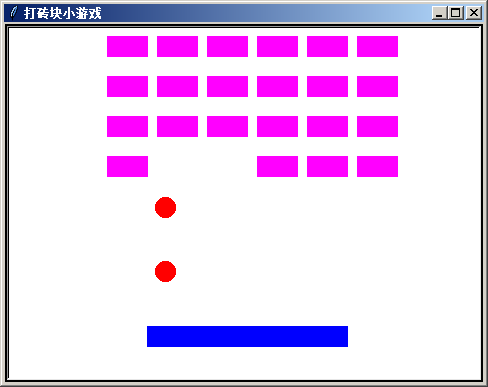
简易打砖块游戏源代码


这是一个完整的打砖块小游戏,有封面.小球类从ball模块导入,砖块类从brick模块导入。
下面是部分代码预览:

"""
   打砖块小游戏.py
   按方向箭头或用鼠标指针拖曳拦板去接小球,按回车键开始游戏.
   brick.py和ball.py模块在下面。
"""

from ball import * 
from brick import *
from time import sleep
from random import randint,choice
       
def start_game(screen,writer ):
    """生成拦板,绑定按键,小球和砖块,让小球不断移动。"""
    
    screen.onkeypress(move_to_right,"Right")# 绑定右方向箭头
    screen.onkeypress(move_to_left,"Left")  # 绑定左方向箭头
    board.ondrag(lambda x,y:board.setx(x))  # 绑定拖动事件

    all_balls = [Ball() for i in range(2)]  # 生成两个球
    rows  = 4
    cols = 6
    Brick.amounts = rows * cols             # 类变量,砖块所有数量
    startpos = (-120,160)                   # 所有砖块的起点坐标

          
def main():
    """新建屏幕,显示标题,按回车键开始游戏"""
    title = "打砖块小游戏"
    width,height = 480,360
    screen = Screen()                        # 新建屏幕
    screen.delay(0)                          # 延时为0
    screen.bgcolor("black")                  # 背景为黑
    screen.title(title)                      # 标题为title
    screen.setup(width,height)               # 设定宽高

    screen.listen()                          # 监听屏幕(设置焦点) 
    screen.mainloop()                        # 进入主循环
    
if __name__ == "__main__":

    main() 


下载完整源代码与素材,包含各子模块,请

成为会员后,登陆才能继续浏览!联系微信scratch8即可办理会员。
(会员专属:能浏览所有文章,下载所有带链接的Python资源。)

发表在 python, turtle | 简易打砖块游戏源代码已关闭评论

螺旋的世界静态图

"""
   螺旋的世界.py
   一个简单的程序,演示函数和coloradd命令的用法。
   本程序要用到coloradd模块,请在cmd里输入
   pip install coloradd进行安装。
   本程序运行的结果稍长,请耐心等待。
   运行结果是在屏幕上随机上很多螺旋。
   
"""

import turtle
from coloradd import *
from random import *

def draw_sprial():
    """画螺旋函数"""
    c  = (1,0,0)                  # RGB红色
    counter = randint(100,250)    # 不定次数
    for i in range(counter):      # 迭代变量
        turtle.pencolor(c)        # 画笔颜色
        turtle.width(i/100)       # 画笔笔宽
        turtle.fd(i/100)          # 海龟前进
        turtle.rt(10)             # 海龟右转
        c = coloradd(c,0.01)      # 颜色增加

width,height = 800,600            # 定义宽高
screen = turtle.getscreen()       # 获取屏幕
screen.setup(width,height)        # 设置宽高
screen.title("多彩螺旋世界 www.lixingqiu.com")
screen.delay(0)                   # 延时为0
screen.bgcolor("black")           # 背景为黑

turtle.hideturtle()               # 隐藏海龟
screen.tracer(0)                  # 关闭动画
for i in range(2000):              # 迭代变量
    turtle.penup()                # 海龟抬笔
    x = randint(-width//2,width//2)
    y = randint(-height//2,height//2)
    turtle.goto(x,y)              # 定位坐标
    turtle.pendown()              # 海龟落笔
    draw_sprial()                 # 画个螺旋
screen.update()                   # 屏幕刷新
screen.mainloop()                 # 进入主循环


发表在 python, turtle | 螺旋的世界静态图已关闭评论

哪吒拼图核心源代码(图像均分splitimage源码)

python nezha Jigsaw source code

python nezha Jigsaw source code


本人创造了一个叫《哪吒拼图》的小游戏。在这个游戏中,一张完整的图形被切割成4块,然后打乱了顺序,通过单击鼠标去把它们拼成一张完整的图。下面的代码演示的是其原理,读者可以根据这个源代码自己开发一个完整的拼图小游戏。
下面是部分代码预览:

"""
   哪吒拼图核心源代码.py
   方块类Block的定义模块,splitimage.py图像均分源代码模块在下面。
"""

import os
from time import sleep
from splitimage import *
from random import shuffle
from tkinter import messagebox
from turtle import Turtle,Screen

class Block(Turtle):
    """方块类,一个方块就是一张切好的图片的封装。当新建一个方块时,
       initcors属性会记住它的应该呆的坐标,而coordinates[i]则是随
       机的一个坐标,两个坐标是不同的。 image就是它的外形。
       它的action方法是单击它后的响应,check_all_picture是检测每张
       图片有没有归位。
    """
    switching = False
    clicked = []             # 记录被第一个被单击的角色的列表
    images = []              # 类变量,记录所有的方块
    success_flag = False     # 过关标志
 
    def __init__(self,image,coordinates,index,i):
        """image:外形图,coordinates:坐标表,
           index:初始坐标索引,i:起始坐标索引
        """
        Turtle.__init__(self,shape = image)
        self.initcors = coordinates[index] # 初始坐标,归位后的坐标
        self.penup()                       # 抬笔
        self.onclick(self.action)          # 单击绑定action
        Block.images.append(self)          # 添加到图像列表中
        self.goto(coordinates[i])          # 定位到打乱了的位置
        
    def action(self,x,y):
        """单击方块时的动作,基本原理,首先记住第一次单击的方块。
           ,等第二次单击时,就能交换它们的坐标了。
        """        
  
    @staticmethod
    def check_all_picture():
        """检测每个方块是否归位"""


if __name__ == "__main__":

   cors = [(100,100),(-100,-100),(-100,100),(100,-100)]
   
   screen = Screen()
   screen.delay(20)
   screen.bgcolor("gray")
   
   redblock = Block('square',cors,0,3)
   redblock.shapesize(8,8)
   redblock.color("red")
   
   orangeblock = Block('square',cors,1,2)
   orangeblock.shapesize(8,8)
   orangeblock.color("orange")

   yellowblock = Block('square',cors,2,0)
   yellowblock.shapesize(8,8)
   yellowblock.color("yellow")
   
   greenblock = Block('square',cors,3,1)
   greenblock.shapesize(8,8)
   greenblock.color("green")


如需要查看完整源代码,请

成为会员后,登陆才能继续浏览!联系微信scratch8即可办理会员。
(会员专属:能浏览所有文章,下载所有带链接的Python资源。)

发表在 python, turtle | 哪吒拼图核心源代码(图像均分splitimage源码)已关闭评论

turtle可移动向后滚动背景_turtle scroll background


本程序让海龟变身隧道图,让它们不断地向后移动,从而形成滚动效果背景。
下面是部分代码预览:

"""
  可移动向后滚动背景,。
"""
from turtle import *

screen = Screen()
screen.setup(480,360)
screen.title("向后滚动的背景")
screen.bgcolor("blue")
screen.delay(0)
screen.bgpic("隧道.png")

backgrounds =["隧道1.gif","隧道2.gif","隧道3.gif"]
[screen.addshape(bg) for bg in backgrounds]
    
costuems = ['造型1.gif','造型2.gif']
[screen.addshape(c) for c in costuems]
    
bg_index = 0                # 全局背景索引号
currentbg = backgrounds[bg_index]
bg1 = Turtle(shape=currentbg)
bg1.speed(0)
bg1.penup()
 
bg2 = bg1.clone()
alt = 1
 
screen.mainloop()

下载完整源代码与素材,请

成为会员后,登陆才能继续浏览!联系微信scratch8即可办理会员。
(会员专属:能浏览所有文章,下载所有带链接的Python资源。)

发表在 python, turtle | turtle可移动向后滚动背景_turtle scroll background已关闭评论

解放军VS木马炮弹类


前言:解放军VS木马是本人创造的一个射击小游戏。在这个游戏中狡猾的外星人把自己装在玻璃盒子里,妄想入侵地球。但是被解放军发现了,勇猛无比的一个解放军叔叔把外星人打得可是鬼哭狼嚎。请按a,d键移动坦克,单击鼠标发射炮弹,击败外星人的入侵。如果有一个外星人安全着陆,游戏就失败了!解放军VS木马是一个坦克射击类小游戏。作品共有8个py文件和相关素材。这里展示的是炮弹Shell类的源代码。每个模块都能单独运行。
下面是部分代码预览:

from turtle import * 

class Shell(Turtle):
    """炮弹类,继承自海龟类,实例化后它就会移动,直到碰到边缘或外星人"""
    def __init__(self,x,y,h):
        """x:横坐标,y:纵坐标,h:方向"""
        Turtle.__init__(self,visible = False,shape="circle")
        self.color('navy')            # 设颜色
        self.penup()                  # 抬笔

        
    def move(self):
       """移动"""               

    def is_to_edge(self):
        """中心点是否到了边缘判断"""
        x = self.xcor()
        y = self.ycor()
        c1 = x < self.left_edge
        c2 = x > self.right_edge
        c3 = y < self.bottom_edge
        c4 = y >self.top_edge
        return  c1 or c2 or c3 or c4

if __name__ =="__main__":

    screen = Screen()
    screen.bgcolor("cyan")
    screen.title("解放军VS木马炮弹类")
    screen.delay(0)
    def spawn_shell(x,y):
       [Shell(0,0,h) for h in range(0,360,36)]
    screen.onscreenclick(spawn_shell)
    screen.mainloop()        

 
如需要查看完整源代码,请

成为会员后,登陆才能继续浏览!联系微信scratch8即可办理会员。
(会员专属:能浏览所有文章,下载所有带链接的Python资源。)

发表在 python, turtle | 解放军VS木马炮弹类已关闭评论

用星号打印图形的三个练习

"""用*号打印三角形"""
for x in range(-10,11):
    print('*' * (10-abs(x)))


"""用*号打印正弦曲线"""
from math import *        # 从数学模块导入所有命令

for x in range(0,180):
    y = int(80 * sin(radians(x))) # radians把弧度值转为角度值
    print('*' * y)


"""用*号打印周期性三角形"""
for x in range(0,60):
    print('*' * (20-abs(x%20)))


发表在 python | 用星号打印图形的三个练习已关闭评论

随机路径生成器turtle简易版 random path maker

路径生成器turtle random path maker
下面是部分代码预览:

"""
   random_path.py
   这是一个用海龟画图制作的随机路径生成器,路径大概是从左到右.random_path会返回路径节点坐标点列表.
"""
from random import randint
from turtle import Turtle,Screen
def random_path(color,width):
    """color:颜色,width:宽度"""
    cors = []
    p = Turtle(visible=False)
    # 下面两句是重画背景
    p.width(10000)
    p.dot(10000,"cyan")


if __name__ == "__main__":

    screen = Screen()
    screen.bgcolor("cyan")
    screen.title("随机路径生成器")
    screen.delay(0)

    screen.onclick(lambda x,y: random_path("black",50))    

如需要查看完整源代码,请

成为会员后,登陆才能继续浏览!联系微信scratch8即可办理会员。
(会员专属:能浏览所有文章,下载所有带链接的Python资源。)

发表在 python, turtle | 随机路径生成器turtle简易版 random path maker已关闭评论

计算两点之间的插值点,简单的线性插值

线性插值

线性插值


下面是部分代码预览:

"""计算两点之间的插值点,简单的线性插值"""

import math

def insert_point(a,b,step):
    """a:起点坐标二元组,b:终点坐标二元组,step:步长"""
    points = []
    x1,y1 = a       # 起点
    x2,y2 = b       # 终点
    dy = y2 - y1
    dx = x2 - x1


start = (100,0)
end = (101,353)
p = insert_point(start,end,10)
print(p)

 
如需要查看完整源代码,请

成为会员后,登陆才能继续浏览!联系微信scratch8即可办理会员。
(会员专属:能浏览所有文章,下载所有带链接的Python资源。)

发表在 python | 计算两点之间的插值点,简单的线性插值已关闭评论

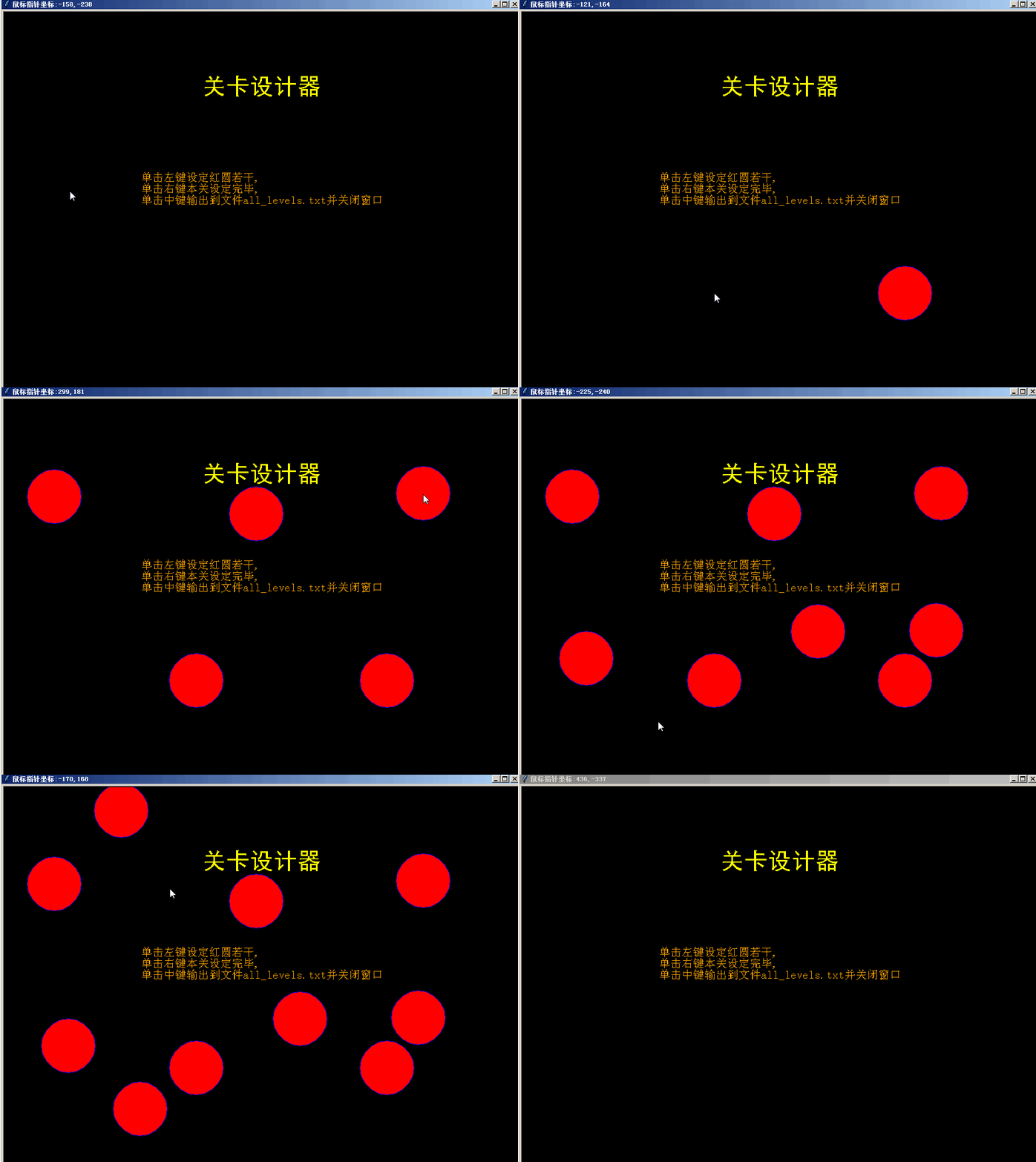
太空出租箭关卡设计器_space rental rocket level designer

太空出租箭的辅助程序
太空出租箭是本人设计一个微重力小游戏,在游戏中操作一艘飞船安全着陆,然后乘客就会跳出来,这个程序是太空出租箭的一个辅助程序,用来设计关卡地图。
下面是部分代码预览:

"""关卡设计器.py
   太空出租箭的辅助程序。本程序单击屏幕时会显示个红色的圆圈,其实就是盖一个图章。
用dot命令也可以。为了配合太空出租箭,所以用的是stamp命令。当你单击后请自行记录坐标点。作者:李兴球

"""
from turtle import *
import os

def init_screen():
    """初始化屏幕"""
    screen = Screen()         # 生成屏幕对象
    screen.setup(960,720)     # 设置分辨率
    screen.delay(0)           # 延时为0
    screen.bgcolor("black")   # 背景为黑
    screen.title("太空出租箭关卡设计器")
    return screen

def produce_redcircle():
    """产生红色圆形对象"""
    redcircle = Turtle(shape='circle')

def onmousemove(event):
    """转换tkinter画布坐标到海龟坐标系"""
    x = event.x - 480     # 新的坐标的x值要比原来的大480
    y = 360 - event.y    

def append(x,y):
    """把redcircle坐标添加到列表"""

def output(x,y):
    """输出所有关卡列表到文件"""
    all_levels = ""
    levels_amount = len(all_list)
    for i in range(levels_amount):
        level = "map" + str(i+1) + " = " + str(all_list[i]) + "\n"
        all_levels = all_levels + level    
     
        
def end_append(x,y):
    """结束添加坐标点列表,把它放入总表all_list,然后清空cors_list"""
    global level_number,cors_list
    if cors_list !=[]:                     # 避免输出空列表
        level_number = level_number + 1    
        
def explain():
    """说明字符"""
    ziti0 = ("黑体",32,"normal")
    ziti1 = ("宋体",16,"normal")
    info0 = "关卡设计器"
    info1 = "单击左键设定红圆若干,\n单击右键本关设定完毕,\n单击中键输出到文件all_levels.txt并关闭窗口"    

if __name__ == "__main__":
        
    level_number = 0
    cors_list = []                    # 定义一个关卡的坐标表
    all_list = []                     # 定义所有关卡列表,嵌套列表
 
    screen = init_screen()            # 初始化屏幕
    explain()                         # 显示标题与说明
    redcircle = produce_redcircle()   # 生成redcircle
    
    screen.cv.bind("<Motion>",onmousemove) # 绑定鼠标移动事件到onmousemove函数
    screen.onclick(append,1)               # 单击左键设定一个红色圆点
    screen.onclick(output,2)               # 单击中键输出并关闭本程序
    screen.onclick(end_append,3)           # 单击右键结束本次设定,准备下一次设定

    screen.mainloop()

如需要查看完整源代码,请

成为会员后,登陆才能继续浏览!联系微信scratch8即可办理会员。
(会员专属:能浏览所有文章,下载所有带链接的Python资源。)

发表在 python, turtle | 太空出租箭关卡设计器_space rental rocket level designer已关闭评论

冒泡排序彩柱图动态演示_python bubble sort dynamic show

python冒泡排序动态演示
下面是部分代码预览:

"""
   冒泡排序彩柱图演示.py

"""

from turtle import *
from random import randint
from time import sleep

class Column(Turtle):
    def __init__(self,x):
        Turtle.__init__(self,shape='square')
        """形状square的初始大小为20x20,所以半高就是10"""        
        self.up()                  # 抬笔
        r = randint(0,255)
        g = randint(0,255)
        b = randint(0,255)        
        self.fillcolor(r,g,b)
        
if __name__=="__main__":

    width,height=800,800
    screen = Screen()
    screen.colormode(255)
    screen.setup(width,height)
    screen.title("冒泡排序动态演示,作者:李兴球 2018/10/1")
    screen.delay(0)

    xcors = [x for x in range(40-width//2,width//2-20,40) ]
    columns = [Column(x) for x in xcors ] # 生成所有柱子
    length = len(columns)
    while True:
        
        排序了吗 = False               # 描述是否交换了数据的标志
        for i in range(0,length-1 ):   # 由于越往后,越不要排这么多次数了.
            c1 = columns[i]            # 代表前面柱子
            c2 = columns[i + 1]        # 代表后面柱子            
            

如需要查看完整源代码,请

成为会员后,登陆才能继续浏览!联系微信scratch8即可办理会员。
(会员专属:能浏览所有文章,下载所有带链接的Python资源。)

发表在 python, turtle | 冒泡排序彩柱图动态演示_python bubble sort dynamic show已关闭评论

泡泡摸奖系统整套源码与素材

python泡泡摸奖系统

"""
   泡泡摸奖系统.py
   在人生的舞台上,你可以单击泡泡摸奖,祝你获得健康,幸福.
"""

import pygame
from winprize.screen import *
from winprize.pop import *
from winprize.girl import * 
from time import sleep

pygame.mixer.init()
bgmusic = "眉飞色舞.wav"
pygame.mixer.music.load(bgmusic)
pygame.mixer.music.play(-1,0)
pop_sound = pygame.mixer.Sound("Pop.wav")


imagelist = ["舞台" + str(i) + ".png" for i in range(7)]
s = Dynamic_screen(title='泡泡摸奖系统',piclist=imagelist,interval=100)
screen = s.screen

girl_images = ["qq女孩秀0.gif","qq女孩秀1.gif"]
[screen.addshape(image) for image in girl_images] # 注册到形状列表
dance_girl = Girl(girl_images)                   # 生成后,它会自己"跳舞"

all_coordinates=[(-120,90),(-40,90),(40,90),(120,90),(-120,0),(-40,0),\
                 (40,0),(120,0),(-120,-90),(-40,-90),(40,-90),(120,-90)]
ac = all_coordinates                    # 仅仅是为了缩短代码而定义的别名 
pop_image_list = ["泡泡造型1.gif","泡泡造型2.gif","泡泡造型3.gif","泡泡造型4.gif"]
[screen.addshape(image) for image in pop_image_list] #注册到形状列表,image为gif图片

# 实例化12个泡泡
pops = [ Pop(pop_image_list,x,y,pop_sound) for x,y in all_coordinates]
pop_amount = len(pops)
pops[0].prize = "一等奖"
pops[1].prize = "二等奖"
pops[2].prize = "二等奖"
pops[3].prize = "三等奖"
pops[4].prize = "三等奖"
pops[5].prize = "三等奖"
    
def pop_shuffle():
    """按空格键后对泡泡的位置进行随机调换,为了演示交换过程,没有使用shuffle命令"""
    old_delay = screen.delay()
    screen.delay(2)
    screen.onkeypress(None,"space")
    [pop.set_shake(False) for pop in pops]  # 所有泡泡暂停摇摆
    sleep(0.5)

    for i in range(10):        
        index1 = randint(0,pop_amount-1)
        index2 = randint(0,pop_amount-1)
        while index1 == index2:index2 = randint(0,pop_amount-1)
        
        tmp = ac[index1]           # 先保存index1索引号的数据(坐标)
        ac[index1] = ac[index2]    # 设定index1索引号的数据为 index2指向的数据
        ac[index2] = tmp           # 设定index2索引号的数据为原index1的数据
        
        pops[index1].initxy(ac[index1][0],ac[index1][1]) # 重新设置为初始坐标
        pops[index2].initxy(ac[index2][0],ac[index2][1]) # 重新设置为初始坐标
        
        pops[index1].goto(ac[index1])   # 让索引为index1的泡泡到已交换位置的坐标        
        pops[index2].goto(ac[index2])   # 让索引为index2的泡泡到已交换位置的坐标
 
        sleep(0.1)               
    
    [pop.set_shake(True) for pop in pops] # 所有泡泡继续摇摆
    screen.delay(old_delay)
    screen.onkeypress(pop_shuffle,"space")

screen.onkeypress(pop_shuffle,"space")

Pop.wait_all_pop_explode()

tip_turtle = Turtle(visible = False)
tip_turtle.penup()
tip_turtle.sety(-160)
def tip():
    """祝词"""
    r,g,b = randint(0,255),randint(0,255),randint(0,255)
    tip_turtle.pencolor(r,g,b)
    wd = "按空格键重排泡泡顺序,单击泡泡即是摸奖。"
    tip_turtle.write(wd,align='center',font=("黑体",14,"normal"))
    tip_turtle.screen.ontimer(tip,1000)
tip()

screen.listen()
screen.mainloop()

下载完整源代码与素材,包括各子模块,请

成为会员后,登陆才能继续浏览!联系微信scratch8即可办理会员。
(会员专属:能浏览所有文章,下载所有带链接的Python资源。)

发表在 python, turtle | 泡泡摸奖系统整套源码与素材已关闭评论

生命动画模拟_海龟画图版

python life game demo by turtle module生命模拟演示

python life game demo by turtle module生命模拟演示


life game 是一个著名的无参与者游戏。本程序用turtle模块实现了一下。
下面是部分代码预览:

    """
   生命动画模拟turtle版.py   
"""

__author__ = "lixingqiu"
__date__ = "2018/11/29"

from turtle import Turtle,Screen
from random import randint

def generate_cors(rows,cols,grid_width,grid_height):
    """产生每个格子中心点坐标列表"""
    
    table_width = cols * grid_width
    table_height = rows  * grid_height
    left =  - table_width // 2  + grid_width //2  # 左上角格子中点x
    top = table_height // 2 - grid_height //2     # 左上角格子中点y

def init_grids_value(rows,cols):
    """随机产生每个格子的值,0或1"""
    grids = []

def print_dots(t,rows,cols):    
    """根据格子的值打印黑点或白点,黑点不必打,因为背景是黑色的"""               
              
def get_around_dots(rows,cols,x,y):
    """得到周围的活点数"""
    counter = 0   
    
if __name__ == "__main__":
    
    screen = Screen()
    screen.setup(480,320)
    screen.bgcolor("black")
    screen.tracer(0,0)
    screen.title('生命模拟turtle版')

    rows ,cols = 50,50
    grid_width,grid_height = 5,5   
    grids_cors = generate_cors(rows,cols,grid_width,grid_height)
    
    grids_value = init_grids_value(rows,cols)    # 初始化点
    
    t = Turtle(visible=False)    
    t.penup()


如需要查看完整源代码,请

成为会员后,登陆才能继续浏览!联系微信scratch8即可办理会员。
(会员专属:能浏览所有文章,下载所有带链接的Python资源。)

发表在 python, turtle | 生命动画模拟_海龟画图版已关闭评论

可爱的金币天使源代码

可爱的金币天使一个接金币小游戏,下面是部分代码预览:

"""
   可爱的金币天使.py
   天下掉来下很多金币,通过按上下左右方向箭头去按住它们。   
"""
from random import randint
from turtle import Turtle,Screen

class Coin(Turtle):
    """定义Coin类,继承自Turtle类"""
    def __init__(self,angel,image):

        """初始化函数,
        参数:
        angel:引用的另一个对象
        image:造型
        """
        Turtle.__init__(self,shape = image,visible= False)
        self.angel = angel
        self.color("white")
        self.penup()        
        self.xspeed = 0
        self.yspeed = randint(-5,-1)
        self.w = self.screen.window_width()   # 屏幕宽度
        self.h = self.screen.window_height()  # 屏幕高度  
       
    def goto_top(self):
        """到上面随机一个位置"""
        self.hideturtle()
        
    def move(self):
        """不断地移动对象"""
        x = self.xcor()
        y = self.ycor()
        self.setx(x + self.xspeed)           # x坐标增加
        self.sety(y + self.yspeed)           # y坐标增加

    def collide(self):
        """碰到angel的检测,以距离进行判断"""

if __name__ == "__main__":
    
    coin = "coin.gif"
    girl = "character.gif"
    
    screen = Screen()
    screen.bgcolor("black")
    screen.delay(0)
    screen.title("可爱的金币天使 www.lixingqiu.com")
    screen.addshape(coin)
    screen.addshape(girl)
    
    angel = Turtle(shape = girl)
    angel.penup()
    angel.counter = 0
    angel.sety(-240)
    screen.onkeypress(lambda:angel.setx(angel.xcor() - 10),"Left")
    screen.onkeypress(lambda:angel.setx(angel.xcor() + 10),"Right")
    screen.onkeypress(lambda:angel.sety(angel.ycor() - 10),"Down")
    screen.onkeypress(lambda:angel.sety(angel.ycor() + 10),"Up")
    
    [Coin(angel,coin) for i in range(10)]
    
    screen.listen()
    
    screen.mainloop()

下载完整源代码与素材,请

成为会员后,登陆才能继续浏览!联系微信scratch8即可办理会员。
(会员专属:能浏览所有文章,下载所有带链接的Python资源。)

发表在 python, turtle | 可爱的金币天使源代码已关闭评论

贪吃蛇列表版源代码

python turtle list snake demo贪吃蛇列表版演示

python turtle list snake demo贪吃蛇列表版演示


下面是部分代码预览:

"""
   贪吃蛇列表版.py
   贪吃蛇游戏真正的原理是维护一个先进先出的列表。不断地在列表末尾删除项目,然后又不断地在列表前面加入新的项目。
   按左右上下方向箭头操作蛇移动,按空格键增加长度。
"""
from turtle import *
from time import sleep

class Block(Turtle):
    xspeed = 4
    yspeed = 0
    def __init__(self,position):
        Turtle.__init__(self,shape='square',visible=False)

screen = Screen()
screen.delay(2)

all_sprites = []
for i in range(5): # 贪吃蛇初始为5段
    position = (-160 - i*24,0)
    all_sprites.append(Block(position))
    sleep(0.001)

    
screen.onkeypress(move_left,"Left")
screen.onkeypress(move_right,"Right")
screen.onkeypress(move_up,"Up")
screen.onkeypress(move_down,"Down")
screen.onkeypress(spawn,"space")
screen.listen()

while True:
    x = all_sprites[0].xcor() + Block.xspeed * 6
    y = all_sprites[0].ycor() + Block.yspeed * 6


如需要查看完整源代码,请

成为会员后,登陆才能继续浏览!联系微信scratch8即可办理会员。
(会员专属:能浏览所有文章,下载所有带链接的Python资源。)

发表在 python, turtle | 贪吃蛇列表版源代码已关闭评论

酷酷的爆炸效果 turtle版 explosion effect

酷酷的爆炸效果turtle explosion effect
下面是部分代码预览:

"""
   酷酷的爆炸效果.py
   本模块用于产生爆炸效果,它是用Python的海龟画图模块制作的。
   其基本原理是切换造型,但是如果要让很多炸弹都同时爆炸,而不
   阻赛程序的运行,这就需要用到异步执行了,在这里用ontimer定时
   器功能模拟异步执行。最后,爆炸效果想要酷,gif图片可要选择好。
   本程序也有pygame版本。
"""

from glob import glob
from random import randint
from turtle import Screen ,Turtle

def explosion(pos,eimages):
    """pos坐标位置产生爆炸效果,eimages:就gif序列帧"""
    t = Turtle(visible=False)        # 实例化一个对象
    t.penup()                        # 抬起笔来
    t.speed(0)                       # 速度为最快
    t.goto(pos)                      # 坐标定位置
    t.st()                           # 显示出来
    t.index = 0                      # 表示造型索引
    t.eimages = eimages              # 所有造型
    t.amounts = len(eimages)         # 造型数量

if __name__ == "__main__":

    width,height = 800,600
    explosion_images = glob("explosion/*.gif")
    screen = Screen()
    screen.setup(width,height)
    screen.bgcolor("black")
    screen.delay(0)
    screen.title("酷酷的爆炸效果www.lixingqiu.com")
  

下载完整源代码与素材,请

成为会员后,登陆才能继续浏览!联系微信scratch8即可办理会员。
(会员专属:能浏览所有文章,下载所有带链接的Python资源。)

发表在 python, turtle | 酷酷的爆炸效果 turtle版 explosion effect已关闭评论

2019更新版大鱼吃小鱼游戏_python big fish eat small fish game frame

2019年6月版大鱼吃小鱼

下面是部分代码预览:

"""
   大鱼吃小鱼简易版.py
   作者曾于几年前编写过本程序,这个版本是全新制作的。
   日期2019年6月11日,本程序导入了Bigfish类和fish类。
   在播放背景音乐的同时,用鼠标去操作大鱼吃小鱼。
   如果要让大鱼吃了一条小鱼后长大,那么可以用pillow模块
   或者pygame模块的图像处理功能让图像增大,再设为它的形状即可。
   fish模块和bigfish模块在下面。
"""

import pygame
from fish import *       # 导入小鱼类
from bigfish import *    # 导入大鱼类

width,height = 480,360
chomp = pygame.mixer.Sound("chomp.wav")

pygame.mixer.init()
pygame.mixer.music.load("InonZur-海洋.wav")
pygame.mixer.music.play(-1,0)

screen = Screen()
screen,setup(480,360)
screen.title("大鱼吃小鱼_海龟画图版 www.lixingqiu.com")
screen.bgpic("背景2.png")
screen.delay(0)

screen.addshape("bigleft.gif")
screen.addshape("bigright.gif")

red_fish = Bigfish("bigright.gif","bigleft.gif")

screen.addshape("fish1.gif")
screen.addshape("fish2.gif")

for i in range(10):
    Fish("fish1.gif","fish2.gif",(50,39),red_fish,chomp)

screen.mainloop()

下载完整源代码与素材,请

成为会员后,登陆才能继续浏览!联系微信scratch8即可办理会员。
(会员专属:能浏览所有文章,下载所有带链接的Python资源。)

发表在 python, turtle | 2019更新版大鱼吃小鱼游戏_python big fish eat small fish game frame已关闭评论

turtle射击游戏基础_python turtle shoot game foundation

用turtle模块也是能开发射击游戏的,这是一个基本的学习程序。
下面是部分代码预览:

"""
   turtle射击游戏基础.py
   通过鼠标指针牵引海龟移动,单击鼠标按键可发射子弹.   

"""

import math
from turtle import *

class Bullet(Turtle):
    def __init__(self,x,y,h):
        Turtle.__init__(self,visible=False,shape="circle")
        self.shapesize(0.5,0.5) 
        self.penup()
        self.dead = False
        
    def move(self):
        self.fd(10)
        if self.碰到边缘():self.dead = True


    def 碰到边缘(self):
        return abs(self.xcor())>240 or abs(self.ycor())>180
        

def follow_mouse(event):
    """本函数让小海龟面朝鼠标指针移动"""
    x = event.x - 240              # 转换成海龟坐标系中的x坐标
    y = 180 - event.y              # 转换成海龟坐标系中的y坐标

def shoot(x,y):
    """发射子弹"""
    b = Bullet(x,y,blue_turtle.heading())

def born_turtle():
    """生成海龟对象"""
    blue= Turtle(shape='turtle') 

if __name__ =="__main__":
    
    blue_turtle = born_turtle()
    子弹们 = []
    screen = Screen()
    screen.setup(480,360)
    screen.delay(0)
    screen.bgcolor("cyan")
    
    screen.cv.bind("<Motion>",follow_mouse) # 画布绑定鼠标移动事件
    screen.onclick(shoot)                   # 单击屏幕,关闭窗口
    screen.mainloop()    

如需要查看完整源代码,请

成为会员后,登陆才能继续浏览!联系微信scratch8即可办理会员。
(会员专属:能浏览所有文章,下载所有带链接的Python资源。)

发表在 python, turtle | turtle射击游戏基础_python turtle shoot game foundation已关闭评论

turtle朝向鼠标指针向前进源代码

"""
通过鼠标指针牵引小海龟前进.
原理:通过获取screen的canvas,对<Motion>鼠标移动事件进行绑定.
由于turtle的坐标系的不同,所以要进行坐标转换.
更好的转换方法可查阅turtle.py源代码文件,可以通过输入关键字
def onclick之类的,顺藤摸瓜,就能找到更好的转换方法.

"""

import math
from turtle import *

screen = Screen()
screen.setup(480,360)
screen.delay(0)

萍乡 = Turtle(shape='turtle')
萍乡.penup()
萍乡.pencolor("blue")
萍乡.fillcolor("blue")
萍乡.pensize(2)

如需要查看完整源代码,请

成为会员后,登陆才能继续浏览!联系微信scratch8即可办理会员。
(会员专属:能浏览所有文章,下载所有带链接的Python资源。)

发表在 python, turtle | turtle朝向鼠标指针向前进源代码已关闭评论

倾巢出动_飞机大战动画

pygame倾巢出动_飞机大战敌机类, 这是一个动画.
下面是部分代码预览:

"""
   倾巢出动_飞机大战敌机类, 这是一个动画。
   读者再加是一个玩家,让它射击就可以把这个动画变成一个射击游戏了.
"""
import glob
import pygame
from pygame.locals import *
from random import randint,choice

class Enemy():
    def __init__(self,costume,screen):
        """参数说明:
        costume:造型
        explosion_costume:爆炸造型
        screen:渲染面
        """                      
        
    def update(self):
        self.rect.move_ip(self.xspeed,self.yspeed)
        if self.rect.top > self.sh:
            self.rect.bottom = randint(-2000,-10)

    def draw(self):
        self.screen.blit(self.image,self.rect)   
             
    
if __name__ == "__main__":

    enemy_images = glob.glob("*.gif")    
    print(enemy_images)
    width,height = 800,600
    
    screen = pygame.display.set_mode((width,height))
    
    pygame.display.set_caption("倾巢而出_李兴球")
    background = pygame.image.load("bg.png")      
    
    enemies = [Enemy(choice(enemy_images),screen) for i in range(10)]
    clock = pygame.time.Clock()
    running = True
    while running:
        clock.tick(60)
        for event in pygame.event.get():
            if event.type ==QUIT:
                running = False

        pygame.display.update()
        
    pygame.quit()

下载完整源代码与素材,请

成为会员后,登陆才能继续浏览!联系微信scratch8即可办理会员。
(会员专属:能浏览所有文章,下载所有带链接的Python资源。)

发表在 pygame, python | 倾巢出动_飞机大战动画已关闭评论

Python模拟海底世界章鱼哥_向面对象

Python模拟海底世界章鱼哥_向面对象

下面是部分代码预览:

'''Python模拟海底世界章鱼哥_向面对象 .py
   本程序采用面向对象方法编程,新建了Bubble类,Octopus类等,栩栩如生地展现了可爱的章鱼吐泡泡和左右摇摆的形态.
   本用也有面向过程的同样效果的程序,还有一个用arcade模块制作的同样效果的程序. 这个版本是有鱼和螃蟹的.
   
'''
import math,time
from turtle import Turtle,Screen              # 导入Turtle类和Screen命令
from random import randint

def follow_mouse(event):
    """本函数让小海龟面朝鼠标指针移动
       由于海龟画图的坐标和tkinter画布原生坐标不一样,所以要进行坐标转换。
    """
    x = event.x - width//2                   # 转换成海龟坐标系中的x坐标
    y = height//2 - event.y                  # 转换成海龟坐标系中的y坐标
     
class Bubble(Turtle):
    def __init__(self,images,master,delaytime):
        Turtle.__init__(self,visible=False)
        self.speed(0)                                  # 动作速度为最快
        self.penup()                                                  
        self.images = images                           # 造型列表
        self.amounts = len(images)                     # 造型数量
        self.master = master                           # 它的主人是章鱼
        self.delaytime = delaytime                     # 延迟总时间
        self.delaycounter = 0                          # 延时出现计时器
        self.screen_height = self.screen.window_height()        
        self.wait_until_time_up()                      # 异步等待,时间到了出现泡泡 调用self.rise

    def wait_until_time_up(self):
        """等到时间到了就显示"""
        if self.delaycounter < self.delaytime:
            self.delaycounter += 1
            self.screen.ontimer(self.wait_until_time_up,1000) # 1秒后再次运行
        else:                                                 # 超时就显示出来
            self.init_costume()                               # 初始化造型等
            self.rise()                                       # 泡泡上升     
 
    def init_costume(self):
        """初始化造型"""
        self.ht()                                       # 隐藏           
        
    def rise(self):
        """泡泡上升"""
                                               
    def alt_costume(self):
        """切换造型,让泡泡变大,为了不让它一下子变大,加了interval"""                 
 
def animate_screen():
    """动态背景,由于要改变bg_index的值,所以申明为全局"""
    global bg_index
    screen.bgpic(waveimages[bg_index])                 # 切换背景
    bg_index = bg_index + 1                            # 背景图像编号加1

class Octopus(Turtle):
    def __init__(self,images):
        Turtle.__init__(self,visible=False)
        self.images = images
        self.penup()
        self.speed(0)
        self.costume_counter = 0                     #  造型计数器,相当于自变量
        self.costume_index = 0                       # 造型索引号
        
    def animate(self):
        """切换造型,此处用到了
           80 - abs(self.costume_counter%160 - 80)   算术表达式
           它的costume_counter相当于自变量,能让造型编号从0增加到80,然后又下降直到0。
           值变化为0,1,2,3,4,...80,79,78,...0,1,2,3....周期性为160。
        """

class Fish(Turtle):
    def __init__(self,images_right,images_left,enemy):
        Turtle.__init__(self,visible=False)
        self.images_right = images_right              # 右造型列表
        self.images_left = images_left                # 左造型列表
        self.images_list = [images_right,images_left] # 造型列表
        
    def wait_until_time_up(self):
        """每条鱼的出现时间不一样"""
        if self.delaycounter < self.delaytime:
            self.delaycounter += 1
            self.screen.ontimer(self.wait_until_time_up,1000) # 1秒后再次运行
        else:                                                 # 超时就显示出来 
            self.move()                           # 移动
            self.animate()                        # 换造型
            self.st()                             # 显示
        
    def set_enemy_dead_rect(self):
        """章鱼脚大概的矩形范围"""
        self.enemy_left = self.enemy.xcor() - 65
        self.enemy_right = self.enemy.xcor() + 65
        self.enemy_top = self.enemy.ycor()  
        self.enemy_bottom = self.enemy.ycor() -125          
        
    def move(self):
        if not self.dead:
            self.fd(10)        
            self.bounce_on_edge()                        # 碰到边缘就反弹
            self.bump_enemy_check()                      # 碰敌人检测
            self.screen.ontimer(self.move,100)

    def bump_enemy_check(self):
        """碰敌人检测"""
        self.set_enemy_dead_rect()
        
    def bounce_on_edge(self):
        if abs(self.xcor()) >= self.screen_width//2:
            self.right(180)
            self.set_costume_list()               
        
    def set_costume_list(self):
        """根据方向设置造型列表,有0和180两个方向"""
        self.images_index = int(self.heading() // 180)     # 根据方向选择用左或右系列造型        
        self.images = self.images_list[self.images_index]  # 当前的造型列表        
        
    def animate(self):
        if not self.dead:
            image = self.images[self.costume_index]        # 取图像
            
            
class Crab(Turtle):
    def __init__(self,images):
        Turtle.__init__(self,visible=False)         
        self.images = images                              # 造型列表        
        self.setheading(randint(0,1)*180)                 # 初始方向,向左或向右               
        self.penup()
        self.speed(0)         
        self.costume_index = 0                            # 造型索引号
        self.costume_amounts = len(images)                # 造型数量    
        self.screen_width = self.screen.window_width()    # 获取屏幕宽
        self.screen_height = self.screen.window_height()  # 获取屏幕高度        
        
    def wait_until_time_up(self):
        """每个crab的出现时间不一样"""
        
    def move(self):
        """移动"""

    def random_turn_back(self):
        """设置一定的概率让它有时候反向""" 
            
    def bounce_on_edge(self):
        """碰到左右边缘就反向"""     
        
    def animate(self):
        """不定时切换造型"""            
            
if __name__ == "__main__":

    bg_index = 0
    width,height = 500,685      
    pop_images = ["bubbles6/" +     str(i) + ".gif" for i in range(20)] 
    octopus_images = ["章鱼/" +     str(i) + ".gif" for i in range(1,82)]
    fish_right_images = ["fishes/0.gif","fishes/1.gif","fishes/2.gif"]
    fish_left_images = ["fishes/0-left.gif","fishes/1-left.gif","fishes/2-left.gif"]
    crab_images = ["crabs/crab-a.gif","crabs/crab-b.gif"]
    waveimages = ["bg2/" + (4-len(str(i))) * "0" + str(i) + ".png" for i in range(1,16)]    
    bg_amounts = len(waveimages)
    
    screen = Screen()
    screen.colormode(255)
    screen.title('章鱼哥')               #写上窗口标题
    screen.setup(width,height)           #设定窗口大小     
    screen.delay(0)    
    [screen.addshape(image) for image in pop_images]       # 添加泡泡从小到大造型
    [screen.addshape(image) for image in octopus_images]   # 添加章鱼的所有造型 
    [screen.addshape(image) for image in fish_right_images]# 添加鱼的右造型表 
    [screen.addshape(image) for image in fish_left_images] # 添加鱼的左造型表
    [screen.addshape(image) for image in crab_images]      # 添加螃蟹的造型表

    animate_screen()
    #Crab(crab_images)
    #Crab(crab_images) 
    octopus = Octopus(octopus_images)    
    [ Bubble(pop_images,octopus,delaytime) for delaytime in range(1,6) ]
    #[ Fish(fish_right_images,fish_left_images,octopus) for i in range(10) ]
   
    screen.cv.bind("<Motion>",follow_mouse)   #画布绑定鼠标移动事件
    screen.mainloop()
 

下载完整源代码与素材,请

成为会员后,登陆才能继续浏览!联系微信scratch8即可办理会员。
(会员专属:能浏览所有文章,下载所有带链接的Python资源。)

发表在 python, turtle | Python模拟海底世界章鱼哥_向面对象已关闭评论

用pillow模块进行图像翻转

"""用pillow模块进行图像翻转"""

from tkinter import *
from PIL import Image
from PIL import  ImageOps
from PIL import ImageTk

img = Image.open("dog_gif/dog2-a_L.gif")
mirror_img = ImageOps.mirror(img)
mirror_img.save("logo_.png")
print(type(img))

tk = Tk()
canvas = Canvas(tk,width=300,height=300)
canvas.pack()
k = ImageTk.PhotoImage(mirror_img)

canvas.create_image(200,200,image =k)
canvas.update()


发表在 pillow, python | 用pillow模块进行图像翻转已关闭评论

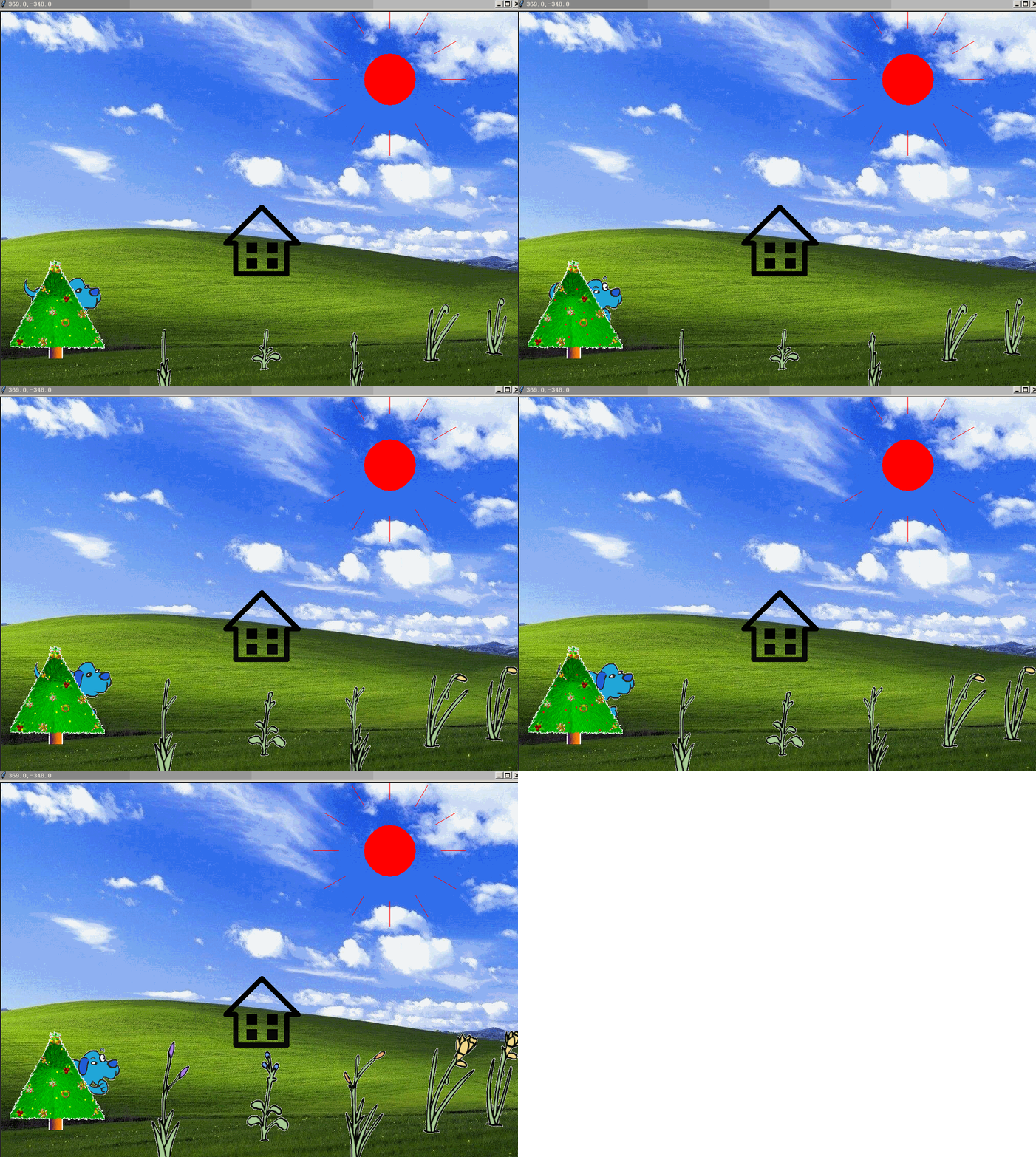
生机勃勃的农场_ 花花草草的小世界

python自然编程生机勃勃的农场
让Python程序描述一下大自然,本程序更关键的是要有好的素材与搭配等.
下面是部分代码预览:

"""
   生机勃勃的农场.py
   太阳升起来了,绿茵草地上的花朵们充满生机,小狗在来会走动,还有发财树在等着你去摇一摇.
"""
import os
from turtle import *
from animation import *
from time import sleep
from random import choice,randint
from sprite import Sprite as Karaoke


"""一、新建屏幕,如需要渐变效果,需要许多张背景图切换"""
width,height = 1024,768
halfwidth,halfheight = width//2,height//2
screen = Screen()
screen.delay(0)
screen.setup(width,height)
screen.bgcolor("black")
sleep(1)
screen.bgpic("background.png")
screen.title("我的农场")


"""二、画太阳"""
draw_turtle = Turtle(visible=False,shape='circle')
draw_turtle.penup()
draw_turtle.goto(250,-250)
draw_turtle.color("red","red")
draw_turtle.shapesize(5,5)
draw_turtle.st()
for i in range(50):
    draw_turtle.sety(draw_turtle.ycor() + 10)
    draw_turtle.stamp()
    sleep(0.01)
    draw_turtle.clear()
    screen.update()

draw_turtle.stamp()
draw_turtle.ht()
for i in range(12):
    draw_turtle.fd(100)
    draw_turtle.pendown()
    draw_turtle.fd(50)
    draw_turtle.penup()
    draw_turtle.bk(150)
    draw_turtle.right(30)
    sleep(0.01)

"""三、花的动画"""
cwd = os.getcwd() + os.sep

f0path = cwd + "花" + os.sep + "淡黄花" + os.sep
flower0_images = [f0path + "黄"+ str(i) + ".gif" for i in range(1,7)] 
[screen.addshape(image) for image in flower0_images]  #注册到屏幕形状列表
flower0 = Animation(flower0_images,400,-200,200)         
flower0.alt_image() 


screen.mainloop()

下载完整源代码与素材,请

成为会员后,登陆才能继续浏览!联系微信scratch8即可办理会员。
(会员专属:能浏览所有文章,下载所有带链接的Python资源。)

发表在 python, turtle | 生机勃勃的农场_ 花花草草的小世界已关闭评论

海龟的小伙伴们

"""海龟的小伙伴们,本程序演示很多不同颜色的小海龟在海里游泳"""

import turtle
from random import randint

width,height = 640,480                 # 定义屏幕宽度和高度
colors = 'red','orange','yellow','green','cyan','blue','purple','gray'

screen = turtle.getscreen()            # 获取屏幕对象
screen.title("海龟的小伙伴们")         # 设定屏幕标题
screen.setup(width,height)             # 设定屏幕宽高
screen.bgpic("dahai.png")              # 设定背景图片
screen.delay(0)                        # 设定屏幕延时

turtles = [turtle]                     # 定义海龟列表

turtle.penup()                         # 让小海龟抬笔
turtle.shape("turtle")                 # 设定海龟形状
for c in colors:                       # 遍历每种颜色
    t = turtle.clone()                 # 克隆一只海龟
    t.color(c)                         # 设定海龟颜色
    t.setheading(randint(0,359))       # 设定海龟朝向
    turtles.append(t)                  # 加入海龟列表

amounts = len(turtles)                 # 统计海龟数量
index = 0                              # 定义列表索引
while True:                            # 进入无限循环
    t = turtles[index]                 # 取一只小海龟
    t.fd(0.1)                          # 海龟前进0.1
    if randint(0,100) == 0 :           # 设定一定机率
        t.right(randint(-90,90))       # 随机转动方向  
    index += 1                         # 索引号加1
    index = index % amounts            # 对数量求余


海龟的小伙伴们

发表在 python, turtle | 海龟的小伙伴们已关闭评论

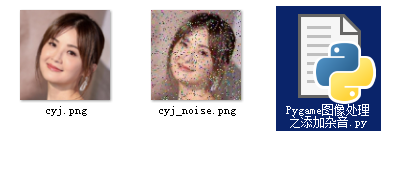
Pygame图像处理之添加杂音

"""给图像加噪音,其实就是在图像上随机打彩色像素点,属于图像处理"""

import pygame
import random

cyj = pygame.image.load("cyj.png")
width,height = cyj.get_size()

for i in range(1500):
    x = random.randrange(width)
    y = random.randrange(height)
    r = random.randint(0,255)
    g = random.randint(0,255)
    b = random.randint(0,255)
    
    cyj.set_at((x,y),(b,g,r))

pygame.image.save(cyj,"cyj_noise.png")

Pygame图像处理之添加杂音

发表在 pygame, python | Pygame图像处理之添加杂音已关闭评论

pygame的mask之本质

"""mask用来在pygame中的碰撞检测。mask记录的是图像的透明或不透明分布情况,打印一下一个mask实例,就能看到其实mask就是0101010101011010101101000000。0的地方表示此处没有像素,1就表示有像素。"""

import pygame

image = pygame.image.load("dot.png")

image_mask = pygame.mask.from_surface(image)
width,height = image_mask.get_size()

print(image_mask)

for y in range(width):
    for x in range(height):
        m = image_mask.get_at((x,y))
        print(m,end=' ')
    print()


发表在 pygame, python | pygame的mask之本质已关闭评论

pygame图像处理基础简单数学运算_PyGame image processing foundation

"""图像处理基础简单数学运算,像素也能加减乘除,所谓图像处理就是对像素操作,以下没有矩阵操作,适合于中小学生理解。"""

__author__ = "李兴球"
__date__ = "2019/5/5"


import pygame
import random

def pixel_add(pixel,number):
    """pixel:像素三元组,number:要增加的数值"""
    r,g,b = pixel
    b = min((b + number ) ,255)
    b = max(b,0)
    g = min((g + number ) ,255)
    g = max(g,0)
    r = min((r + number ) ,255)
    r = max(r,0)
    return r,g,b   


cyj = pygame.image.load("cyj.png")
width,height = cyj.get_size()

### 像素的加差
##for x in range(width):
##    for y in range(height):
##        r,g,b,a = cyj.get_at((x,y))        
##        r,g,b = pixel_add((r,g,b),-150) 
##        cyj.set_at((x,y),(b,g,r,255))
##
##pygame.image.save(cyj,"cyj_2.png")

# 像素值两级化,大于127的就让它的值变成255,否则为0
for x in range(width):
    for y in range(height):
        r,g,b,a = cyj.get_at((x,y))
        r = (r > 127) * 255
        g = (g > 127) * 255
        b = (b > 127) * 255
        cyj.set_at((x,y),(b,g,r,255))

pygame.image.save(cyj,"cyj_3.png")


pygame图像处理基础简单数学运算

发表在 pygame, python | pygame图像处理基础简单数学运算_PyGame image processing foundation已关闭评论

epic射击角色_动作游戏核心代码 pygame Shooting Character-Action Game Core Code

pygame游戏关卡制作器演示

下面是部分代码预览:

"""epic射击角色, 动作射击游戏基础核心源代码哦. 按鼠标射击,按a,d左右行走,按w拿枪攻击,按s倒地."""

__author__= "李兴球"
__date__ = "2019/6/8"
__blog__ = "www.lixingqiu.com"

import time
import pygame
from pygame.locals import *

class Actor:
    
    def __init__(self,right_frames,left_frames,screen):
        self.screen = screen
        self.sw = screen.get_width()
        self.sh = screen.get_height()
        self.right_frames = right_frames
        self.left_frames = left_frames
        self.frames = [right_frames,left_frames]
         
    def update(self):
        if time.time() - self.start_time > self.interval: # 超时则换造型
          

def main():

    width,height = 480,360
    screen = pygame.display.set_mode((width,height))
    pygame.display.set_caption("epic射击角色_动作游戏核心代码 www.lixingqiu.com")

    fighter = Actor(costumes_right,costumes_left,screen)
       
    clock = pygame.time.Clock()
    running = True
    while running:
        for event in pygame.event.get():
            if event.type == QUIT:running = False
            if event.type == KEYDOWN:
                if event.key == K_a:
                    fighter.heading = 1  # 向左
                    fighter.status = "run"
                    fighter.index = 48
                    fighter.speed = (-5,0)
                    
                if event.key == K_d:
                    fighter.heading = 0 # 向右
                    fighter.status = "run"
                    fighter.index = 48
                    fighter.speed = (5,0)
                    
                if event.key == K_w:
                    fighter.status = "up_attack"
                    fighter.index = 32
                    fighter.start_time = time.time()
                    
                    
                if event.key == K_s:
                    fighter.status = "hurt"
                    fighter.index = 16
                    fighter.start_time = time.time()
            if event.type == KEYUP:
                if event.key == K_a or event.key == K_d:
                   fighter.status = 'stand'
                   fighter.index = 0
                   fighter.speed = (0,0)
                    
            if event.type == MOUSEBUTTONDOWN:
                    fighter.status = "shoot"
                    fighter.index = 0
                    fighter.start_time = time.time()

        fighter.update()
        
        screen.blit(background,(0,0))
        screen.blit(fighter.image,fighter.rect)
        pygame.display.update()
        clock.tick(60)

    pygame.quit()

if __name__ == "__main__":

    main()               
                

下载完整源代码与素材,请

成为会员后,登陆才能继续浏览!联系微信scratch8即可办理会员。
(会员专属:能浏览所有文章,下载所有带链接的Python资源。)
发表在 pygame, python | epic射击角色_动作游戏核心代码 pygame Shooting Character-Action Game Core Code已关闭评论

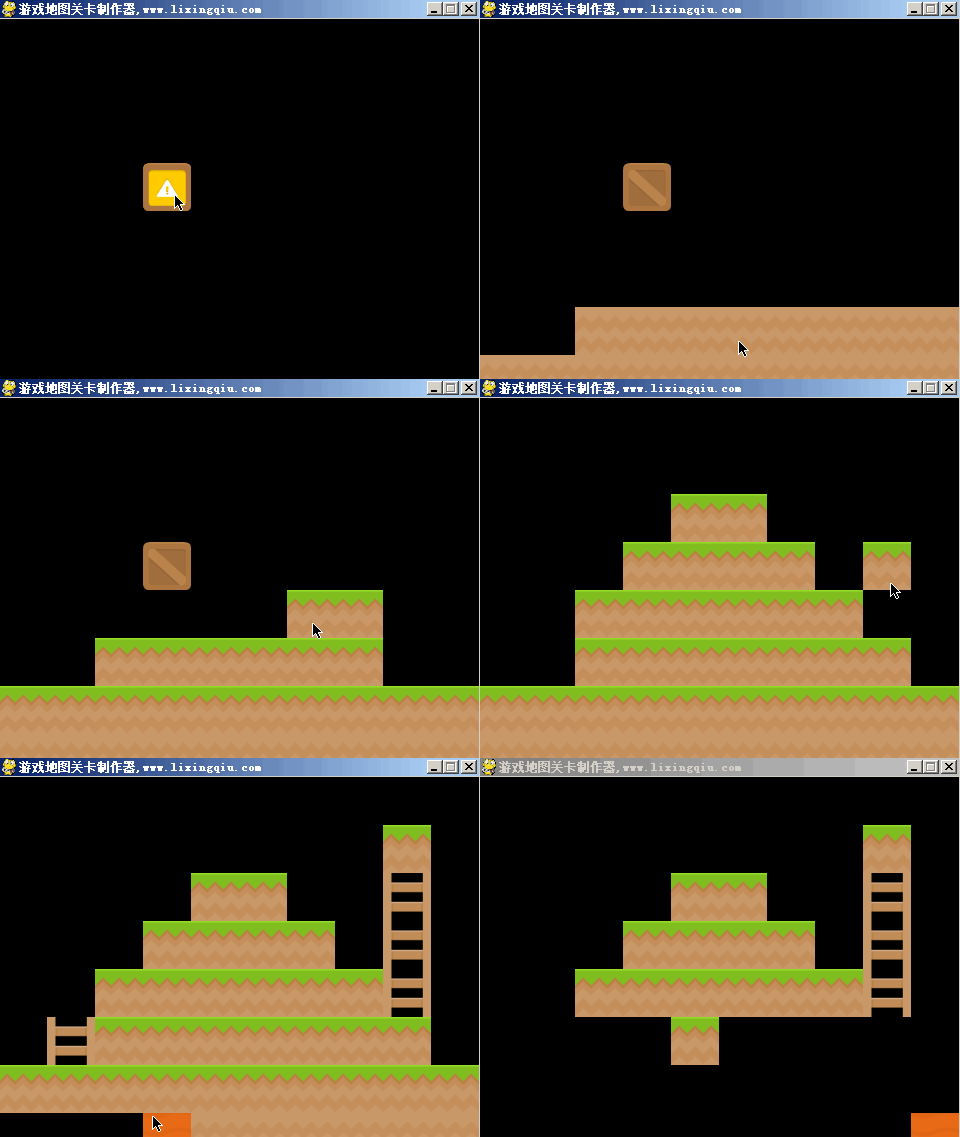
游戏地图关卡制作器_pygame game map maker

pygame游戏关卡制作器演示
下面是部分代码预览:

"""
游戏地图关卡制作器,按空格键切换方块,按鼠标左键放置方块,按鼠标右键清除方块。
要保存地图,只要设一个按键,然后把update后的screen保存到磁盘上即可。
"""

__author__ = "李兴球"
__date__ = "2019/6/8"
__website__ = "www.lixingqiu.com"

import glob
import pygame
from pygame.locals import *

width,height = 480,360

screen = pygame.display.set_mode((width,height))
pygame.display.set_caption("游戏地图关卡制作器,www.lixingqiu.com")

black = pygame.Surface((48,48))
black.fill((0,0,0))
 
rect = image.get_rect()

running = True

while running:
    for event in pygame.event.get():
        if event.type == QUIT:running = False
    
    screen.fill((0,0,0))
    screen.blit(gamemap,(0,0))
    screen.blit(image,rect)
    pygame.display.update()

pygame.quit()   

下载完整源代码与素材,请

成为会员后,登陆才能继续浏览!联系微信scratch8即可办理会员。
(会员专属:能浏览所有文章,下载所有带链接的Python资源。)

发表在 pygame, python | 游戏地图关卡制作器_pygame game map maker已关闭评论

抖动的云朵_帧图生成样本示例

天上的云朵在发抖!这是一个pygame制作的动画。给它配了音乐,气势磅礴!音乐振撼!
下面是部分代码预览:

"""抖动的云朵_帧图生成样本示例,本程序会新建云类,它生成后会不断地抖动。
更重要的是程序会保存游戏的每一帧放在frames文件夹里面。所以可以通过继续编写程序把这些png文件合成gif或视频。
由于要不断地写磁盘,所以程序运行速度变慢了,改进的方法是跳帧,即跳过某些帧,如让index为5的倍数时才写入。
"""

import os
import time
import pygame
from pygame.locals import *
from random import randint

class Cloud(pygame.sprite.Sprite):
    def __init__(self,image,screen):
        super().__init__()               # 调用超类初始化方法
        self.screen = screen             # screen属性,这样能访问screen
        self.sw = screen.get_width()
        self.sh = screen.get_height()
        self.scale = randint(1,10)/10
        self.image = image

        
    def update(self):
        """更新云朵的坐标"""
        if time.time() - self.start_time > self.interval:
            self.dx = randint(-5,5)
            self.dy = randint(-5,5)

def main():

    """主函数"""
    width,height = 960,720
    screen = pygame.display.set_mode((width,height))
    pygame.display.set_caption("抖动的云朵_帧图生成样本示例 www.lixingqiu.com")

    pygame.mixer.init()
    pygame.mixer.music.load("inception.wav")
    pygame.mixer.music.play(-1,0)

    running = True
    
    index = 0
    frame_path = "frames"
    if not os.path.exists(frame_path):os.mkdir(frame_path)

    while running:
        for event in pygame.event.get():
            if event.type == QUIT:running = False
        cloud_group.update()

    pygame.quit()

if __name__ == "__main__":

    main()       


下载完整源代码与素材,请

成为会员后,登陆才能继续浏览!联系微信scratch8即可办理会员。
(会员专属:能浏览所有文章,下载所有带链接的Python资源。)

发表在 pygame, python | 抖动的云朵_帧图生成样本示例已关闭评论

python彩色圆点绕圈图

python彩色圆点绕圈图

今天上课练习的内容为画以下图形:

"""彩色圆点绕圈图_Python海龟画图练习"""

import turtle

colors = ['red','orange','yellow','green','cyan','blue','purple']
amounts = len(colors)

screen = turtle.getscreen()
screen.title("彩色圆点绕圈图")
screen.bgcolor("red")
screen.setup(640,480)
screen.delay(0)

turtle.penup()
for x in range(40):
    for i in range(amounts):
        turtle.color(colors[i])
        turtle.dot(i * 10 + 10)
        turtle.fd(30)
    turtle.bk(210)
    turtle.right(9)

screen.exitonclick()         # 单击关闭窗口

发表在 python, turtle | python彩色圆点绕圈图已关闭评论

执剑女角色版本1之造型切换,动作游戏基础 _pygame Action Game Foundation

Action Game Foundation
下面是部分代码预览:

"""执剑女角色版本1之造型切换,动作游戏基础,本版本只是实现动作切换.,按a或d键实现方向的改变,按空格键实现重击造型变换,按鼠标键实现普通攻击。
   完整的角色为,按鼠标键发普通攻击,会向前位移,按空格键为跃起,然后显示重击效果,并且落地时会有火花等。
"""

import time
import pygame
from pygame.locals import *

class Actor:
    def __init__(self,right_frames,left_frames):
        self.right_frames = right_frames
        self.left_frames = left_frames
        self.frames = [right_frames,left_frames]
        self.heading = 0        # 为0表示朝向为右,使用初始是面向右系列造型
        self.index = 0          # 初始状态系列造型中的索引为0的造型

    def update(self):
        if time.time() - self.start_time > self.interval: # 超时则换造型
            if self.status == "attack":
                if self.index < 4 :
                    self.index += 1
                    
                else:
                    self.status = "stand"
                    self.index = 0

if __name__ == "__main__":

    width,height = 960,720

    screen = pygame.display.set_mode((width,height))
    pygame.display.set_caption("执剑女角色版本1之造型切换,动作游戏基础 www.lixingqiu.com")

    girl = Actor(right_frames,left_frames)
       
    clock = pygame.time.Clock()
    running = True
    while running:
        for event in pygame.event.get():
            if event.type == QUIT:running = False
         
        screen.fill((0,0,0))
        screen.blit(girl.image,girl.rect)
        pygame.display.update()
        clock.tick(60)

    pygame.quit()

下载完整源代码与素材,请

成为会员后,登陆才能继续浏览!联系微信scratch8即可办理会员。
(会员专属:能浏览所有文章,下载所有带链接的Python资源。)

发表在 pygame, python | 执剑女角色版本1之造型切换,动作游戏基础 _pygame Action Game Foundation已关闭评论

影子奔跑猫 pygame向前移动背景演示

影子奔跑猫,向前移动背景演示,猫的坐标不变只是切换造型

下面是部分代码预览:

"""影子奔跑猫,向前移动背景演示,猫的坐标不变只是切换造型,程序其实很简单.
"""

import time
import pygame
from pygame.locals import *

class Background:
    """不断向前移动的滚动背景"""
    def __init__(self,image,screen):
        """初始化函数"""
        self.screen = screen
        self.w = screen.get_width()     # 记录屏幕宽度
        self.h = screen.get_height()    # 记录屏幕高度
        self.image = image              # image是一个surface
        self.image2 = image
        self.rect = self.image.get_rect()
        self.rect2 = self.image2.get_rect()
        self.rect2.right = 0           # 两个surface相隔一个屏幕宽度
        self.dx = 50
        
class Cat:
    """猫类,生成后会不断地切换造型"""
    def __init__(self,images):
        self.frames = images
        self.amounts = len(images)     # 帧数
        self.index = 0                 # 初始帧索引
        self.image = self.frames[self.index]
        self.rect = self.image.get_rect()
        self.interval = 0.01            # 帧切换的间隔时间
        self.start_time = time.time()    
    
if __name__ == "__main__":

    width,height = 960,720
    screen = pygame.display.set_mode((width,height))
    pygame.display.set_caption("影子奔跑猫 pygame向前移动背景演示,www.lixingqiu.com")

    pygame.mixer.init()
    pygame.mixer.music.load("The Downtown Fic.wav")
    pygame.mixer.music.play(-1,0)

    bgs = pygame.image.load("costume1.png")
    background = Background(bgs,screen)

    cat_images = [f"frames/frame{index}.png" for index in range(20)]
    cat_frames = [pygame.image.load(image).convert_alpha() for image in cat_images]
    shadow_cat = Cat(cat_frames)
    shadow_cat.rect.center = width//2,height//2
    clock = pygame.time.Clock()
    running = True
    while running:
        for event in pygame.event.get():
            if event.type == QUIT:running = False
            
        background.update()
        shadow_cat.update()


    pygame.quit()


下载完整源代码与素材,请

成为会员后,登陆才能继续浏览!联系微信scratch8即可办理会员。
(会员专属:能浏览所有文章,下载所有带链接的Python资源。)

发表在 pygame, python | 影子奔跑猫 pygame向前移动背景演示已关闭评论