爱的纪念_Python创意情景绘图源代码


Python爱的纪念源代码
下面是做为练习的源代码,请同学们把下面的空填好.

import time
import turtle
from coloradd import coloradd
from winsound import PlaySound

turtle.speed(1)
turtle.delay(30)
turtle.pensize(10)
turtle.colormode(_____)
turtle.bgcolor(________)
turtle.setup(1024,760)
turtle.bgpic('背景.png')

PlaySound('爱的纪念.wav',9)

c = (255,0,0)
for _ in range(4):
    
    for _ in _____________:
        c = coloradd(c,0.1)
        turtle.color(_____)
        turtle.circle(90,90)
        turtle.right(180)        
    turtle.rt(90)
    
turtle.penup()
turtle.fd(180)
turtle.left(90)
turtle.color('light green')
turtle.pendown()
turtle.______(180)                               # 画半径为180的圆

turtle.penup()
turtle.color('red')
ft = ('',100,'normal')

turtle.goto(0,180)                               
turtle.write(chr(10084),align='center',font=ft)  # 上心

turtle.goto(0,-300)
turtle.write(chr(10084),align='center',font=ft)  # 下心

turtle.goto(-300,-50)
turtle.write(chr(10084),align='center',font=ft)  # 左心

turtle.goto(300,-50)
turtle.write(chr(10084),align='center',font=ft)  # 右心

turtle.goto(-80,310)
turtle.color('white')
turtle.setheading(0)                             # 设定方向为0度(向东) 
ft = ('楷体',28,'bold')
for c in '爱的纪念':
    turtle.write(c,align='center',font=ft)
    turtle.fd(50)
    time.______(0.8)

turtle.ht()
turtle.done()

发表在 python, turtle | 留下评论

生成bat批处理把wmv批量转换成mp4

以 下程序生成一个批处理文件,再运行批处理后能把wmv视频都转换成mp4文件. 转换时用的是大名鼎鼎的ffmpeg。这个请自行下载,网上多得是。

import os

tasks = []
path = 'E:\\展示的创意视频'
for root,dirs,files in os.walk(path):                  # 递归遍历path的所有子文件夹和其下面的所有文件
    for file in files:                                 # 当前文件夹下面的所有文件 
        f,ext = os.path.splitext(file)                 # 分开文件名和扩展名
        if ext=='.wmv':                                # 如果扩展名是.wmv 
           source = root + os.sep + f + ext            # 形成源文件名
           dest = root + os.sep + f + '.mp4'           # 合成mp4文件名 
           s = 'ffmpeg -i ' + source + " " + dest      # 合成字符串 
           tasks.append(s)                             # 添加到tasks列表

s = '\n'.join(tasks)
s = s + "\n" + 'pause'

f = open('生成mp4.bat',mode='w')
f.write(s)
f.close()
           

以下是生成的bat文件:

ffmpeg -i E:\展示的创意视频\pygame\2D_Minecraft.wmv E:\展示的创意视频\pygame\2D_Minecraft.mp4
ffmpeg -i E:\展示的创意视频\pygame\3D星空.wmv E:\展示的创意视频\pygame\3D星空.mp4
ffmpeg -i E:\展示的创意视频\pygame\Chinese Music花瓣飞舞的春天.wmv E:\展示的创意视频\pygame\Chinese Music花瓣飞舞的春天.mp4
ffmpeg -i E:\展示的创意视频\pygame\G.wmv E:\展示的创意视频\pygame\G.mp4
ffmpeg -i E:\展示的创意视频\pygame\Video_2018-11-27_170458.wmv E:\展示的创意视频\pygame\Video_2018-11-27_170458.mp4
ffmpeg -i E:\展示的创意视频\pygame\动态背景_绿色瀑布风景waterfall parallax.wmv E:\展示的创意视频\pygame\动态背景_绿色瀑布风景waterfall parallax.mp4
ffmpeg -i E:\展示的创意视频\pygame\动态背景_蓝天绿地太阳云朵户外场景动画演示.wmv E:\展示的创意视频\pygame\动态背景_蓝天绿地太阳云朵户外场景动画演示.mp4
ffmpeg -i E:\展示的创意视频\pygame\勇闯黑暗迷宫_预览视频.wmv E:\展示的创意视频\pygame\勇闯黑暗迷宫_预览视频.mp4
ffmpeg -i E:\展示的创意视频\pygame\小猫过桥.wmv E:\展示的创意视频\pygame\小猫过桥.mp4
ffmpeg -i E:\展示的创意视频\pygame\小鸟捕手.wmv E:\展示的创意视频\pygame\小鸟捕手.mp4
ffmpeg -i E:\展示的创意视频\pygame\尖峰时刻.wmv E:\展示的创意视频\pygame\尖峰时刻.mp4
ffmpeg -i E:\展示的创意视频\pygame\打地鼠.wmv E:\展示的创意视频\pygame\打地鼠.mp4
ffmpeg -i E:\展示的创意视频\pygame\抖动的云朵_帧图生成样本示例.wmv E:\展示的创意视频\pygame\抖动的云朵_帧图生成样本示例.mp4
ffmpeg -i E:\展示的创意视频\pygame\最简太空飞船射击.wmv E:\展示的创意视频\pygame\最简太空飞船射击.mp4
ffmpeg -i E:\展示的创意视频\pygame\月亮之夜_鼠标渐隐拖尾.wmv E:\展示的创意视频\pygame\月亮之夜_鼠标渐隐拖尾.mp4
ffmpeg -i E:\展示的创意视频\pygame\泡泡坦克大战.wmv E:\展示的创意视频\pygame\泡泡坦克大战.mp4
ffmpeg -i E:\展示的创意视频\pygame\漫天飞雪效果动画.wmv E:\展示的创意视频\pygame\漫天飞雪效果动画.mp4
ffmpeg -i E:\展示的创意视频\pygame\生死存亡.wmv E:\展示的创意视频\pygame\生死存亡.mp4
ffmpeg -i E:\展示的创意视频\pygame\跳跳猫.wmv E:\展示的创意视频\pygame\跳跳猫.mp4
ffmpeg -i E:\展示的创意视频\pygame\闪电侠接金币.wmv E:\展示的创意视频\pygame\闪电侠接金币.mp4
ffmpeg -i E:\展示的创意视频\pygame\雪地打蝙蝠.wmv E:\展示的创意视频\pygame\雪地打蝙蝠.mp4
ffmpeg -i E:\展示的创意视频\pygame\鼠闯迷宫.wmv E:\展示的创意视频\pygame\鼠闯迷宫.mp4
ffmpeg -i E:\展示的创意视频\sprites\一马当先.wmv E:\展示的创意视频\sprites\一马当先.mp4
ffmpeg -i E:\展示的创意视频\sprites\人类之路.wmv E:\展示的创意视频\sprites\人类之路.mp4
ffmpeg -i E:\展示的创意视频\sprites\太空虫子.wmv E:\展示的创意视频\sprites\太空虫子.mp4
ffmpeg -i E:\展示的创意视频\sprites\奥特曼.wmv E:\展示的创意视频\sprites\奥特曼.mp4
ffmpeg -i E:\展示的创意视频\sprites\急速返航_躲避游戏_李兴球博客.wmv E:\展示的创意视频\sprites\急速返航_躲避游戏_李兴球博客.mp4
ffmpeg -i E:\展示的创意视频\sprites\恐龙跳.wmv E:\展示的创意视频\sprites\恐龙跳.mp4
ffmpeg -i E:\展示的创意视频\sprites\月满西楼mv.wmv E:\展示的创意视频\sprites\月满西楼mv.mp4
ffmpeg -i E:\展示的创意视频\sprites\未来可期之星辰大海.wmv E:\展示的创意视频\sprites\未来可期之星辰大海.mp4
ffmpeg -i E:\展示的创意视频\sprites\猴小子冲关.wmv E:\展示的创意视频\sprites\猴小子冲关.mp4
ffmpeg -i E:\展示的创意视频\sprites\盘山公路的牵引.wmv E:\展示的创意视频\sprites\盘山公路的牵引.mp4
ffmpeg -i E:\展示的创意视频\sprites\相思配图.wmv E:\展示的创意视频\sprites\相思配图.mp4
ffmpeg -i E:\展示的创意视频\sprites\竹林弹字游戏.wmv E:\展示的创意视频\sprites\竹林弹字游戏.mp4
ffmpeg -i E:\展示的创意视频\sprites\第一人称射击打蝙蝠.wmv E:\展示的创意视频\sprites\第一人称射击打蝙蝠.mp4
ffmpeg -i E:\展示的创意视频\sprites\精卫填海.wmv E:\展示的创意视频\sprites\精卫填海.mp4
ffmpeg -i E:\展示的创意视频\sprites\自动打砖块.wmv E:\展示的创意视频\sprites\自动打砖块.mp4
ffmpeg -i E:\展示的创意视频\sprites\雷电图章版.wmv E:\展示的创意视频\sprites\雷电图章版.mp4
ffmpeg -i E:\展示的创意视频\sprites\音乐跳舞毯.wmv E:\展示的创意视频\sprites\音乐跳舞毯.mp4
ffmpeg -i E:\展示的创意视频\sprites\飞扬小鸟.wmv E:\展示的创意视频\sprites\飞扬小鸟.mp4
ffmpeg -i E:\展示的创意视频\turtle\1943.wmv E:\展示的创意视频\turtle\1943.mp4
ffmpeg -i E:\展示的创意视频\turtle\Video_2019-11-27_084845.wmv E:\展示的创意视频\turtle\Video_2019-11-27_084845.mp4
ffmpeg -i E:\展示的创意视频\turtle\二维码的梦.wmv E:\展示的创意视频\turtle\二维码的梦.mp4
ffmpeg -i E:\展示的创意视频\turtle\保卫公主.wmv E:\展示的创意视频\turtle\保卫公主.mp4
ffmpeg -i E:\展示的创意视频\turtle\坦克大战.wmv E:\展示的创意视频\turtle\坦克大战.mp4
ffmpeg -i E:\展示的创意视频\turtle\太空入侵.wmv E:\展示的创意视频\turtle\太空入侵.mp4
ffmpeg -i E:\展示的创意视频\turtle\太空出租箭.wmv E:\展示的创意视频\turtle\太空出租箭.mp4
ffmpeg -i E:\展示的创意视频\turtle\忍者的行为.wmv E:\展示的创意视频\turtle\忍者的行为.mp4
ffmpeg -i E:\展示的创意视频\turtle\抢收成语.wmv E:\展示的创意视频\turtle\抢收成语.mp4
ffmpeg -i E:\展示的创意视频\turtle\星际赛车.wmv E:\展示的创意视频\turtle\星际赛车.mp4
ffmpeg -i E:\展示的创意视频\turtle\猫狮大战之算术达人.wmv E:\展示的创意视频\turtle\猫狮大战之算术达人.mp4
ffmpeg -i E:\展示的创意视频\turtle\相声大数据.wmv E:\展示的创意视频\turtle\相声大数据.mp4
ffmpeg -i E:\展示的创意视频\turtle\砸蛋.wmv E:\展示的创意视频\turtle\砸蛋.mp4
ffmpeg -i E:\展示的创意视频\turtle\神算子一休哥.wmv E:\展示的创意视频\turtle\神算子一休哥.mp4
ffmpeg -i E:\展示的创意视频\turtle\老鼠过街.wmv E:\展示的创意视频\turtle\老鼠过街.mp4
ffmpeg -i E:\展示的创意视频\turtle\花框音乐盒.wmv E:\展示的创意视频\turtle\花框音乐盒.mp4
ffmpeg -i E:\展示的创意视频\turtle\菜根谭小猫.wmv E:\展示的创意视频\turtle\菜根谭小猫.mp4
ffmpeg -i E:\展示的创意视频\turtle\解放军VS木马.wmv E:\展示的创意视频\turtle\解放军VS木马.mp4
ffmpeg -i E:\展示的创意视频\turtle\迷宫寻宝.wmv E:\展示的创意视频\turtle\迷宫寻宝.mp4
pause
发表在 python | 留下评论

Python水调歌头·明月几时有_turtle 阴影字

Python儿童课程写诗词阴影字
我们上课的一个例子,简单的顺序结果,用海龟的写字命令写一首词。

import turtle

s="""丙辰中秋,欢饮达旦,大醉,作此篇,兼怀子由。

明月几时有?把酒问青天。不知天上宫阙,今夕是何年。
我欲乘风归去,又恐琼楼玉宇,高处不胜寒。起舞弄清影,何似在人间?

转朱阁,低绮户,照无眠。不应有恨,何事长向别时圆?
人有悲欢离合,月有阴晴圆缺,此事古难全。但愿人长久,千里共婵娟。"""

turtle.penup()
turtle.setup(1048,574)
turtle.bgpic('素材\\88.png')

turtle.goto(0,200)
turtle.color('black')
turtle.write('水调歌头,明月几时有',align='center',font=('',32,'bold'))

turtle.goto(2,202)
turtle.color('white')
turtle.write('水调歌头,明月几时有',align='center',font=('',32,'bold'))


turtle.goto(0,-130)
turtle.color('gray')
turtle.write(s,align='center',font=('楷体',18,'bold'))

turtle.goto(1,-129 )
turtle.color('white')
turtle.write(s,align='center',font=('楷体',18,'bold'))

turtle.ht()
turtle.done()


发表在 python, turtle | 标签为 | 留下评论

Python葫芦图形7个


简单的一个小创意, 上Python课的一个例子:

import turtle

cs = ['red','orange','yellow','green','cyan','blue','purple']

turtle.color('purple')
turtle.bgcolor('black')
turtle.speed(0)
turtle.delay(0)
turtle.bk(300)

for y in range(7):
    turtle.color(cs[y])
    turtle.right(90)
    for x in range(1,51):
        turtle.pensize(x)
        turtle.fd(1)
    turtle.pensize(1)
    
    turtle.fd(50)
    turtle.dot(70)
    
    turtle.bk(100)          # 退后50
    turtle.left(90)         # 左转90度
    turtle.color('brown')
    turtle.fd(100)          # 前进100

turtle.penup()
turtle.home()               # 回家
turtle.left(90)
turtle.fd(100)
turtle.color('white')
# align对齐,方式有center,left,right
# font字体,小括号括起来的一些数据叫元组, 斜体:italic  粗体:bold, 下划线:underline
turtle.write("葫芦娃",align='center',font=('黑体',32,'italic'))
turtle.done()

发表在 python, turtle | 标签为 | 留下评论

风火轮编程Python课堂训练题_题81_140种颜色全显示

python turtle_140种颜色全显示
题目描述和源代码及素材于一体的“奇怪”的Python题目。

#FFB6C1 LightPink 浅粉红
#FFC0CB Pink 粉红
#DC143C Crimson 深红/猩红
#FFF0F5 LavenderBlush 淡紫红
#DB7093 PaleVioletRed 弱紫罗兰红
#FF69B4 HotPink 热情的粉红
#FF1493 DeepPink 深粉红
#C71585 MediumVioletRed 中紫罗兰红
#DA70D6 Orchid 暗紫色/兰花紫
#D8BFD8 Thistle 蓟色
#DDA0DD Plum 洋李色/李子紫
#EE82EE Violet 紫罗兰
#FF00FF Magenta 洋红/玫瑰红
#FF00FF Fuchsia 紫红/灯笼海棠
#8B008B DarkMagenta 深洋红
#800080 Purple 紫色
#BA55D3 MediumOrchid 中兰花紫
#9400D3 DarkViolet 暗紫罗兰
#9932CC DarkOrchid 暗兰花紫
#4B0082 Indigo 靛青/紫兰色
#8A2BE2 BlueViolet 蓝紫罗兰
#9370DB MediumPurple 中紫色
#7B68EE MediumSlateBlue 中暗蓝色/中板岩蓝
#6A5ACD SlateBlue 石蓝色/板岩蓝
#483D8B DarkSlateBlue 暗灰蓝色/暗板岩蓝
#E6E6FA Lavender 淡紫色/熏衣草淡紫
#F8F8FF GhostWhite 幽灵白
#0000FF Blue 纯蓝
#0000CD MediumBlue 中蓝色
#191970 MidnightBlue 午夜蓝
#00008B DarkBlue 暗蓝色
#000080 Navy 海军蓝
#4169E1 RoyalBlue 皇家蓝/宝蓝
#6495ED CornflowerBlue 矢车菊蓝
#B0C4DE LightSteelBlue 亮钢蓝
#778899 LightSlateGray 亮蓝灰/亮石板灰
#708090 SlateGray 灰石色/石板灰
#1E90FF DodgerBlue 闪兰色/道奇蓝
#F0F8FF AliceBlue 爱丽丝蓝
#4682B4 SteelBlue 钢蓝/铁青
#87CEFA LightSkyBlue 亮天蓝色
#87CEEB SkyBlue 天蓝色
#00BFFF DeepSkyBlue 深天蓝
#ADD8E6 LightBlue 亮蓝
#B0E0E6 PowderBlue 粉蓝色/火药青
#5F9EA0 CadetBlue 军兰色/军服蓝
#F0FFFF Azure 蔚蓝色
#E0FFFF LightCyan 淡青色
#AFEEEE PaleTurquoise 弱绿宝石
#00FFFF Cyan 青色
#00FFFF Aqua 浅绿色/水色
#00CED1 DarkTurquoise 暗绿宝石
#2F4F4F DarkSlateGray 暗瓦灰色/暗石板灰
#008B8B DarkCyan 暗青色
#008080 Teal 水鸭色
#48D1CC MediumTurquoise 中绿宝石
#20B2AA LightSeaGreen 浅海洋绿
#40E0D0 Turquoise 绿宝石
#7FFFD4 Aquamarine 宝石碧绿
#66CDAA MediumAquamarine 中宝石碧绿
#00FA9A MediumSpringGreen 中春绿色
#F5FFFA MintCream 薄荷奶油
#00FF7F SpringGreen 春绿色
#3CB371 MediumSeaGreen 中海洋绿
#2E8B57 SeaGreen 海洋绿
#F0FFF0 Honeydew 蜜色/蜜瓜色
#90EE90 LightGreen 淡绿色
#98FB98 PaleGreen 弱绿色
#8FBC8F DarkSeaGreen 暗海洋绿
#32CD32 LimeGreen 闪光深绿
#00FF00 Lime 闪光绿
#228B22 ForestGreen 森林绿
#008000 Green 纯绿
#006400 DarkGreen 暗绿色
#7FFF00 Chartreuse 黄绿色/查特酒绿
#7CFC00 LawnGreen 草绿色/草坪绿
#ADFF2F GreenYellow 绿黄色
#556B2F DarkOliveGreen 暗橄榄绿
#9ACD32 YellowGreen 黄绿色
#6B8E23 OliveDrab 橄榄褐色
#F5F5DC Beige 米色/灰棕色
#FAFAD2 LightGoldenrodYellow 亮菊黄
#FFFFF0 Ivory 象牙色
#FFFFE0 LightYellow 浅黄色
#FFFF00 Yellow 纯黄
#808000 Olive 橄榄
#BDB76B DarkKhaki 暗黄褐色/深卡叽布
#FFFACD LemonChiffon 柠檬绸
#EEE8AA PaleGoldenrod 灰菊黄/苍麒麟色
#F0E68C Khaki 黄褐色/卡叽布
#FFD700 Gold 金色
#FFF8DC Cornsilk 玉米丝色
#DAA520 Goldenrod 金菊黄
#B8860B DarkGoldenrod 暗金菊黄
#FFFAF0 FloralWhite 花的白色
#FDF5E6 OldLace 老花色/旧蕾丝
#F5DEB3 Wheat 浅黄色/小麦色
#FFE4B5 Moccasin 鹿皮色/鹿皮靴
#FFA500 Orange 橙色
#FFEFD5 PapayaWhip 番木色/番木瓜
#FFEBCD BlanchedAlmond 白杏色
#FFDEAD NavajoWhite 纳瓦白/土著白
#FAEBD7 AntiqueWhite 古董白
#D2B48C Tan 茶色
#DEB887 BurlyWood 硬木色
#FFE4C4 Bisque 陶坯黄
#FF8C00 DarkOrange 深橙色
#FAF0E6 Linen 亚麻布
#CD853F Peru 秘鲁色
#FFDAB9 PeachPuff 桃肉色
#F4A460 SandyBrown 沙棕色
#D2691E Chocolate 巧克力色
#8B4513 SaddleBrown 重褐色/马鞍棕色
#FFF5EE Seashell 海贝壳
#A0522D Sienna 黄土赭色
#FFA07A LightSalmon 浅鲑鱼肉色
#FF7F50 Coral 珊瑚
#FF4500 OrangeRed 橙红色
#E9967A DarkSalmon 深鲜肉/鲑鱼色
#FF6347 Tomato 番茄红
#FFE4E1 MistyRose 浅玫瑰色/薄雾玫瑰
#FA8072 Salmon 鲜肉/鲑鱼色
#FFFAFA Snow 雪白色
#F08080 LightCoral 淡珊瑚色
#BC8F8F RosyBrown 玫瑰棕色
#CD5C5C IndianRed 印度红
#FF0000 Red 纯红
#A52A2A Brown 棕色
#B22222 FireBrick 火砖色/耐火砖
#8B0000 DarkRed 深红色
#800000 Maroon 栗色
#FFFFFF White 纯白
#F5F5F5 WhiteSmoke 白烟
#DCDCDC Gainsboro 淡灰色
#D3D3D3 LightGrey 浅灰色
#C0C0C0 Silver 银灰色
#A9A9A9 DarkGray 深灰色
#808080 Gray 灰色
#696969 DimGray 暗淡灰
#000000 Black 纯黑
"""
   要求程序把自己读出,并提取上面的140种颜色,把所有颜色都一一显示在海龟画图屏幕上。
   显示方法如下:
   1.以边长为20像素的正方形显示一种颜色。
   2.正方形的边是黑色的,填充颜色就是上面的140颜色之一。
   3.按顺序每行显示14种颜色,共显示10行。
"""
# 下面......可以用多行或一行代码替换,______只能用一行或一个表达式替换。
import sys
import turtle

def draw_square(length):
    turtle.begin_fill()
    for _ in range(4):
        turtle.fd(length)
        turtle.right(90)
    turtle.end_fill()
    
f =open(________,encoding='utf-8')
........
f.close()

.......

turtle.speed(0)
turtle.delay(0)
i = 0
for _ in range(10):
    for _ in range(14):
        .........
        turtle.color('black',c)
        draw_square(20)
        turtle.fd(20)
        i = i + 1
    turtle.bk(280)
    turtle.right(90)
    turtle.fd(20)
    turtle.left(90)
发表在 python, turtle | 标签为 | 留下评论

turtle海龟画图中的游戏课之射击飞碟

下面是一个简单的小游戏, 上面的造型为三角形的海龟表示飞碟,下面的表示子弹。玩家可以按左右键操作子弹左右移动,按向上箭头则是发射。飞碟“碰”到子弹会消失,然后过一会儿它又会出现!这是我们风火轮编程上Python课的一个案例。以下是完整代码:


import time
from turtle import *

screen = Screen()
screen.delay(0)
screen.setup(800,600)
screen.title('www.lixingqiu.com 李兴球')

arrow = Turtle(shape='arrow')
arrow.left(90)
arrow.speed(0)
arrow.penup()
arrow.sety(-200)

screen.onkeypress(lambda:arrow.setx(arrow.xcor()-5),'Left')
screen.onkeypress(lambda:arrow.setx(arrow.xcor()+5),'Right')

成为会员后,登陆才能继续浏览!联系微信scratch8即可办理会员。
(会员专属:能浏览所有文章,下载所有带链接的Python资源。)

发表在 python, turtle | 标签为 | 留下评论

复杂的现实需要灵活的Python授课(小学生python课程海龟案例免费送)

课程是死的,融汇贯通,才能运用自由,现实上课比较复杂,不是公立学校整齐划一,经常插个学生要上课等等,来的学生参差不齐,至少2年级和初中生一起上课怎么办?实在是没有时间调整!所以怎么办呢? 一个班学生太少则成本高昂,所以不少大的少儿编程公司反而倒下了。而我,依然在少儿编程这个道路上前行。下面是今天给小学生上的一次Python课程中用的的案列。需要的人拿去。
小学生python课程海龟案例

这堂课怎么上,请自行设计。

发表在 python, turtle | 标签为 | 留下评论

吃豆人动画_函数版

吃豆人这个小游戏,很多学生都知道,所以干脆上一次课,先画一个吃豆人,然后,哎呀,让它给动起来。后来,你还能操作它移动,后来,还能去吃豆子,不过,这是后话了。这个案例就是一个动画。上个图形:
Python吃豆人动画

代码还是比较简单的,这里免费发放给认真阅读了本人博客的人。

"""
   吃豆人动画1_函数.py
"""
import time
import turtle

def draw_sector(radius,start,end):
    """radius半径,start起始角,end结束角"""
    turtle.begin_fill()         # 开始填充
    turtle.setheading(start)
    turtle.fd(radius)
    turtle.left(90)
    turtle.circle(radius,end)      # 画圆,度数为315
    turtle.left(90)
    turtle.fd(radius)              # 回到中心点
    turtle.end_fill()           # 结束填充
    
turtle.ht()                 # 隐藏海龟
turtle.speed(0)
turtle.tracer(0,0)
turtle.color('blue')    # 设定填充颜色

while True:
    turtle.clear()    
    draw_sector(200,15,315)
    turtle.update()
    time.sleep(0.5)
    turtle.dot(400)
    turtle.update()
    time.sleep(0.5)
    
 
发表在 python, turtle | 标签为 | 留下评论

Python创意绘画_颜色增加模块PPT幻灯片教程与示例

Python创意绘画创意程序动画
用Python制作各种创意绘画,代码简单,学生喜欢才最重要, 附幻灯片教程和9个代码示例。

成为会员后,登陆才能继续浏览!联系微信scratch8即可办理会员。
(会员专属:能浏览所有文章,下载所有带链接的Python资源。)

发表在 python, turtle | 留下评论

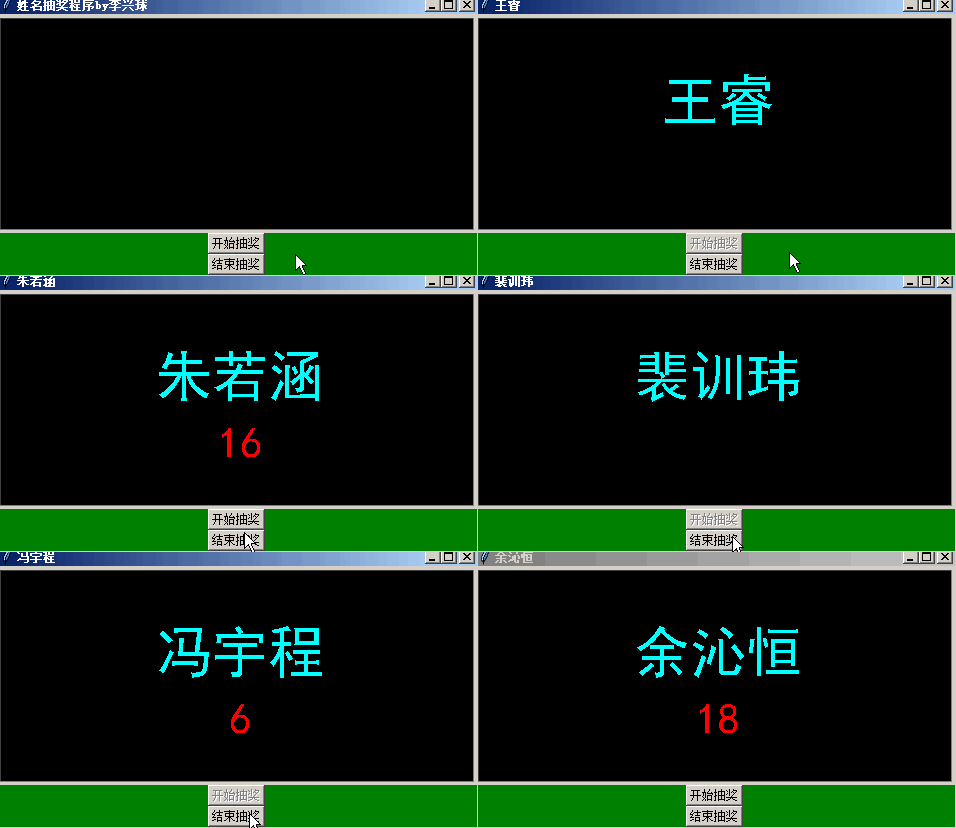
简单的姓名抽奖小程序带计数器

python turtle创意姓名抽奖程序2

python turtle创意姓名抽奖程序2


在Python课堂上用的一个小程序,抽到的同学需要把学习的内容讲解出来。以下是完整版代码。

import random
import turtle

def begin():
    global flag ,counter          # 声明flag是全局变量,(因为要在函数中改变它值)
    flag = True
    b1.config(state='disabled')   # 让b1按钮失效
    counter = 0
    select()
    
def end():
    global flag
    flag = False
    b1.config(state='normal')
    
def select():
    global counter 
    if flag==True:
        counter += 1
        turtle.clear()               # 清除以前写的字
        name = random.choice(names)  # 从names列表中随机选择一个名字,赋值给name
        screen.title(name)
        turtle.sety(0)
        turtle.color('cyan')                     # 海龟颜色为青        
        turtle.write(name,align='center',font=('黑体',42,'normal'))
        turtle.sety(-60)
        turtle.color('red')                     # 海龟颜色为lime
        turtle.write(counter,align='center',font=('黑体',32,'normal'))
        screen.ontimer(select,100)   #  通过ontimer命令,让select函数在100毫秒后再次运行 

names = ['罗*宁','郭*尘','汤*','裴*玮','余*恒','赵*阳','李*顺',
         '王*禹','王*睿','刘*宇','冯*程','朱*涵','肖*欣']

成为会员后,登陆才能继续浏览!联系微信scratch8即可办理会员。
(会员专属:能浏览所有文章,下载所有带链接的Python资源。)

发表在 python, tkinter, turtle | 标签为 | 留下评论

python turtle制作的史上最简图像查看器只有10行代码

10行代码就开发了一个最简单的png或者gif图像查看器。运行下面这个程序,就会有一个窗口弹出,单击右键,或者单击最下面的打开图像按扭,就会弹出图像选择对话框,选择png图片就能查看到图形了。

本人稍微加了几行代码,转换成可执行文件,就成为了一个真正的图像查看器了。

以下是前4行代码:

from turtle import TK,Screen
from tkinter import filedialog

def open_image():
    ps = [('png图像','*.png'),('gif图像','*.gif')]

pass                               # 下面还有六行代码 

生成可执行文件后,略微设定,即可双击png图片,实现用自己开发的图像查看器打开图片。
需要以下源代码和素材请扫码付款,或者联系微信scratch8
Python10行代码开发图像查看器

这是我们少儿Python课程的一个案例,能比较大的激发兴学生的编程兴趣,实乃各计算机教师必备良品。

成为会员后,登陆才能继续浏览!联系微信scratch8即可办理会员。
(会员专属:能浏览所有文章,下载所有带链接的Python资源。)

发表在 python, tkinter, turtle | 标签为 | 留下评论

寻找丢失的数据与预测未来_中小学生的线性回归方程与Python

以下是一个基本的线性回归问题:

假设某县2015年的税收为10.2个亿,2019年是18.1个亿。,2020年的税收是20.3个亿。2016年、2017、2018年的税收由于数据库损坏,数据已经丢失,但是知道每年税收增长基本都差不多。你能大致求出下列缺失年份,并且预测2021年以后每年的税收吗?

给中小学生讲线性回归方程问题

给中小学生讲线性回归方程问题

为了教中小学生理解线性回归的基本含义,制作了PPT幻灯片教程,从最基本的∑求和符号讲起的, 并且紧密联系Python编程,循序渐进地剖析了以上问题, 需要幻灯片教程的联系本人微信scratch8

以下是解决以上问题的源代码:

x_list = [2015,2019,2020]
y_list = [10.2,18.1,20.3]

n = len(x_list)
xmeans = sum(x_list)/n
ymeans = sum(y_list)/n

f1 = sum([x*y for x,y in zip(x_list,y_list)])
f2 = n * xmeans * ymeans
f3 = sum([x*x for x in x_list])
f4 = n * xmeans * xmeans
b = (f1-f2)/(f3-f4)
a = ymeans - b * xmeans

# 请把下面的代码用for循环实现
y2016 = round(b * 2016 + a,2)
print('2016年的税收金额大概是:',y2016)

y2017 = round(b * 2017 + a,2)
print('2017年的税收金额大概是:',y2017)

y2018 = round(b * 2018 + a,2)
print('2018年的税收金额大概是:',y2018)

y2021 = round(b * 2021 + a,2)
print('2021年的税收金额大概是:',y2021)

y2022 = round(b * 2022 + a,2)
print('2022年的税收金额大概是:',y2022)

y2023 = round(b * 2023 + a,2)
print('2023年的税收金额大概是:',y2023)

y2024 = round(b * 2024 + a,2)
print('2024年的税收金额大概是:',y2024)

为了教中小学生理解线性回归的基本含义,制作了PPT幻灯片教程,从最基本的∑求和符号讲起的, 并且紧密联系Python编程,循序渐进地剖析了以上问题, 需要幻灯片教程的联系本人微信scratch8

在幻灯片教程中用到的相关符号图片:

发表在 python | 标签为 , , | 留下评论

全国计算机等级考试Python程序设计二级教材电子教案与模拟练习题目20套

以下是幻灯片电子教案:
一.电子教案 第1章 程序设计基本方法
二.电子教案 第2章 Python语言基本语法元素
三.电子教案 第3章 基本数据类型
四.电子教案 第4章 程序的控制结构
五.电子教案 第5章 函数和代码复用
六.电子教案 第6章 组合数据类型
七.电子教案 第7章 文件和数据格式化
八.电子教案 第8章 Python计算生态
九.电子教案 第9章 Python标准库概览
十.电子教案 第10章 Python第三方库概览
十一.电子教案 第11章 Python第三方库纵览

还有20套模拟练习题目等更重要的资源,上课讲题做题目,更加轻松。成为本站会员,免费下载。

下面是下载链接:

成为会员后,登陆才能继续浏览!联系微信scratch8即可办理会员。
(会员专属:能浏览所有文章,下载所有带链接的Python资源。)

发表在 python | 留下评论

20几行代码实现的Python打地鼠游戏

20几行代码实现的打地鼠游戏python简单打地鼠游戏
纯用turtle模块实现的,20行左右实现一个打地鼠游戏,有背景图,有背景音乐,当然也有地鼠。程序精简,适合Python趣味游戏教学,这是我们内部培训机构的教学案例。以下是仅是代码示例:

import random
import turtle
import winsound

cors = [(-55,15),(-154,-53),(-157,-126),(-23,-110),
        (66,-53),(157,30),(200,-80),(153,-148)]

turtle.setup(480,360)
turtle.bgpic('tree.png')
turtle.addshape('地鼠.gif')
                           
winsound.PlaySound('My Musicfmusic1.wav',9)

turtle.done()

成为会员后,登陆才能继续浏览!联系微信scratch8即可办理会员。
(会员专属:能浏览所有文章,下载所有带链接的Python资源。)

发表在 python, turtle | 留下评论

不到30行代码实现最简单贪吃蛇游戏

python30代码实现最简单贪吃蛇游戏
纯粹用turtle模块实现的一个贪吃蛇游戏,用了不到30行代码。以下是部分代码,

import time
import random
import turtle as t

t.delay(0)
t.speed(0)
t.shape('square')
t.penup()

t.onkeypress(lambda:t.setheading(90),"Up")
t.onkeypress(lambda:t.setheading(-90),"Down")
t.onkeypress(lambda:t.setheading(180),"Left")
t.onkeypress(lambda:t.setheading(0),"Right")
t.listen()
       

成为会员后,登陆才能继续浏览!联系微信scratch8即可办理会员。
(会员专属:能浏览所有文章,下载所有带链接的Python资源。)

发表在 python, turtle | 标签为 | 留下评论

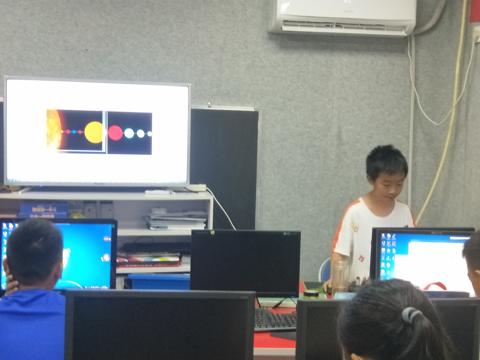
Python编程家长会花絮_萍乡中小学Python家长会现场

萍乡乐学创客编程学校的Python春季班结束了,即将迎来暑假班。学完后,学生们发表了学习Python的感言,或者讲解了一个自己喜爱的程序。

萍乡乐学创客编程学校Python学生

下面是视频,用的也是Python代码实现的,背景音乐渲染的气氛挺不错的。

代码如下所示,其中的gameturtle模块安装方法是用cmd打开命令行窗口,输入 pip install gameturtle即可安装。

import os
import time
import random
from gameturtle import *
from winsound import *

def xsleep(cv,t):
    start = time.time()
    while time.time() - start < t:
        cv.update()
    
project = '萍乡乐学创客学校家长会'
root = Tk()                                    # 新建窗口
root.title('萍乡市乐学创客学校2021春季班家长会')
cv = Canvas(width=480,height=360,bg='black')   # 新建画布
cv.pack()                                      # 放置画布
root.center()

PlaySound('音乐素材/Mika - Elle Me Dit (clip officiel).wav',9)

dummy = Sprite(cv,visible=False)
dummy.color('yellow')
dummy.write(project,font=('',22,'bold'))
xsleep(cv,2)
dummy.clear()

pics = []                                  # 要展示的图片列表 
path =os.getcwd() + os.sep + '家长会'
for file in os.listdir(path):
    ext = os.path.splitext(file.lower())[-1]
    if ext in ('.jpg','.png','.bmp','.jpeg'):
       filename = path + os.sep + file
       pics.append(filename)
pics = [Image.open(im) for im in pics]
random.shuffle(pics)                      # 打乱顺序

p = Sprite(cv,pics)                       # 新建角色 
i = 0
zi = Sprite(cv,visible=False)
zi.color('yellow')
zi.sety(90)
zi.write('未来的计算机人才将从这里升起')
zi.goto(240,91)
zi.color('green')
zi.write('未来的计算机人才将从这里升起')

zi.goto(240,150)
zi.color('yellow')
zi.write('视频由Python计算机语言编程实现')

words = ['编程,就是编写程序的简称',
         '通过编写符合规则的代码,就能掌控世界',
         '编程有很多种,从机器语言到汇编语言,',
         'C及Python与Scratch图形化编程',
         '科技已进化到让人人都可以从小学编程',
         '从小学编程,长大本领高',
         '万物互联的世界,编程是一项基本技能',
         '千里之行,始于编程',         
         '夏虫不可语于冰,井蛙不可语于海',
         '燕雀安知鸿鹄之志',
         '本视频即是通过编程实现的',
         '涉及到可视化编程、图形处理、',
         '随机模块、函数知识、当循环、',
         'for循环、计数器、像素滤镜数学原理。',
         '变量、列表、洗牌算法、音乐播放等知识。',
         '欢迎您到萍乡秋收广场乐学创客学校来。'
         ]
w = Sprite(cv,visible=False)
w.color('white')
w.goto(240,330)

wc = 0
while True:
    im = pics[i]
    p.shape(im)                           # 切换到下一张图片
    xsleep(cv,1)
    for x in range(25,101,25):
        im2 = pixelate(im,x)               # 像素化图形
        p.shape(im2)                       # 切换到下一张图片
        xsleep(cv,0.1)
    i= i + 1
    i= i % len(pics)

    wc += 1;print(wc)    
    w.clear()
    w.write(words[wc%len(words)])
        
    im = pics[i]    
    for x in range(100,0,-25):
        im2 = pixelate(im,x)             # 像素化图形
        p.shape(im2)                     # 切换到下一张图片
        xsleep(cv,0.1)
    p.shape(im)                          # 切换到下一张图片
    xsleep(cv,1)
发表在 gameturtle, python | 标签为 , , | 留下评论

简易反弹龟

一个受到重力的不断反弹的小海龟,x的值越来越大,表示速度不断变化。

import turtle

turtle.delay(1)
turtle.penup()
turtle.shape('turtle')
turtle.speed(0)
turtle.right(90)
turtle.bk(160)

while True:
    
    for x in range(300):
        turtle.fd(x/100)

    for x in range(300,0,-1):
        turtle.fd(-x/100)


发表在 python, turtle | 留下评论

描点画车动来显示_Python画实物图

python描点画车动图

import math
from turtle import *

def fillblack():
    tom.pensize(0)
    tom.penup()
    tom.goto(cors[0]) 
    tom.begin_fill()
    for p in cors:
        tom.goto(p)    
    tom.end_fill()


def draw_oval(a,b=None,width=5,fill=''):
    """ 以角色为中心点画椭圆,这个方法不会根据角色的方向对椭圆进行倾斜,所以速度快.
        a:长半轴,b:短半轴,
        width:边框像素值 
        fill:填充颜色,
        outline:边框颜色        
    """
    

def draw_oval2(a,b=None,width=2,fill=''):
        """以海龟为中心点画椭圆,这个方法会根据角色的方向对椭圆进行倾斜,所以速度慢
            a:长半轴,b:短半轴,
            width:边框像素值 
            fill:填充颜色,如果为空字符串,则无颜色            
        """        
        
def two_point_distance(p1,p2):
    """返回两点之间的距离"""
    a,b = p1
    c,d = p2
    return math.sqrt((a-c)**2 + (b-d)**2)
    
def get_triangle_angle_by_length(a,b,c):
    """a:边1  b:边2 c:边3
       返回ab夹角,ac夹角,bc角度
    """
    bc=math.degrees(math.acos((a*a-b*b-c*c)/(-2*b*c)))   # bc边的夹角
    ac=math.degrees(math.acos((b*b-a*a-c*c)/(-2*a*c)))   # ac边的夹角
    ab=math.degrees(math.acos((c*c-a*a-b*b)/(-2*a*b)))   # ab边的夹角

    return ab,ac,bc         

def get_triangle_angle_by_points(p1,p2,p3):
    """根据三角形的三点得到三个角度"""
    a = two_point_distance(p1,p2)
    b = two_point_distance(p1,p3)
    c = two_point_distance(p3,p2)
    return get_triangle_angle_by_length(a,b,c)

def circle_center(p0, p1, r):
    """得到圆心点坐标"""
    pass

def draw_arc(start,end,radius):
    """两点之间画弧,radius是圆半径"""
    
drawarc = draw_arc 

def draw_arc2(start,end,radius):
    """两点之间画弧,radius是圆半径"""
    pass

drawarc2 = draw_arc2
        
def draw_line(start,end):
    """start:起点坐标,二元组,end终点坐标二元组"""
    tom.penup()
    tom.goto(start)
    tom.pendown()
    tom.goto(end)
drawline = draw_line        # 取别名

def draw_lines():
    am = len(cors)
    for i in range(am-1):
        start = tuple(cors[i])
        end = tuple(cors[i+1])
        drawline(start,end)
drawlines = draw_lines

screen = Screen()

tom = Turtle()
tom.penup()

tom.pensize(2)

# 轮廓
cors = [[-265.0, 44.0], [-250.0, 72.0], [-208.0, 85.0], [-157.0, 124.0], [-44.0, 144.0], [22.0, 143.0], [102.0, 123.0], [172.0, 57.0], [203.0, 43.0], [219.0, 42.0], [244.0, 26.0], [260.0, -2.0], [269.0, -78.0], [269.0, -94.0], [258.0, -113.0], [253.0, -115.0], [-24.0, -137.0], [-82.0, -135.0], [-88.0, -142.0], [-134.0, -144.0], [-147.0, -107.0], [-204.0, -74.0], [-209.0, -81.0], [-249.0, -83.0], [-265.0, -30.0], [-265.0, 33.0], [-264.0, 44.0]]
draw_lines()

# 挡风玻璃
cors = [[-188.0, 102.0], [-157.0, 123.0], [-139.0, 130.0], [-120.0, 129.0], [-110.0, 123.0], [-105.0, 110.0], [-108.0, 42.0], [-48.0, 40.0], [105.0, 45.0], [176.0, 55.0],[107.0, 120.0], [29.0, 120.0], [-64.0, 114.0], [-103.0, 110.0]]
draw_lines()

# 门
cors = [[-193.0, 97.0], [-156.0, 118.0], [-143.0, 123.0], [-126.0, 120.0], [-116.0, 104.0], [-118.0, 79.0], [-118.0, 56.0], [-120.0, 39.0], [-141.0, 19.0], [-148.0, -0.0], [-149.0, -29.0], [-148.0, -89.0], [-146.0, -103.0], [-204.0, -73.0], [-226.0, -61.0], [-234.0, -39.0], [-207.0, -57.0], [-206.0, -45.0], [-219.0, -34.0], [-225.0, -26.0], [-228.0, 2.0], [-231.0, 20.0], [-231.0, 47.0], [-222.0, 65.0], [-208.0, 75.0], [-198.0, 88.0], [-190.0, 97.0]]
draw_lines()

# 门2
cors = [[-168.0, 111.0], [-190.0, 68.0], [-208.0, 54.0], [-211.0, 43.0], [-213.0, 32.0], [-214.0, -4.0], [-207.0, -44.0], [-204.0, -47.0], [-197.0, -41.0], [-196.0, -29.0], [-198.0, 3.0], [-199.0, 27.0], [-178.0, 20.0], [-201.0, 29.0], [-201.0, 34.0], [-202.0, 37.0], [-206.0, 39.0], [-211.0, 39.0]]
draw_lines()


# 前进风
cors =[[-111.0, -28.0], [-77.0, -34.0], [-80.0, -24.0], [-76.0, -21.0], [52.0, -47.0], [63.0, -43.0], [160.0, -36.0], [200.0, -37.0], [205.0, -42.0], [256.0, -7.0], [260.0, -16.0], [260.0, -23.0], [256.0, -38.0], [259.0, -77.0], [251.0, -86.0], [213.0, -99.0], [224.0, -30.0], [205.0, -41.0], [207.0, -61.0], [199.0, -98.0], [196.0, -99.0], [189.0, -108.0], [109.0, -115.0], [82.0, -116.0], [76.0, -114.0], [72.0, -109.0], [54.0, -50.0]]
draw_lines()


cors =[[-77.0, -27.0], [-68.0, -53.0], [-57.0, -92.0], [-45.0, -102.0], [36.0, -109.0], [12.0, -61.0], [32.0, -61.0], [-64.0, -51.0], [-64.0, -68.0], [36.0, -77.0]]
draw_lines()

# 车盖
cors=[[-97.0, 33.0], [8.0, -26.0]]
draw_arc(tuple(cors[0]),tuple(cors[1]),300)

cors=[[197.0, 37.0], [219.0, 7.0]]
draw_arc(tuple(cors[0]),tuple(cors[1]),100)
cors=[ [219.0, 7.0], [220.0, -22.0]]
draw_arc(tuple(cors[0]),tuple(cors[1]),100)

# 右前轮
tom.penup()
tom.goto(-140.0, -78.0)
draw_oval(6,40,3)
tom.goto(-140.0, -78.0)
draw_oval(10,55,3)
tom.goto(-134.0, -78.0)
draw_oval(12,65,3)
# 前轮填充
cors=[[-139.0, -13.0], [-133.0, -9.0], [-126.0, -8.0], [-126.0, -4.0], [-123.0, -5.0], [-110.0, -28.0], [-93.0, -124.0], [-83.0, -134.0], [-89.0, -142.0], [-133.0, -144.0], [-135.0, -139.0], [-131.0, -137.0], [-124.0, -122.0], [-123.0, -112.0], [-123.0, -63.0], [-127.0, -33.0], [-132.0, -21.0], [-137.0, -15.0], [-138.0, -15.0], [-140.0, -12.0],[-139.0, -13.0]]
fillblack()

cors=[[-148.0, -9.0], [-141.0, -11.0], [-140.0, -3.0], [-135.0, 2.0], [-128.0, -0.0], [-124.0, -4.0], [-122.0, -8.0]]
tom.pensize(3)
cors=[[-149.0, -6.0], [-140.0, -15.0], [-142.0, -4.0], [-140.0, -2.0],[-138.0, 0.0],[-131.0, -2.0], [-125.0, -5.0], [-113.0, -26.0]]
draw_lines()
tom.penup()

# 右后轮
tom.goto(-254.0, -25.0)
draw_oval(7,30,3)
draw_oval(11,50,3)
tom.goto(-254.0, -20.0)
draw_oval(12,65,3)
# 后轮填充
cors=[[-202.0, -74.0], [-205.0, -73.0], [-206.0, -75.0], [-209.0, -81.0], [-211.0, -82.0], [-223.0, -82.0], [-252.0, -82.0], [-254.0, -79.0], [-252.0, -78.0], [-246.0, -75.0], [-243.0, -60.0], [-242.0, -45.0], [-242.0, -1.0], [-239.0, -5.0], [-238.0, -9.0], [-232.0, -36.0], [-223.0, -62.0], [-203.0, -73.0]]
fillblack()

# 车把手填充
cors=[[-204.0, -48.0], [-198.0, -40.0], [-197.0, -21.0], [-199.0, -13.0], [-199.0, 5.0], [-200.0, 28.0], [-213.0, 31.0], [-214.0, -5.0], [-206.0, -48.0],[-204.0, -48.0]]
fillblack()

# 前挡填充
cors=[[-31.0, -135.0], [-19.0, -128.0], [-3.0, -124.0], [79.0, -122.0], [163.0, -118.0], [209.0, -113.0], [250.0, -105.0], [252.0, -105.0], [254.0, -115.0], [223.0, -126.0], [89.0, -137.0], [-17.0, -137.0], [-27.0, -136.0]]
fillblack()

tom.goto(-189.0, 86.0)
tom.setheading(60)
draw_oval2(12,4)


tom.pensize(2)
cors=[-206.0, -55.0], [-148.0, -90.0]
drawlines()
tom.ht()

# 右反光镜
cors=[[-191.0, 68.0], [-178.0, 62.0], [-158.0, 67.0], [-148.0, 67.0], [-142.0, 48.0], [-147.0, 44.0], [-156.0, 44.0], [-174.0, 47.0], [-183.0, 49.0], [-182.0, 58.0], [-178.0, 63.0]]
drawlines()
cors=[[-121.0, 39.0], [-142.0, 48.0], [-145.0, 42.0], [-140.0, 37.0], [-148.0, 31.0], [-156.0, 43.0], [-144.0, 45.0]]
drawlines()

# 左反光镜
cors=[[168.0, 59.0], [169.0, 73.0], [173.0, 83.0], [188.0, 83.0], [198.0, 77.0], [199.0, 66.0], [183.0, 58.0], [173.0, 58.0], [172.0, 54.0], [179.0, 50.0], [182.0, 59.0]]
drawlines()
cors=[[-246.0, 26.0], [-232.0, 20.0]]
drawlines()

cors=[[60.0, -55.0], [66.0, -49.0], [193.0, -43.0], [199.0, -48.0], [200.0, -56.0], [190.0, -96.0], [183.0, -101.0], [106.0, -107.0], [88.0, -108.0], [78.0, -102.0], [61.0, -56.0], [61.0, -53.0]]
drawlines()

# 左进风
tom.pensize(6)
cors=[[222.0, -45.0], [247.0, -38.0], [259.0, -39.0], [264.0, -21.0], [259.0, -8.0], [259.0, -48.0], [223.0, -61.0], [219.0, -76.0], [245.0, -67.0], [259.0, -60.0], [259.0, -55.0], [259.0, -73.0], [266.0, -71.0], [249.0, -80.0], [218.0, -88.0], [214.0, -97.0]]
drawlines()

tom.pensize(3)
cors=[[224.0, -30.0], [221.0, -76.0], [217.0, -88.0], [215.0, -99.0]]
drawlines()

#右进风
tom.pensize(7)
cors=[[-76.0, -23.0], [-56.0, -54.0], [28.0, -58.0], [18.0, -40.0]]
drawlines()
tom.pensize(4)
cors=[[-71.0, -65.0], [5.0, -76.0], [37.0, -77.0]]
drawlines()
cors=[[-67.0, -79.0], [-24.0, -87.0], [27.0, -89.0], [46.0, -91.0]]
drawlines()
cors=[[-61.0, -93.0], [-13.0, -98.0], [30.0, -100.0], [53.0, -105.0]]
drawlines()

screen.mainloop()

所有的坐标点是通过自己编制的辅助程序手动选取的,当然不需要自己去一个一个输入。
最终的车是像下面这样的:
python turtle 画实物

本代码有偿提供,需要所有源代码及素材请联系scratch8微信。

发表在 python, turtle | 标签为 , , | 留下评论

python海龟画斜着的椭圆.py

python turtle画斜椭圆图

"""
   python海龟画斜着的椭圆.py
"""
import math
from turtle import *

def draw_oval2(a,b=None,width=5,fill=''):
        """以海龟为中心点画椭圆,这个方法会根据角色的方向对椭圆进行倾斜,所以速度慢
            a:长半轴,b:短半轴,
            width:边框像素值 
            fill:填充颜色,如果为空字符串,则无颜色            
        """
        if b == None : b = a
        
        cx,cy = tom.pos()                 # 中心点坐标
        cors = []                          # 多边形坐标点
        k = math.radians(tom.heading())   # 椭圆的倾斜角度
        for t in range(361):
          j= math.radians(t) 
          x = cx + a*math.cos(j)*math.cos(k)-b*math.sin(j)*math.sin(k) 
          y = cy + a*math.cos(j)*math.sin(k)+b*math.sin(j)*math.cos(k)
          cors.append(x)
          cors.append(-y)
        item = screen.cv.create_polygon(cors, fill=fill,width=width,outline='black')
       
def draw_oval(a,b=None,width=5,fill=''):
    """ 以海龟为中心点画椭圆,这个方法不会根据角色的方向对椭圆进行倾斜,所以速度快.
        a:长半轴,b:短半轴,
        width:边框像素值 
        fill:填充颜色,
        outline:边框颜色        
    """
    if b == None : b = a
    x,y = tom.pos()
    x0,y0 = x-a,-y-b
    x1,y1 = x+a,b-y
    item = screen.cv.create_oval(x0,y0,x1,y1,fill=fill,width=width)
   
tom = Turtle()
screen = tom.getscreen()
tom.pensize(10)
tom.left(45)
draw_oval2(100,50)
screen.mainloop()

发表在 python, turtle | 标签为 | 留下评论

Python图着色算法答案_CSE 30_Programming Assignment 6美国留学生Python作业pa6答案

完成无向图用最少的颜色着色,即相邻点的颜色不一致,要提交GraphColoring.py和graph.py两个模块。

下面是我写的GraphColoring.py的源代码:

import os
import sys
from graph import *

def CheckProperColoring(G):
     """
     如果相邻的两个点颜色一样,返回真,否则返回假.
     """
     flag = True
     for v in G._color:       # 对于每一个着色的点
         for node in G.d[v]:  # 当前节点的每个相邻点
             if G.getColor(v) == G.getColor(node): # v点和相邻点颜色一致,则着色有一样的,着色方案错误!
                 flag = False
                 break
     return flag


def main():

    p = sys.argv
    if len(p)<3:
        print("Usage: $ python3 GraphColoring.py  ")
    else:
        infile = sys.argv[1]
        if not os.path.exists(infile):
            print(f"[Errno 2] No such file or directory: '{infile}'")
            print("Usage: $ python3 GraphColoring.py  ")
        else:
            
            outfile=sys.argv[2]          # 输出文件
            f = open(infile)
            items = []
            for item in f:
                items.append(item.strip())
            f.close()

            amounts = int(items[0])     # 顶点数
            vs = [str(v) for v in range(1,amounts+1)] # [1,2,3,4....]顶点表
            g = {}                      # 初始化图
            for v in vs:g[v] = list()

            for item in items[1:]:
                v,a = item.split(' ')   # 顶点 相邻点    
                g[v].append(a)          # 添加到v点的相邻点列表

            for item in items[1:]:
                v,a = item.split(' ')   # 顶点 相邻点    
                g[a].append(v)          # 添加到v点的相邻点列表

            
            g = Graph(g)                # 实例化图
            g.Color()                   # 对进行着色

            colors = set(g._color.values())
            color_amounts = len(colors)
            
            outstring = f'{color_amounts} colors used : {colors}\n\n'
            outstring = outstring  + 'vertext     color\n'
            outstring = outstring  + '_________________\n'
            for i in range(1,amounts+1):
                s = f"{i:3d}          {g.getColor(str(i)):3d}\n"
                outstring = outstring + s
                
            msg = '\n\ncoloring is proper: {}'.format(CheckProperColoring(g))
            outstring = outstring + msg

            of = open(outfile,'w')           
            print(outstring, file=of )
            of.close()


if __name__ == "__main__":

    main()


graph.py的源代码,需要的联系本人,价格600元。

以下是作业要求详情:
1
CSE 30
Programming Abstractions: Python
Programming Assignment 6
In this project you will solve (approximately) the Graph Coloring (GC) problem discussed in class. Given
a graph ??, determine an assignment of colors from the set {1, 2, 3, … , ??} to the vertices of ?? so that no two
adjacent vertices are assigned the same color. Further, try to reduce the size ?? of the color set as far as
possible. Such an assignment is called a ??-coloring of ??, and ?? is said to be ??-colorable. The smallest ??
for which ?? is ??-colorable is called the chromatic number of ??, and is denoted ??(??). Any graph with ??
vertices is necessarily ??-colorable (just assign each vertex its own color). Therefore, any solution the GC
problem is expected to satisfy ??(??) ≤ ?? ≤ ??. However, for a general graph ??, the value ??(??) may not be
known, so in solving GC, one is left not knowing what value of ?? is the minimum. Indeed, this is the
difficulty.
Let us pause a moment and think about how we might solve this minimization problem exactly, i.e. find a
??-coloring with ?? = ??(??). An assignment of colors from {1, 2, 3, … , ??} to ??(??) = {1, 2, 3, … …, ??}, is
nothing but a mapping ??: {1, 2, 3, … … , ??} → {1, 2, 3, … , ??}. How many such mappings are there? This is
a counting problem right out of Discrete Mathematics (CSE 16). There are ?? ways to choose the color
??(1), then ?? ways to choose the color ??(2), then ?? ways to choose ??(3), …, and finally ?? ways to choose
??(??). Altogether, the number of ways of making these choices in succession is:
??��⋅ ??��⋅ �?? �⋅ ⋯��⋅�??
??
= ????
Therefore, the number of ??-color assignments to ??(??) is ????. Of course, not all of these mappings represent
proper ??-colorings, since adjacent vertices may be assigned the same color. Indeed, if ?? < ??(??), then no
such mappings are ??-colorings. Fortunately, it is easy to check whether a mapping is a ??-coloring or not.
Just step through all edges {??, ??} ∈ ??(??), and check that the colors ??(??) and ??(??) are different. If for some
{??, ??} ∈ ??(??), we have ??(??) = ??(??), then ?? is not a ??-coloring.
A brute force solution to this minimization problem is now clear. For each ?? = 1, 2, 3, …, enumerate all ????
mappings ??: {1, 2, 3, … … , ??} → {1, 2, 3, … , ??} (itself an interesting problem), then check each one to see if
it is a proper ??-coloring. The first (smallest) ?? for which this check succeeds is ??(??). Unfortunately, the
algorithm just described is utterly impractical for all but the smallest ??. Observe that the total number of
checks performed is
� ????
??(??)
??=1
≥ ??(??)??,
which grows very rapidly with the size ?? of the vertex set of ??. For instance, if ?? has ?? = 100 vertices
and ??(??) = 10, then more than 10100 checks must be performed. Even if each check could be performed
in a billionth of a second (far too optimistic), the amount of time consumed would be
1091 seconds = (3.168… ) ⋅ 1083 years.
For contrast, the current estimate of the age of the universe is only (13.772) ⋅ 109 years. There are ways
to improve the above algorithm, such as to consider only surjective mappings from {vertices} to {colors},
but nothing can overcome its basic inefficiency. If someone were to discover an efficient algorithm for the
2
Graph Coloring problem, it would be considered a major advancement in theoretical computer science, and
would win its inventor one million dollars. See
https://en.wikipedia.org/wiki/P_versus_NP_problem
and
https://en.wikipedia.org/wiki/Graph_coloring#Computational_complexity
for details.
Obviously then, our goal in this project must be more modest. Instead, you will create a program that only
approximates an optimal solution, and does it efficiently. There is a word for this: heuristic. A heuristic
for an optimization problem is a computational process that returns an answer that is likely to be a good
approximation to optimal, and is likely to be efficient in doing so. There may be a small set of problem
instances for which the approximation is bad, and some for which the runtime is long. An algorithm on the
other hand, is supposed to solve all instances of a problem, i.e. always return an optimal solution.
The heuristic you develop for the GC problem will be based on the reachable() and BFS() algorithms
discussed in class. These algorithms are very efficient and can be run on large graphs with thousands or
even millions of vertices. Both algorithms start at a source vertex and search outward from it, always
processing the next vertex nearest the source. This makes sense for the SSSP problem, since the goal is to
determine distances from the source. It may not make sense for the GC problem. Here is the general outline
followed by both algorithms.
1. start somewhere
2. while some vertex has not been “processed” (whatever that may mean)
3. pick the “best” such vertex ?? (whatever “best” means)
4. process ??
5. for each neighbor ?? of ??
6. “update” the vertex ?? (whatever “update” means)
Both reachable() and BFS() have a defined starting point, the source, which is one of the algorithm inputs.
For the GC problem we can start anywhere. Is there a best place to start? That will be up to you. Each
vertex ?? participates in a constraint with each of its neighbors ??, namely that color[??] ≠ color[??]. The
number of constraints on color[??] is the number of neighbors of ??, also called the degree of ??, denoted
deg(??). Should we pick the largest degree (most constraints) to start? The smallest (least constraints)?
Should we consider the degrees of the neighbors of ??? Should we ignore all this and just pick a random
starting vertex? These are all things for you to consider. Once you get a running program, you will be able
to do experiments, altering your heuristic in various ways to see if you get better results.
What does it mean to “process” a vertex ??? In this problem, it pretty clearly means assigning a color to ??,
although even this is open to interpretation. One thing your heuristic must do is to always produce a proper
??-coloring of ??. To this end you should, for each ?? ∈ ??(??), maintain a set ecs[??] containing the excluded
color set for ??, i.e. the set of colors that have already been assigned to its neighbors, and therefore cannot
be assigned to ??. Since our goal is to use the smallest possible number of colors, the color we assign to ??
should always be the smallest color in the set {1, 2, 3, … , ??} − ecs[??], i.e. pick the smallest color that can
be assigned. This assures that there will be no gaps in the set of colors used. In other words, if we manage
to find a 5-coloring using the set {1, 2, 3, 4, 5}, but the color 3 is never assigned, then we could have
achieved a 4-coloring.
3
If “process” ?? means to pick color[??], then to “update” one of its neighbors ?? ∈ adj[??], should mean to add
color[??] to ecs[??], so when it comes ??’s turn to be “processed”, we know what colors not to assign.
Finally, what should “best” mean on line 3 of the outline? This decision is where you will have the most
leeway to be creative in designing your heuristic. Here are some ideas. You may base the choice for what
is “best” on degrees again, i.e. pick an unprocessed (uncolored) vertex of either highest or lowest degree.
You might also pick one with the largest excluded color set, the idea being to put out the biggest fire first.
Another approach would be to pick a vertex closest to your starting point. In this case, you should maintain
a FIFO queue with the closest vertex at the front, just in BFS(). Then to “update” a neighbor ?? of ?? would
entail adding it to the back of the queue, as well as updating ecs[??]. You can refine all of these strategies
by combining them in various ways. For instance, pick ?? to be an uncolored vertex of maximum degree,
then break ties by picking one with largest ecs[??].
Program Specifications
You will write a module called graph.py containing a Graph class. This file should be based on the example
graphs.py discussed at length in class (note the different spellings). Begin by removing anything not
needed in this project, like the attributes _distance, _predecessor and _component, and functions
like findComponents() and getPredecessor(). Add the following attributes to your Graph class.
_color: a dictionary whose keys are vertices x, and value _color[x], the color of x
_ecs: a dictionary whose keys are vertices x, and value _ecs[x], the excluded color set of x
You may add other attributes that you deem necessary for your heuristic strategy. Include functions that
perform the actions described in their respective doc strings.
def Color(self):
“””
Determine a proper coloring of a graph by assigning a color from the
set {1, 2, 3, .., n} to each vertex, where n=|V(G)|, and no two adjacent
vertices have the same color. Try to minimize the number of colors
used. Return the subset {1, 2, .., k} of {1, 2, 3, .., n} consisting
of those colors actually used.
“””
pass
# end
def getColor(self, x):
“”” Return the color of x.”””
pass
# end
It is recommended (but not required) that you include a helper function as described below.
def _find_best(self, L):
“””Return the index of the best vertex in the list L.”””
pass
# end
The required function Colors() is of course the main event in this project. Again you may add other
functions as you deem appropriate.
4
Write a client program called GraphColoring.py containing the following functions.
def CheckProperColoring(G):
“””
Return True if no two adjacent vertices in G have like colors,
False otherwise.
“””
pass
# end
def main():
# check command line arguments and open files

# read each line of input file

# get number of vertices on first line, create vertex list

# create edge list from remaining lines

# create graph G

# Determine a proper coloring of G and print it to the output file

“””
# Check that the coloring is correct
print(file=outfile)
msg = ‘coloring is proper: {}’.format(CheckProperColoring(G))
print(msg, file=outfile )
“””
# end
You may follow the outline in function main() if you like, though it is not required. The code after the final
comment (triple quoted out) is for diagnostic purposes only, and intended for you to run your own tests.
Do not include those commands in your submitted version.
A sample run of your program is given below.
$ python3 GraphColoring.py
Usage: $ python3 GraphColoring.py
$ python3 GraphColoring.py in
Usage: $ python3 GraphColoring.py
$ python3 GraphColoring.py in out
[Errno 2] No such file or directory: ‘in’
Usage: $ python3 GraphColoring.py
$ python3 GraphColoring.py in1 out1
As you can see, your program should do basic checks of the command line inputs, as in previous projects.
It will then read from an input file, and write to an output file, both named on the command line.
5
File Formats
An input file will contain a single positive integer on line 1, giving the number of vertices in a graph. Each
subsequent line will contain two integers, separated by a space, giving the ends of an edge in the graph. A
blank line in the file terminates the input, and no lines after it will be read. The following example represents
a graph with 15 vertices.
15
1 7
2 3
2 6
3 7
4 10
5 9
5 10
6 7
6 11
7 12
8 13
9 13
9 14
10 15
14 15
One possible output file to match this input is given below.
3 colors used: {1, 2, 3}
vertex color
—————-
1 1
2 1
3 3
4 1
5 1
6 3
7 2
8 2
9 2
10 2
11 1
12 1
13 1
14 1
15 3
The first line of the output file gives the number of colors used, then lists the colors in set braces. This is
followed by a blank line, then a table listing each vertex and its corresponding color. As usual your output
formatting must match this exactly for full credit. The file FormatNumbers.py, posted in Examples/pa6,
may help achieve the column formatting. A set of seven matched pairs of input-output files are also posted
in the same directory. The above pair is in2-out2. You’ll also find the program RandomInput.py which
will create a properly formatted, random input file for this project.
6
If you draw the above graph, you will find that it contains the 5-cycle (5, 10, 15, 14, 9, 5), which we know
requires 3 colors. Therefore the 3-coloring given in the above output file is optimal, and ??(??) = 3 in this
case. In general, you should not expect your output file to contain an optimal coloring, but only to establish
the inequality ??(??) ≤ ??, where ?? is the size of your color set. Not all of the output files given in
Examples/pa6 are optimal, and for the larger ones, it is probably impossible to tell what ??(??) actually is.
Of all our programming projects thus far, this one perhaps affords you the greatest freedom in developing
your own techniques. It is recommended that you begin by writing a program that always produces a proper
coloring. Once that is done, experiment with different strategies to improve your results. As you
experiment, you will likely find that your estimate of ??(??) improves on some examples (by getting smaller),
and worsens on others.
Start this project as soon as possible and get help from TAs and course tutors as needed. Turn in your two
files graph.py and GraphColoring.py to Gradescope before the due date.

发表在 python | 标签为 , , | 留下评论

科大飞讯语音听写功能样版程序

'''

  本demo测试时运行的环境为:Windows + Python3.7
  本demo测试成功运行时所安装的第三方库及其版本如下,您可自行逐一或者复制到一个新的txt文件利用pip一次性安装:
   cffi==1.12.3
   gevent==1.4.0
   greenlet==0.4.15
   pycparser==2.19
   six==1.12.0
   websocket==0.2.1
   websocket-client==0.56.0

  语音听写流式 WebAPI 接口调用示例 接口文档(必看):https://doc.xfyun.cn/rest_api/语音听写(流式版).html
  webapi 听写服务参考帖子(必看):http://bbs.xfyun.cn/forum.php?mod=viewthread&tid=38947&extra=
  语音听写流式WebAPI 服务,热词使用方式:登陆开放平台https://www.xfyun.cn/后,找到控制台--我的应用---语音听写(流式)---服务管理--个性化热词,
  设置热词
  注意:热词只能在识别的时候会增加热词的识别权重,需要注意的是增加相应词条的识别率,但并不是绝对的,具体效果以您测试为准。
  语音听写流式WebAPI 服务,方言试用方法:登陆开放平台https://www.xfyun.cn/后,找到控制台--我的应用---语音听写(流式)---服务管理--识别语种列表
  可添加语种或方言,添加后会显示该方言的参数值
  错误码链接:https://www.xfyun.cn/document/error-code (code返回错误码时必看)
  采样率16k或8K、位长16bit、单声道
'''
import websocket
import datetime
import hashlib
import base64
import hmac
import json
from urllib.parse import urlencode
import time
import ssl
from wsgiref.handlers import format_date_time
from datetime import datetime
from time import mktime
import _thread as thread

STATUS_FIRST_FRAME = 0  # 第一帧的标识
STATUS_CONTINUE_FRAME = 1  # 中间帧标识
STATUS_LAST_FRAME = 2  # 最后一帧的标识

class Ws_Param(object):
    # 初始化
    def __init__(self, APPID, APIKey, APISecret, AudioFile):
        self.APPID = APPID
        self.APIKey = APIKey
        self.APISecret = APISecret
        self.AudioFile = AudioFile

        # 公共参数(common)
        self.CommonArgs = {"app_id": self.APPID}
        # 业务参数(business),更多个性化参数可在官网查看
        self.BusinessArgs = {"domain": "iat", "language": "zh_cn", "accent": "mandarin", "vinfo":1,"vad_eos":10000}

    # 生成url
    def create_url(self):
        url = 'wss://ws-api.xfyun.cn/v2/iat'
        #url = 'wss://iat-api.xfyun.cn/v2/iat'
        # 生成RFC1123格式的时间戳
        now = datetime.now()
        date = format_date_time(mktime(now.timetuple()))

        # 拼接字符串
        signature_origin = "host: " + "ws-api.xfyun.cn" + "\n"
        signature_origin += "date: " + date + "\n"
        signature_origin += "GET " + "/v2/iat " + "HTTP/1.1"
        # 进行hmac-sha256进行加密
        signature_sha = hmac.new(self.APISecret.encode('utf-8'), signature_origin.encode('utf-8'),
                                 digestmod=hashlib.sha256).digest()
        signature_sha = base64.b64encode(signature_sha).decode(encoding='utf-8')

        authorization_origin = "api_key=\"%s\", algorithm=\"%s\", headers=\"%s\", signature=\"%s\"" % (
            self.APIKey, "hmac-sha256", "host date request-line", signature_sha)
        authorization = base64.b64encode(authorization_origin.encode('utf-8')).decode(encoding='utf-8')
        # 将请求的鉴权参数组合为字典
        v = {
            "authorization": authorization,
            "date": date,
            "host": "ws-api.xfyun.cn"
        }
        # 拼接鉴权参数,生成url
        url = url + '?' + urlencode(v)
        # print("date: ",date)
        # print("v: ",v)
        # 此处打印出建立连接时候的url,参考本demo的时候可取消上方打印的注释,比对相同参数时生成的url与自己代码生成的url是否一致
        # print('websocket url :', url)
        return url


# 收到websocket消息的处理
def on_message(ws, message):
    s = ''
    try:
        code = json.loads(message)["code"]
        sid = json.loads(message)["sid"]
        if code != 0:
            errMsg = json.loads(message)["message"]
            print("sid:%s call error:%s code is:%s" % (sid, errMsg, code))

        else:
            data = json.loads(message)["data"]["result"]["ws"]
            # print(json.loads(message))
            result = ""
            for i in data:
                for w in i["cw"]:
                    result += w["w"]
            #print("sid:%s call success!,data is:%s" % (sid, json.dumps(data, ensure_ascii=False)))
            for d in data:
                s = s + d['cw'][0]['w']
            print(s)
    except Exception as e:
        print("receive msg,but parse exception:", e)


# 收到websocket错误的处理
def on_error(ws, error):
    print("### error:", error)


# 收到websocket关闭的处理
def on_close(ws):
    print("### closed ###")

# 收到websocket连接建立的处理
def on_open(ws):
    def run(*args):
        frameSize = 8000  # 每一帧的音频大小
        intervel = 0.04  # 发送音频间隔(单位:s)
        status = STATUS_FIRST_FRAME  # 音频的状态信息,标识音频是第一帧,还是中间帧、最后一帧

        with open(wsParam.AudioFile, "rb") as fp:
            while True:
                buf = fp.read(frameSize)
                # 文件结束
                if not buf:
                    status = STATUS_LAST_FRAME
                # 第一帧处理
                # 发送第一帧音频,带business 参数
                # appid 必须带上,只需第一帧发送
                if status == STATUS_FIRST_FRAME:

                    d = {"common": wsParam.CommonArgs,
                         "business": wsParam.BusinessArgs,
                         "data": {"status": 0, "format": "audio/L16;rate=16000",
                                  "audio": str(base64.b64encode(buf), 'utf-8'),
                                  "encoding": "raw"}}
                    d = json.dumps(d)
                    ws.send(d)
                    status = STATUS_CONTINUE_FRAME
                # 中间帧处理
                elif status == STATUS_CONTINUE_FRAME:
                    d = {"data": {"status": 1, "format": "audio/L16;rate=16000",
                                  "audio": str(base64.b64encode(buf), 'utf-8'),
                                  "encoding": "raw"}}
                    ws.send(json.dumps(d))
                # 最后一帧处理
                elif status == STATUS_LAST_FRAME:
                    d = {"data": {"status": 2, "format": "audio/L16;rate=16000",
                                  "audio": str(base64.b64encode(buf), 'utf-8'),
                                  "encoding": "raw"}}
                    ws.send(json.dumps(d))
                    time.sleep(1)
                    break
                # 模拟音频采样间隔
                time.sleep(intervel)
        ws.close()

    thread.start_new_thread(run, ())


if __name__ == "__main__":
    # 测试时候在此处正确填写相关信息即可运行
    time1 = datetime.now()
    appid = '测试的id'                                 #  请自行到科大飞讯网站上去申请appid
    apisecret = 'ZTJjZWUwMTQ2Y2U0ZGM0NDcwZWQ3Zjhj'     #  请自行到科大飞讯网站上去申请apisecret
    apikey = 'bf7396d58c1fd80596ac91c33f9a9237'        #  请自行到科大飞讯网站上去申请apikey
    wsParam = Ws_Param(APPID=appid, APISecret=apisecret,
                       APIKey=apikey,
                       AudioFile=r'output.wav')
    websocket.enableTrace(False)
    wsUrl = wsParam.create_url()
    ws = websocket.WebSocketApp(wsUrl, on_message=on_message, on_error=on_error, on_close=on_close)
    ws.on_open = on_open
    ws.run_forever(sslopt={"cert_reqs": ssl.CERT_NONE})
    time2 = datetime.now()
    print(time2-time1)

发表在 python | 留下评论

打开麦克风录音程序

import wave
import pyaudio

CHUNK = 1024  # 每个缓冲区的帧数
FORMAT = pyaudio.paInt16  # 采样位数
CHANNELS = 1  # 单声道
RATE = 16000
def record_audio(wave_out_path, record_second):
    """ 录音功能 """
    p = pyaudio.PyAudio()  # 实例化对象
    stream = p.open(format=FORMAT,
                    channels=CHANNELS,
                    rate=RATE,
                    input=True,
                    frames_per_buffer=CHUNK)  # 打开流,传入响应参数
    wf = wave.open(wave_out_path, 'wb')  # 打开 wav 文件。
    wf.setnchannels(CHANNELS)  # 声道设置
    wf.setsampwidth(p.get_sample_size(FORMAT))  # 采样位数设置
    wf.setframerate(RATE)  # 采样频率设置

    for _ in range(0, int(RATE * record_second / CHUNK)):
        data = stream.read(CHUNK)
        wf.writeframes(data)  # 写入数据
    stream.stop_stream()  # 关闭流
    stream.close()
    p.terminate()
    wf.close()

record_audio('output.wav',5)
print('本次录音完毕')

发表在 python | 留下评论

马赛克效果测试程序.py

python马赛克程序mozaic.py

python马赛克程序mozaic.py

"""
   马赛克效果测试程序.py
   mozaic.py
"""
import numpy as np
from PIL import Image

def mozaic(im,k):
    k = 1/k
    w,h = im.size
    new_w,new_h = int(w*k),int(h*k)
    new_w = max(1,new_w)
    new_h = max(1,new_h)
    rows = h//new_h                    # 行数
    cols = w//new_w                    # 列数
    if cols>1:
        im_small = im.resize((new_w,new_h))# 小图像
        im_small = np.array(im_small)
        
        # 水平连接
        arrh = np.hstack((im_small, im_small))
        for _ in range(cols-2):
            arrh = np.hstack((arrh, im_small))
            
        arrv = np.vstack((arrh, arrh))
        for _ in range(rows-2):
            arrv = np.vstack((arrv, arrh))
        return Image.fromarray(arrv)
    else:
        return im
        
    
mozaic(Image.open("c:/nvtaiji.png"),10).save('c:/马赛克.png')

发表在 numpy, pillow, python | 标签为 , | 留下评论

numpy图像连接.py

"""
   numpy图像连接.py
   水平连接和垂直连接示例,下面的a.png和b.png大小一样。
   
"""
import numpy as np
from PIL import Image

arr1 = np.array(Image.open('a.png'))

arr2 = np.array(Image.open('b.png'))

arrh = np.hstack((arr1, arr2))
arrh = np.hstack((arrh, arr2))

arrv = np.vstack((arr1, arr2))

Image.fromarray(arrh).save('h.png')
Image.fromarray(arrv).save('v.png')


发表在 numpy, python | 留下评论

颜色替换函数.py

"""
   颜色替换函数.py
   替换颜色的一个函数。
   本程序需要gameturtle模块支持,安装方法pip install gameturtle
"""
import numpy as np
from gameturtle import *

def replace_color(im,source,dest):
    """颜色替换函数,把source颜色换成dest颜色
       im:pillow图形对象,
       soucrce: 将要换的颜色值,如[255,0,0,255]为红色
       dest:目标颜色值,如[0,0,0,0]即透明色
       返回pillow图形对象,要求numpy模块和pillow模块支持
    """
    if isinstance(source,str):
        source = ImageColor.getrgb(source)
        source = source[0],source[1],source[2],255
    if isinstance(dest,str):
        dest = ImageColor.getrgb(dest)
        dest = dest[0],dest[1],dest[2],255
    
    im = im.convert("RGBA")
    im = np.array(im)
    mask = np.all(im==source,axis=-1) # 返回所有source颜色逻辑阵列
    im[mask] = dest
    return Image.fromarray(im)

ball = make_ellipse(100,100,'cyan',10,'blue')
ball.save('1.png')
ball = replace_color(ball,'blue','red')               # 蓝的换成红的
ball.save('2.png')

rect = make_rect(100,100,'red',10,'blue')
rect.save('3.png')
rect = replace_color(rect,[255,0,0,255],[0,255,0,255]) # 红的换成绿的
rect.save('4.png')
rect = replace_color(rect,[0,255,0,255],[0,0,0,0]) # 绿的换成空的
rect.save('5.png')

发表在 gameturtle, numpy, pillow, python | 标签为 , , , , | 留下评论

python旋转彩小正方十字架

下面这个图形也不知道怎么起名字,就叫:旋转彩小正方十字架。
程序的最小单元就是画正方形。有7种颜色,分别是红橙黄绿青蓝紫。
画完每个分支后,图形会旋转起来。这用到了简单动画原理 。
同学们,把这个动画用Python的turtle模块编写出来吧。

下面是完整代码。


"""
   旋转彩小正方十字架.py
"""
import time
import turtle

def draw_square(length):
    """
       画边长为length的正方形
    """
    for _ in range(4):
        turtle.fd(length)
        turtle.rt(90)

cs = ['red','orange','yellow','green','cyan','blue','purple']
turtle.penup()
turtle.bgcolor('black')
turtle.pensize(2)

turtle.tracer(0,0)
turtle.speed(0)

成为会员后,登陆才能继续浏览!联系微信scratch8即可办理会员。
(会员专属:能浏览所有文章,下载所有带链接的Python资源。)

发表在 python, turtle | 留下评论

python简易画4个三角形填充命令的用法

python简易画4个正三角形填充命令用法

python简易画4个正三角形填充命令用法

import turtle

turtle.ht()
turtle.pensize(8)
turtle.color('red','yellow')

for _ in range(4):
    turtle.begin_fill()
    for _ in range(3):
        turtle.fd(100)
        turtle.left(120)
    turtle.end_fill()
    turtle.left(90)
发表在 python, turtle | 留下评论

立4彩正方形.py

Python简易画立4彩正方形

Python简易画立4彩正方形

"""
   立4彩正方形.py
"""
import turtle

cs = ['red','orange','yellow','green']
turtle.pensize(5)
turtle.bgcolor('black')

for c in cs:
    turtle.color('magenta',c)
    turtle.begin_fill()
    for _ in range(2):
        turtle.fd(100)
        turtle.left(90)
    turtle.end_fill()
    turtle.left(90)

发表在 python, turtle | 留下评论

学生作品登飞来峰动画


程序运行后,单击按钮开始读诗.左上角的指针会开始旋转,背景是学生自己画的。


from turtle import Turtle,Screen
from time import sleep
from winsound import PlaySound,SND_ASYNC,SND_LOOP

screen = Screen()
screen.delay(0)                        # 屏幕延时为0毫秒
screen.setup(606,510)
screen.bgpic('dflf.png')
screen.title('登飞来峰by龚春*、杨予*')
#旋转的大箭头

##绘制大箭头
pointer=((0,0),(25,0),(25,100),
           (50,100),(0,150),(-50,100),
           (-25,100),(-25,0))
screen.addshape("bigarrow",pointer)    # 注册多边形造型
screen.addshape('按钮.gif')

##旋转箭头
t = Turtle(shape="bigarrow")           # 新建海龟对象
t.shapesize(0.1,0.3)                   # 设定造型的尺寸
t.speed(0)                             # 速度为最快
t.penup()                              # 抬笔
t.goto(-240,200)                       # 坐标定位
t.color('brown')                       # 设定颜色
def rotate():
    t.left(1)
    screen.ontimer(rotate,50)          # 50毫秒后再次调用rotate


# 显示歌词段
t2=Turtle(visible=False)             # 新建用来写字的海龟
t2.penup()
t2.left(90)
t2.color('blue')
t2.goto(120,-20)


f = open('登飞来峰.txt')               # 打开文件
c = f.read()                           # 读取所有歌词
f.close()                              # 关闭文件
lrc = c.split('\n')


# 按钮程序段
b=Turtle(shape='按钮.gif')           # 新建开始按钮
b.speed(0)                             # 速度为最快
b.penup()                              # 抬笔

def start_sing(x,y):
    if b.isvisible():
        b.hideturtle()
        rotate()
        ft=('黑体',14,'normal')
        for line in lrc:               # lrc列表中的每行歌词
            t2.write(line,font=ft)     # 在屏幕上写line
            t2.bk(22)                  # 倒退22个距离
            sleep(0.2)
        PlaySound('登飞来峰.wav',SND_ASYNC|SND_LOOP)


b.onclick(start_sing)

screen.mainloop()

发表在 python, turtle | 留下评论

马儿跑起来多帧造型

李兴球Python马儿跑gameturtle多帧动画


"""
    马儿跑起来.py
    本程序需要gameturtle模块支持,安装方法
    pip install gameturtle
"""
from gameturtle import *

root = Tk()                          # 新建窗口
root.title('马儿跑起来_gameturtle多帧动画')
cv = Canvas(bg='white')              # 新建画布 
cv.pack()                            # 铺上画布

images = [f"{i}.png" for i in range(15)]
frames = [Image.open(im) for im in images]

sp = Sprite(cv,frames)
while 1:
    sp.nextshape() 
    cv.update()                      # 更新画布
    time.sleep(0.1)                  # 等待0.1秒

python马儿跑多帧图

发表在 gameturtle, python | 留下评论

Python矩形碰撞检测Test程序

"""
    rect模式的碰撞检测.py
    本程序需要gameturtle模块支持,安装方法
    pip install gameturtle
"""
from gameturtle import *

root = Tk()                          # 新建窗口
cv = Canvas(bg='white')              # 新建画布 
cv.pack()                            # 铺上画布

cat = Image.open("images/小猫.png")  # 加载图形到内存

m1 = Sprite(cv,cat)                  # 实例化m1小猫 
m2 = Sprite(cv,cat)                  # 实例化m2小猫
cv.tag_raise(m1.item)                # 上移一层

while True:
    mx,my = cv.mouse_pos()           # 获取鼠标指针坐标 
    m1.goto(mx,my)                   # m1到达鼠标指针
    if m1.collide(m2,mode='rect'):               # 如果m1碰撞到m2
        root.title("碰到了")         # 在窗口标题显示碰到了  
    else:
        root.title("没有碰到")
    cv.update()                      # 更新画布显示


发表在 gameturtle, python | 标签为 | 留下评论

Python像素级碰撞检测测试程序

Python像素级碰撞检测

"""
    pixel模式的碰撞检测.py
"""
from gameturtle import *

root = Tk()                          # 新建窗口
cv = Canvas(bg='white')              # 新建画布 
cv.pack()                            # 铺上画布

cat = Image.open("images/小猫.png")  # 加载图形到内存

m1 = Sprite(cv,cat)                  # 实例化m1小猫 
m2 = Sprite(cv,cat)                  # 实例化m2小猫
cv.tag_raise(m1.item)                # 上移一层

while True:
    mx,my = cv.mouse_pos()           # 获取鼠标指针坐标 
    m1.goto(mx,my)                   # m1到达鼠标指针
    if m1.collide(m2):               # 如果m1碰撞到m2
        root.title("碰到了")         # 在窗口标题显示碰到了  
    else:
        root.title("没有碰到")
    cv.update()                      # 更新画布显示


发表在 gameturtle, python | 留下评论

python小猴接桃子

Python游戏海龟小猴接桃


Python游戏海龟小猴接桃


以下是python小海龟游戏小猴接桃子完整版代码。

"""
   小猴接桃子.py
   本程序需要gameturtle模块,枕头模块运行,请先运行以下命令进行安装
   pip install gameturtle
   博客网址: www.lixingqiu.com
   内有本人自2010年探索少儿编程以来的1000多创意Python程序/课程/教程等。
"""
import time                                 # 导入时间模块
import random                               # 导入随机模块
from tkinter import *                       # 从tkinter模块导入所有
from PIL import Image                       # 从枕头模块导入Image
from gameturtle import Sprite               # 从gameturtle模块导入角色类

root = Tk()                                 # 新建窗口
root.title('猴子接桃子by李兴球')             # 设定窗口标题

cv = Canvas(width=480,height=360,bg='cyan') # 实例化青色画布
cv.pack()                                   # 放置画布
root.center()                               # 窗口居中显示 

im=PhotoImage(file='images/花果山3.png')      # 背景图  
cv.create_image(240,180,image=im)            # 铺上背景图 

taozi = Image.open('images/桃子.png')        # 桃子图
w,h = taozi.width,taozi.height               # 桃子宽高
taozi = taozi.resize((w//18,h//18))            # 桃子图缩小
peachs = []                                  # 所有的桃子在这 
for _ in range(20):                          # 在范围20内迭代下划线  
    x = random.randint(0,480)                # x的范围是0到480
    y = random.randint(-360,-10)             # y的范围是-360到-10 
    tz = Sprite(cv,taozi,pos=(x,y))          # 生成一个桃子
    peachs.append(tz)                        # 添加到桃子列表

成为会员后,登陆才能继续浏览!联系微信scratch8即可办理会员。
(会员专属:能浏览所有文章,下载所有带链接的Python资源。)

发表在 gameturtle, python | 留下评论

Python删除单词后缀er,ly,ing与C++代码对比

如果英文单词以er或者ly或者ing结尾,那么把抬缀删除。下面是Python实现代码:

s = input("请输入一个英文单词:")
x = list(s)
if s.endswith("er") or s.endswith("ly"):
    x.pop();x.pop()
elif s.endswith("ing"):
    [x.pop() for _ in range(3)]
print("".join(x))

下面是C++实现代码:

#include 〈cstdio>
#include 〈cstring>

int main()
{
	char s[201],b[201];
	int i,n,len;

	gets(s);
	
	len=strlen(s);

    if(s[len-2]=='e'&&s[len-1]=='r') s[len-2]='\0';
 
    if(s[len-2]=='l'&&s[len-1]=='y') s[len-2]='\0';   
 
    if(s[len-3]=='i'&&s[len-2]=='n'&&s[len-1]=='g') s[len-3]='\0';
        
    puts(s);
    
    return 0;

}
发表在 python | 标签为 | 留下评论

Python海龟数据分析,第七次全国人口普查历年数据图表.py

李兴球Python第七次全国人口普查历年数据图表

李兴球Python第七次全国人口普查历年数据图表

"""
   Python海龟数据分析,第七次全国人口普查历年数据图表.py
   使用Python的海龟模块能进行数据分析,显示统计图标,画柱状图吗?
   答案是肯定的。下面的程序主要使用了变形shapesize和图章功能。
   把每一年人口数据以柱状图的形式显示出来。
   
"""
import turtle

years = [1953,1964,1982,1990,2000,2010,2020]      # 年份表
datas = [6.01,7.23,10.31,11.60,12.95,13.70,14.43] # 数据含港澳台,单位:亿
cs = ['red','orange','yellow','blue','cyan','blue','purple'] # 颜色表

points =((0,0),(0,10),(-20,10),(-20,-10),(0,-10))
turtle.addshape('csquare',points)
turtle.shape('csquare')

turtle.bgcolor("pink")               # 背景色为粉红色
turtle.penup()                       # 抬起笔来

turtle.goto(-200,-150)               # 定位到此开始盖图章
turtle.hideturtle()

ft = ('',14,'normal')

成为会员后,登陆才能继续浏览!联系微信scratch8即可办理会员。
(会员专属:能浏览所有文章,下载所有带链接的Python资源。)

发表在 python, turtle | 标签为 , , | 留下评论

调整gif文件尺寸到宽480或高360的程序

在设计幼儿编程课程中编写的一个小程序。 程序比较简单,迭代每一帧,调整后再合帧,输出为新的gif图形。

"""
调整gif文件大小
"""
from PIL import Image,ImageSequence

def resize_gif(infile,outfile):
    im = Image.open(infile)
    k = im.width/im.height
    if k > (4/3):        #  如果宽高比大于4比3则宽度设为480
        width = 480
        height = int(width / k)
    else:
        height = 360
        width = int(height * k)
    
    frames = []
    for frame in ImageSequence.Iterator(im):
        frame = frame.resize((width,height))
        frames.append(frame)
    pic = frames[0]
    pic.save(outfile, save_all=True,append_images=frames[1:], optimize=True,quality=100,duration=200)

path = 'F:\\风火轮编程\\课程体系\\L1_幼儿编程启蒙\\05_星空\\'
file = '银河系.gif'
outfile = path + '银河系x.gif'
resize_gif(path+file,outfile)

发表在 pillow, python | 留下评论

你的孩子Python编程学到哪个阶段了?给孩子报编程的家长,务必仔细一读。

你的孩子Python编程学到哪个阶段了?给孩子报编程的家长,务必仔细一读。

Python并不是一门新语言,它由Guido van Rossum于1989年年底开始设计,并于1991年推出第一个公开发行版本,比Java早4年。经过20多年的发展,已经渗透到统计分析、移动终端开发、科学计算可视化、
系统安全、逆向工程、软件测试与软件分析、图形图像处理、人工智能、机器学习、游戏设计与策划、网站开发、数据爬取与大数据处理、密码学、系统运维、音乐编程、影视特效制作、计算机辅助教育、医药辅助设计、天文信息处理、化学、生物信息处理、神经科学与心理学、自然语言处理、电子电路设计、电子取证、树莓派等几乎所有专业和领域,在黑客领域更是多年来一直拥有霸主地位。作为一个非常不完整列表,这里给出几个Python应用案例:著名搜索引擎Google的核心代码使用Python实现,
迪士尼公司的动画制作与生成采用Python实现,大部分UNIX和Linux操作系统都内建了 Python环境支持,豆瓣网使用Python作为主体开发语言进行网站架构和有关应用的设计与开发,网易大量网络游戏的服务器端代码超过70%采用Python进行设计与开发,易度的PaaA企业应用云端开发平台和百度云计算平台BAE也都大量采用了 Python语言,eBay已经使用Python超过15年以上(在eBay官方宣布支持Python之前就已经有程序员在使用了),美国宇航局使用Python实现了CAD/CAE/PDM库及模型管理系统,微软集成开发环境Visual Studio 2015开始默认支持Python语言而不需要像之前的版本一样再单独安装PTVS和IronPython,
开源ERP系统Odoo完全采用Python语言开发,树莓派使用Python作为官方编程语言,引力波数据是用Python进行处理和分析的,YouTube、美国银行等也在大量使用Python进行开发…。

早在多年前Python就已经成为卡耐基梅隆大学、麻省理工学院、加州大学伯克利分校、哈佛大学、多伦多大学等国外很多大学计算机专业或非计算机专业的程序设计入门教学语言,近几年来国内也有不少学校的多个专业陆续开设了Python程序设计课程。

Python已经是三大计算机语言之一。在有些编程语言中需要编写大量代码才能实现的功能,在Python中直接调用内置函数或标准库方法即可实现,大幅度简化了代码的编写和维护。Python用户只需要把主要精力放在业务逻辑的设计与实现上,在开发速度和运行效率之间达到了完美的平衡,其精妙之处令人击节赞叹。

如何学习Python要想改变世界,首先要改变自己的世界。要想学好 Python ,首先要从内心认识到Python的强大与美,树立起学好、用好Python的信念并坚持不懈的努力,然后才有可能攀登Python高手之巅。

很多人从内心很恐惧Python,曾经有不少人问我:”Python功能那么强大,肯定很难学吧?”
其实,从编程语言发展史来看,人类语言和机器语言之间的鸿沟越来越小,人机交互越来越方便,越高级的编程语言越接近人类自然语言,越容易学习、掌握和运用,所以请不要有丝毫的恐惧和犹豫,放手去学便是。

以我个人20多年的经验,不管学习和使用哪种编程语言,大概都需要经历4个阶段:
第一阶段,能看懂和调试别人的代码;
第二阶段,能在别人的代码基础上进行适当改写;
第三阶段,能把多段已有的代码拼凑起来实现自己需要的功能;
第四阶段,完全自己动手编写代码实现特定功能需求。

前面4个阶段,是每个人都能到达的。下面这两个阶段,则是高峰。
第五阶段,创新算法,发明世界上没有的算法,解决无人解决的难题。
第六阶段,设计一种计算机语言,世界上能做这事的人极少。中国能做这事的好像没有一个,易语言不算。

其实在萍乡乐学创客教育培训学校,相当多的同学已经到了第三个阶段。可是为什么很多同学感觉到学了这么久还是不会呢?
并不是没有“学会”,而是没有学到第四阶段的完全自己动手编写代码。
由于本人要求严格,上课都是要求是完全自己动手编写代码。这是对一个大学生的严格要求,你要知道的是,很多大学生学了计算机编程后,还是不会完全自己动手编写程序。
现在的程序员,或者说所谓的码农。在做软件项目的时候,大多也只是拼凑已有的代码而已。只有少数完全自己编写创新的代码。
而且程序员的编程环境都是很友好,如有自动补全,无需记忆。在工作环境中,随时可以查阅已有代码复制粘贴。
你让一个普通程序员,用记事本去编写程序。他一样写不出来。因为他习惯了他的友好的生产环境。习惯了就产生了依赖,所以用记事本就写不出程序了。
这样的好处是专注于核心逻辑,能以更最高效地完成项目。
而学生则是学习,不是处于生产环境当中,所以需要严格要求,记忆基本的一些编程知识。

所以,Python编程的学习,主要是掌握概念。有了这个概念,那么基本认为就学会了。
比如说Python有一种数据类型就叫列表。它就是生活中列表的抽象。有一种数据类型叫字典,它就是生活中“新华字典”的抽象。
有了概念,这个认知,自己就可以去网上查阅。为了提高学习能力,我有时会让学生去网上查,
然后教学生如何更快更准确的查到知识。这是学习能力的培养。

反过来,连这个概念也没有,纵使有互联网,也利用不起来。现在互联网普及了,很多人就知道自己很多东西无法理解。
以前学习不好,初中毕业后早早进入社会,可以去餐厅打工,端盘子,做司机,搞装修等体力活。以后这些事情还有的做吗?
售票员被谁抢去了饭碗?高速公路收费员被谁抢去了饭碗? 前些年街边开了几个买纸质火车票的店。我去买过几次,现在好像这些店一个都没有了。这些店又是被谁给关闭的?有些人说是程序员,我说是更高智商的人或者说是被科学技术自然淘汰。

一个社会,科学技术不发展,并不防碍很多人赚很多钱,财商高,情商高啊什么的杰出人士一大堆。但整个社会还是没有发展,像是在内循环,必然会落后。大清帝国本来内循环得还不错的。但地球上并不只有大清帝国,虽然也向西方学了些技术,但不敢学最根本的制度,因为学了,自己就不存在了。皇帝们也急也想把自己的国家搞好。但时间不等人,“灭亡”是必然的。
但我是不认同国家灭亡了的,只不过是管理者更换了。原有的管理者不能与时俱进,所以孙中山硬把他们赶走。于是溥仪被囚禁在紫禁城中了。我自己从不看学生学了多少课时了。很多时候超过了课时我是全然不知。因为这对于我来说不重要。每个人都要把主要的时间花在一门上。有些同学报了很多兴趣班,家长也付出了很多金钱,由于时间精力分散,一门也没学好。家长当然自己也清楚,我还是要说一下,到了一定时间最后只能精一门。这个时间点就靠如何去怎么掌握了。

为什么20多年前,说互联网处于“粗放”发展时期。那时由于上层自己也不懂,无法精细管理,有心无力,法律滞后,于是美其名曰“放手”及“百花齐放”。而现在呢?如果你感觉到无时无刻被监控,说明你已对这个互联网社会有更深刻认知了。因为越来越多懂行的慢慢上升到管理阶层了,所以能日趋严格地管控互联网了。于是各种纲要,各种战略都制定出来了。政府部门并不是科学技术创新人,只是管理者,而要到能管理的阶段,必然有一个滞后期。如果不懂,而硬管,方法是听科学技术创新人的话。
否则,一定会犯错。轻则闹笑话,重则阻碍社会的发展….。

这是一个充满机遇的年代。珠三角,长三角,环渤海,甚至我们附近的长珠潭都有可能在2,30年后成长为世界级的超级都市区。当中很多同学可能就会去这些地方工作,甚至落户到那里。广阔的天地在等着他们。现在能在萍乡乐学创客教育培训学校学Python编程的同学。从全市的角度来看,也是极少的。可能你的孩子,尤其是还有乡下来学的。99%可能他们全校就只有他一个人在学Python编程。可以不夸张的说,只要把Python学精了,一只脚就踏入了另一个崭新世界的门槛了。

我自己编写了很多编程学习资料。在我这里学习编程的同学,尽管向我要学习资料。感谢有眼光的父母们,让你的孩子从小就学了编程。

发表在 python, 杂谈 | 留下评论

Python任意形状的窗口本质!

用Python新建一个任意形状的窗口本质是什么呢?其实就是去掉窗口的标题栏,然后把一种颜色设置为透明色。这样操作系统就不会渲染这种颜色,于是乎就呈现出仅图片的形状。下面的程序运行后会显示一个在计算机桌面上的姑娘。
python姑娘
以下是一个例子,当然也可以不用Sprite新建角色,直接用create_image创建图形也是一样的。

"""
   本程序需gameturtle模块支持。安装方法是按win+r键,打开命令提示符,
   即管理员窗口,输入以下命令 : pip install gameturtle
   
"""
import tkinter
from PIL import Image, ImageTk
from gameturtle import Sprite

root = tkinter.Tk()
root.config(bg='white')
# 不显示标题栏
root.overrideredirect(True)
# 设置白色透明色,这样图片中所有白色区域都被认为是透明的了
root.wm_attributes('-transparentcolor', 'white')

# 设置图片描绘的坐标,注意乘号是字母x
#root.geometry(f'{w}x{h}+200+100')
# 不允许修改大小
root.resizable(False, False)
cv = tkinter.Canvas(root,width=w*4,height=h*3,bg='white',bd=0)
cv.config(highlightbackground = "white", highlightcolor= "white")
cv.pack()

# 打开图片并设置尺寸
image = Image.open('姑娘2.jpg')
w,h = image.width//2,image.height//2
image = image.resize((w, h))

girl = Sprite(cv,image)
girl.say('你好,我是姑娘',20)

root.mainloop()

python speak bubble两人对话

发表在 gameturtle, python | 留下评论

Python单行文本变多行程序研究

"""
   Python单行文本变多行.py
   本程序可以把单行文本变成多行,
   第一个函数是原始版本,如果有英文和中文杂在一起,则每行长度不一样。
   第二个版本single2multitext是改进版,每行大致一样的长度。
"""
def is_chinese(uchar):
        """判断一个unicode是否是汉字"""
        if uchar >= u'\u4e00' and uchar<=u'\u9fa5':
            return True
        else:
            return False

def single2multitext1(line, w, ofile):
    """
    转换单行字符串到多行,w是每行字数。
    ofile是输出文件,这是第一个原始版本,留着以备忘。
    """
    out = open(ofile, "w")
    line = line.rstrip()
    start=0    
    line_length = len(line)           # 字符串总长度

    while line_length - start >= w:
          print(line[start:start+w],file=out)
          start += w
    print(line[start:],file=out)

def single2multitext(line,length):
    """line:字符串,length:每行的字母长度,注意一个汉字占两个位"""
    txtbiao = []
    start = 0
    index = 0
    # w是一个计数器,记录当前行字母数是否超出length
    w = 0                                               
    当前行长度 = 0
    while index < len(line):       
        if is_chinese(line[index]):                      # 如果是中文则占2个位
            w += 2
        else:
            w+=1                                         # 如果是英文则占1个位
        当前行长度 += 1
        if w>= length:
            txtbiao.append(line[start:start+当前行长度]) # 当前行长度是动态的。
            start += 当前行长度
            w = 0
            当前行长度 = 0
        index += 1
    txtbiao.append(line[start:])
    return txtbiao
    
s = """测试的文本China JiangXi anyuan dist江西省萍乡市安源区有一个Python专家叫李兴球。李兴球博客www.lixingqiu.com,上面记录了很多研究成果。这就是其中之一,转载此篇文章请注意来自李兴球博客。Python创意编程专家微信公众号: 李兴球Python。回复coloradd即可获取Python创意编程教程。wechat不是QQ,wechat is not qq今天是五一劳动节。"""
b = single2multitext(s,30)

##out = open('c:/t2.txt', "w")
##print(b,file=out)
##out.close()

for line in b:
    print(line)
发表在 python | 标签为 , , , | 留下评论

python画圆角矩形

python圆角矩形画法
下面的程序生成了一个圆角矩形图片,保存在c盘的根目录。

from PIL import Image, ImageDraw

im = Image.new("RGBA", (300, 100), (0, 0, 0,0))
draw = ImageDraw.Draw(im, "RGBA")

draw.rounded_rectangle((00, 0, 300, 100), 30,width=5,
                       outline=(200,200,220,255))
im.show()
im.save('c:/test.png')

发表在 pillow, python | 标签为 , , | 留下评论

makegif制作gif动态字幕图程序

python字幕动画


from gameturtle import txt2images,makegif

s = """2021年4月29日,印度新增新冠肺炎确诊病例日超37万例!

失控的印度疫情可能让全世界付出代价。

"""

frames = txt2images(s,margin=48,background='生死时速后背景.png',fgcolor='cyan',compress=True)

index = 0
for frame in frames:
    f = f"frames/{index}.png"
    frame.save(f)
    index += 1
makegif(frames,'后话.gif')

发表在 gameturtle, python | 留下评论

觉醒时代.py(Python生成极小gif字幕动画秘籍)

下面的程序能生成极小的gif字幕动画文件。关键代码是txt2images中的compress=True参数。它能让生成的帧压缩。
配合makegif命令的quality参数,这样最终生成的gif文件就非常小了。如果不信,那么把这两个参数去掉,看看生成的gif文件会有多大。


"""
   觉醒时代.py
   本程序需要gameturtle模块支持,安装方法:用cmd命令打开管理员窗口。
   输入pip install gameturtle即可安装。
"""
from gameturtle import makegif,txt2images

s = """
科技让物质财富极大丰富,已不需要未来的人来创造这些。未来的人们专注于创造精神财富。

你的体内蕴涵无限强大的能量,但是否能激发出来,将看你是否有这个念头。

也就是意识,即心想事成。古人早已总结了,我们只需探索与创造。

不要膜拜外在的力量,专注于内在,自己将是自己的神,那么将获得一切。

本gif动画由2行关键代码完成。更重要的是能生成极小的gif文件。

具体方法请扫码关注 李兴球Python公众号。
"""

frames = txt2images(s,width=480,height=720,background='erweima.png',
                    fontsize=20,fgcolor='blue',margin=48,compress=True)

makegif(frames,'觉醒时代.gif',quality=10)

发表在 gameturtle, pillow, python | 标签为 , , , , | 留下评论

给视频加入逐帧显示的字幕gameturtle模块应用

"""
    给视频加入逐帧显示的字幕.py。
    这个程序的原理是利用txt2images命令把文字转换成逐帧图像,
    然后把这些帧都合成到视频当中。本程序需要gameturtle模块支持。
    用cmd命令打开管理员窗口,输入pip install gameturtle即可安装。
"""
import numpy as np
from gameturtle import txt2images
from moviepy.editor import VideoFileClip,ImageClip,CompositeVideoClip,concatenate_videoclips

def make_text(s,w,h,size=38,fill='cyan'):
    """生成文本,s:文本,w:宽度,h:高度"""
    frames = txt2images(s,width=w,height=h,fontsize=size,fgcolor=fill)
    index = 0
    for frame in frames:
        f = f"frames/{index}.png"
        frame.save(f)
        index += 1
    return f                  # 注意返回最后一张图片的路径。

def composite_frame(video_path,frame_array,begin,end):
    """截取一段视频,把frame_array合成进去,frame_array是转换成numpy数组的图形对象。
    """
    
    video = VideoFileClip(video_path).subclip(t_start=begin,t_end=end)  # 剪辑视频
    
    logo = (ImageClip(frame_array).set_duration(video.duration) # 水印持续时间
            .margin(right=8, top=108,opacity=1)                 # 水印边距和透明度
            .set_pos(("left", "top")))                          # 水印的位置
 
    final = CompositeVideoClip([video, logo])                   # 把logo合成进视频
    return final
    

txt = '钢铁侠是怎么练成的!'
frames = txt2images(txt,width=720,height=1280,fontsize=38,fgcolor='cyan')
frames2 = [np.array(frame) for frame in frames]

video_list = []
video_path = 'dy.mp4'
start_time = 0                         # 开始时间
for i in range(len(txt)):
    frame_array = frames2[i]
    # 把转换成numpy数组的图形对象合成到视频中。
    v = composite_frame(video_path,frame_array,start_time,start_time+0.5)
    print(v)
    video_list.append(v)
    start_time += 0.5

final = concatenate_videoclips(video_list)                      # 所有短视频连接起来   
final.write_videofile("logo.mp4", codec="libx264", bitrate="10000000")


发表在 gameturtle, python | 留下评论

留学生作业之7进制与序列产生

作业如下所示:

1. (25 Points) Fill in the definition of the recursive function base7digits(?) below that prints out the base 7
digits of the positive integer ?. All output will be on a single line with no spaces between the digits. Your
function need not print anything when ? ≤ 0. (Hint: this was discussed as an exercise in lecture on 4-1-
21, and in the examples on the class webpage.) 主要意思是把n转换成7进制数.

def base7digits(n):
# begin solution

2. (25 Points) Fill in the definition of the Python function sequence_gen(?, ?) below that returns a generator
object which produces the (infinite) sequence of positive multiples of ? that have remainder 1 when divided
by ?. Thus sequence_gen(3, 5) would produce the sequence: 6, 21, 36, 51, 66, 81,… . You may assume
that ? and ? are positive integers. 主要意思是定义一个生成器,产生6,21,36,51,66……,81这个序列.
def sequence_gen(a, b):

# begin solution

以下是7进制的参考答案:

def base7digits(n):
  
    n,r = divmod(n,7)
    if n !=0:
        return base7digits(n) + str(r)
    else:
        return str(r) 

print(base7digits(19)) 

以下是产生序列的参考答案:

def sequence_gen(a, b):

    n=6
    while True:
        yield n
        n = n + a*b

x = sequence_gen(3,5)
for _ in range(10):
    print(next(x),end=',')

晚是10:41了,还没洗脸和脚和刷牙,但要睡觉了!

发表在 python | 留下评论

留学生Python作业与答案Point类和Line类

作业描述:
CSE 30
Programming Abstractions: Python
Programming Assignment 3
In this assignment you will create a class called Lines that will be placed in a file called lines.py. Much of
the work is already done in the template file lines_stub.py, posted at
https://classes.soe.ucsc.edu/cse030/Spring21/Examples/pa3/lines_stub.py
The Line class provides an abstract representation of a line in the ??-?? coordinate plane. Included in the
above stub is the Point class we covered in the geometry.py example, also posted on the class webpage.
Your task is fill in the definitions of the methods (10 in all) belonging to the Line class, and to add one new
method to the Point class.
The Line class represents a line in the plane by maintaining two attributes: a Point object representing a
point on the line, and a numeric value giving its slope. The obvious names for these attributes are point and
slope respectively, which are used in this document, but you can give them any names you like. One logical
problem entailed by this representation is how to represent vertical lines, i.e., lines that have no numerical
value as slope. Such lines are often said to have “infinite slope” in Geometry textbooks. We will handle
this situation by simply setting the slope attribute, normally a number, to be the string ‘infinity’. This
choice will create some special cases in the design of several of the required functions, and it will be your
task to sort out these cases logically.
This project requires some familiarity with basic facts of plane geometry, but nothing more than would be
encountered in a class like MATH 3 (precalculus algebra), a prerequisite for this course. For instance, the
function parallel() in the Line class, when called as ??.parallel(??), returns True if line ?? is parallel to line
??, and False otherwise. But as is well known, two lines are parallel if and only if they have the same slope.
Another example is intersect(), contained in the Line class. The call ??.intersect(??) will return the Point
object representing the point of intersection of line ?? with line ??. This is a common homework problem in
elementary algebra, i.e., find the point of intersection of two lines whose equations are given. You must
solve the general problem: find formulas for the coordinates of the intersection point, and account for the
special cases where the lines are parallel (return None), or where one line is vertical.
The correct output for function main() is included as a comment in the above template. If your function
definitions are correct, the output will match the quoted output exactly. However, main() should not be
considered a complete test of all of the required functions. As always, you should thoroughly test every
logical pathway within every function you design, making sure that it strictly adheres to its specification.
To do this testing, you may alter main() temporarily, but be sure to return it to its original state before you
submit the file.
Once all coding and testing are complete, change the name of the file from lines_stub.py to lines.py and
submit it to Gradescope before the due date. As always, ask questions and get help early.

帮国外留学生做的一个练习,关于面向对象编程的,以下是参考答案:


import math

class Point(object):
   """在x-y平面代表一个点的类.Class representing a Point in the x-y coordinate plane."""

   def __init__(self, x, y):
      """初始化点对象。Initialize a Point object."""
      self.xcoord = x
      self.ycoord = y
   # end

   def __str__(self):
      """返回代表点的字符串表示。Return the string representation of a Point."""
      return '({}, {})'.format(self.xcoord, self.ycoord)
   # end

   def __repr__(self):
      """返回代表点的详细的字符串表示Return the detailed string representation of a Point."""
      return 'geometry.Point({}, {})'.format(self.xcoord, self.ycoord)
   # end

   def __eq__(self, other):
      """
      判断两个点是否相等。Return True if self and other have the same coordinates, False otherwise.
      """
      if not isinstance(self,Point):return False
      if not isinstance(other,Point):return False      
      eqx = (self.xcoord==other.xcoord)
      eqy = (self.ycoord==other.ycoord)
      return eqx and eqy
   # end

   def distance(self, other):
      """返回两点距离。Return the distance between self and other."""
      diffx = self.xcoord - other.xcoord
      diffy = self.ycoord - other.ycoord
      return math.sqrt( diffx**2 + diffy**2 )
   # end

   def norm(self):
      """返回到原点距离。Return the distance from self to the origin (0, 0)."""
      return self.distance(Point(0,0))
   # end

   def midpoint(self, other):
      """返回中间点。Return the midpoint of the line segment from self to other."""
      midx = (self.xcoord + other.xcoord)/2
      midy = (self.ycoord + other.ycoord)/2
      return Point(midx, midy)
   # end

   #---------------------------------------------------------------------------
   #  Fill in the definition of this function, belonging to the Point class.
   #---------------------------------------------------------------------------
   def join(self, other):
      """
      两点确定和条线。If self==other return None. Otherwise return the line passing through 
      self and other. 两点连线
      """
      if self==other:return None
      dy = other.ycoord - self.ycoord
      dx = self.xcoord - self.xcoord
      if dx ==0:
         return Line(self,'infinity')
      else:
         return Line(self,dy/dx)
   # end     

# end


#------------------------------------------------------------------------------
#  Fill in the definitions of each method in the Line class.
#------------------------------------------------------------------------------
class Line(object):
   """在x-y平面中表示线的Line类。Class representing a Line in the x-y coordinate plane."""
   
   def __init__(self, P, m):
      """初始化一根线,P表示点,m表示斜率。Initialize a Line object."""
      self.P = P                  # 线上的一个点
      self.m = m                  # 斜率
      if m=='infinity':           # 如果位子斜率无限大
         self.b = 'infinity'
      else:
         self.b = str(P.ycoord- m * P.xcoord) # 根据y = k*x + b算出在y轴上的截距
         self._b = P.ycoord- m * P.xcoord
      # end

   def __str__(self):
      """Return a string representation of a Line."""
      #return '({}, {})'.format(self.P, self.m)
      return 'Line through ({}, {}) of slope {}'.format(self.P.xcoord,self.P.ycoord,self.m)
   # end

   def __repr__(self):
      """ Return a detailed string representation of a Line."""
      #return 'geometry.Line({}, {})'.format(self.P, self.m)
      return 'lines.Line(point=({}, {}), slope={})'.format(self.P.xcoord,self.P.ycoord,self.m)
   # end

   def __eq__(self, other):
      """
      返回两线是否是同一根线。Return True if self and other are identical Lines, False otherwise.
      """
      if not isinstance(self,Line):return False
      if not isinstance(other,Line):return False
     
      # 第一种情况,都是垂直,第二种情况self垂直x轴,other不垂直x轴,第三种情况self不垂直x轴,other垂直x轴
      if self.m == 'infinity' and other.m == 'infinity' and self.P.xcoord == other.P.xcoord:return True
      if self.m == 'infinity' and  not isinstance(other.m,str):return False
      if not isinstance(self.m,str) and  other.m=='infinity' :return False      
      
      b = self.b == other.b
      m = self.m == other.m
      return b and m
   # end

   def parallel(self, other):
      """
      Return True if self and other are parallel lines, False otherwise.
      """
      if self == other:return False
      if self.m == 'infinity' and  not isinstance(other.m,str):return False
      if not isinstance(self.m,str) and  other.m=='infinity' :return False   
      return self.m == other.m
   # end

   def perpendicular(self, other):
      """
      返回两线是否垂直。Return True if self and other are perpendicular lines, False otherwise.
      """
      if self.m == 'infinity' and other.m == 0 :return True
      if self.m == 0 and other.m == 'infinity': return True
      if self.m * other.m == -1 : return True
      return False
   
   # end

   def contains_point(self, P):
      """
      返回是否包括P点。Return True if self contains point P, False otherwise.
      """
      x = P.xcoord
      y = P.ycoord
      if self.m == 'infinity':              #  如果self垂直x轴
         return self.P.xcoord == x
      else:                                 # 否则不垂直x轴            
         ycor  = self.m * x + self._b       # 根据y = k* x + b算出应该的y值
         return y == ycor
   
   # end

   def intersect(self, other):
      """
      返回交叉点。If self and other are parallel, return None.  Otherwise return their
      Point of intersection.
      """
      # 第一种情况,两者相等
      if self == other:return None
      # 第二种情况是两者都垂直x轴,但平行
      if self.m == 'infinity' and other.m == 'infinity' :return None
      # 第三种情况,斜率都为0
      if self.m==0 and other.m==0 : return None
      # 第四种情况,self垂直x轴,other不垂直x轴
      if self.m == 'infinity' and  not isinstance(other.m,str):
         x = self.P.xcoord
         y = other.m * x + other._b
      # 第五种情况,self是斜的,other垂直于x轴
      if not isinstance(self.m,str) and  other.m=='infinity' :
         x = other.P.xcoord
         y = self.m * x + self._b

      if not isinstance(self.m,str) and  not isinstance(other.m,str):
         x = (other._b - self._b) / (self.m - other.m)
         y = self.m * x + self._b
      return Point(x,y)     
      
   # end

   def parallel_line(self, P):
      """返回通过P点的平行线。Returns the Line through P that is parallel to self."""
      m = self.m
      return Line(P,m)
   # end

   def perpendicular_line(self, P):
      """返回通过P点的垂直线。Returns the Line through P that is perpendicular to self."""
      if self.m=='infinity':
         m = 0
      elif self.m==0:
         m = 'infinity'
      else:
         m = -self.m
      return Line(P,m)
      
   # end

# end


#------------------------------------------------------------------------------
#  Do not change functon main(). Its role is just to test all of the above.
#  Actually you can change it during your own independent testing, but return
#  it to exactly this state before you submit the project.
#------------------------------------------------------------------------------
def main():

   P = Point(1, 3)
   Q = Point(3, 3)
   R = Point(1, 1)
   S = Point(3, 1)
   T = Point(4, 3)
   U = Point(5, 5)
   V = Point(2, 2)
   W = Point(2, 5)
   X = Point(2, -1)

   A = Line(P, -1)
   B = Line(R, 1)
   C = S.join(T) #points_to_line(S, T)
   D = Line(W, 'infinity')               # 垂直线
   E = Line(Q, 0)
   F = C.parallel_line(P)                # 是否平行  

   print()
   print('A =', A)
   print(repr(A))
   print()
   print('B =', B)
   print(repr(B))
   print()
   print('C =', C)
   print(repr(C))
   print()
   print('D =', D)
   print(repr(D))
   print()
   print('E =', E)
   print(repr(E))
   print()
   print('F =', F)
   print(repr(F))

   print()
   print(B.intersect(C)==U)
   print(A.intersect(B)==V)
   print(D.intersect(C)==X)
   print(D.intersect(Line(T,'infinity'))==None)
   print(A.perpendicular(B))
   print(D.perpendicular(E))
   print(A.parallel(B.perpendicular_line(Q)))
   print(A.contains_point(S))
   print(B.contains_point(U))
   print(C.contains_point(X))
   print(F.contains_point(W))

   print()

# end

#------------------------------------------------------------------------------
if __name__=='__main__':

   main()

发表在 python | 留下评论

python八皇后问题的两种解法源代码

帮国外留学生写的代码,这代码写了很多次。正所谓,温故而知新,可以为师矣。
解法一:

import time

def init(n):
    n = int(n)
    row = [0] * (n+1)
    box = []
    for i in range(n+1):
        box.append(list(row))            # 每一行的索引为0的值缺省为1,记录此行皇后索引号的
    
    return box

def is_safe(B,i,j):
    n = len(B)-1    
    direction = [(-1,-1),(-1,0),(-1,1)]
    
    for d in direction:
        dx,dy = d
        r = i                # 行
        c = j                # 列  
        while True:
            r = r + dx
            c = c + dy
            if r>=1 and r<=n and c>=1 and c<=n:
                if B[r][c]==1 :                    
                    return False
            else:               
                break    
    return True
            
def printBoard(B):
    
    n = len(B)-1
    s = [B[i][0] for i in range(1,n+1)]
    print(tuple(s))
        
def removeQueen(B,i,j):
    """移除i行的皇后"""
    
    for x in range(1,len(B)):
        B[i][x] = 0
        
def placeQueen(B,i,j):
    """放皇后,首先移除i行的皇后"""
    removeQueen(B,i,j-1)

    B[i][j] = 1
    B[i][0] = j


def findSolutions(B,i,mode=None):
    
    global acc_sum    
    n = len(B)-1
    if i > n:
        if mode=='-v':            
            printBoard(B)        
            acc_sum += 1
        return 1
    else:
        for j in range(1,len(B)):           
            if is_safe(B,i,j):                 
                placeQueen(B,i,j)                
                findSolutions(B,i+1,mode)
          
    return acc_sum

def main():
    import sys
    p = sys.argv
    p = ['Queen.py','-v','5']
    if len(p)==1:
        print("Usage: python3 Queens.py [-v] number")
    elif len(p)==2:
        if p[1].isnumeric():
            a = init(p[1])            
            findSolutions(a,1)
            print(f"{p[1]}-Queens.py has {len(box)} solutions")
        else:
            print("Usage: python3 Queens.py [-v] number")
    else:
        a = init(p[2])
         
        findSolutions(a,1,p[1])
         
        print(f"{p[2]}-Queens.py has {acc_sum} solutions")
        
if __name__ == '__main__':
   acc_sum = 0
   main()


八皇后问题解决法二:

import sys

def no_conflict(board,row,col):
    """检测row行,col列上的皇后是否和其它的皇后有冲突"""
    i = 0
    while i < row:
        if abs(col-board[i]) in (0,abs(row-i)):
            return False
        i += 1
    return True

def EightQueen(board,row):
    global box
    blen = len(board)
    if row == blen:               # 索引为8了,则输出一个方案
        box.append(tuple(board))
        return True
    col = 0
    while col < blen:
        if no_conflict(board,row,col):  # 如果没有冲突,则摆一颗皇后
            board[row] = col
            EightQueen(board,row+1)     # 摆下一行                
        col += 1                        # 同一行,下一列

def main():
    global box    
    p = sys.argv
    p = ['Queen.py','-v','7']
    if len(p)==1:
        print("Usage: python3 Queens.py [-v] number")
    elif len(p)==2:
        if p[1].isnumeric():
            a = [None]*int(p[1])
            EightQueen(a,0)
            print(f"{p[1]}-Queens.py has {len(box)} solutions")
        else:
            print("Usage: python3 Queens.py [-v] number")
    else:
        a = [None]*int(p[2])
        EightQueen(a,0)
        for b in box:
            print(b)
        print(f"{p[2]}-Queens.py has {len(box)} solutions")
            
if __name__== '__main__':

    box = []
    main()


发表在 python | 留下评论

制作gif图一例_合成gif_制作gif

python制作gif合成gif

"""
   制作gif图一例
"""
from PIL import Image, ImageDraw

images = []

width = 200
center = width // 2
color_1 = (0, 110, 110)
color_2 = (0, 255, 0)
max_radius = int(center * 1.5)
step = 8

for i in range(0, max_radius, step):
    im = Image.new('RGB', (width, width), color_1)
    draw = ImageDraw.Draw(im)
    draw.ellipse((center - i, center - i, center + i, center + i), fill=color_2)
    images.append(im)

for i in range(0, max_radius, step):
    im = Image.new('RGB', (width, width), color_2)
    draw = ImageDraw.Draw(im)
    draw.ellipse((center - i, center - i, center + i, center + i), fill=color_1)
    images.append(im)

images[0].save('合成.gif',save_all=True, append_images=images[1:],
               optimize=False, duration=40, loop=0)

发表在 pillow, python | 标签为 , | 留下评论

Python文字转逐字gif图片程序(合成gif/生成gif)

李兴球python合成gif
李兴球Python科学探索最终目的
下面的程序能把一段文字,加上一个背景图,合成一个逐字显示的gif图片。 程序需要pillow模块支持。安装方法,在管理员窗口下输入pip install pillow。


from PIL import Image,ImageDraw,ImageFont

def make_gif_image(images,filename):
   """
      images: 列表或者一个路径。如果是列表,则里面的是用图形对象。如果是路径,则是一个字符串而已
      filename: 输出的gif文件名
      注意path下面的文件名要是这样的:0.png,1.png,2.png....
    """
   if isinstance(images,(list,tuple)):
        frames = images
   else:                                          # 否则认为是一个路径
       amounts = len([ image for image in os.listdir(images) if os.path.splitext(image)[-1] == ".png"])
       images = [ path_image + os.sep + str(i) + ".png" for i in range(0,amounts)]
       frames = [Image.open(image) for image in images]
   
   pic = frames[0]
    
   pic.save(filename, save_all=True,append_images=frames[1:], quality=85,duration=250)
   
def txt2images(string,width=480,height=360,bg=None,margin=68,
               fontsize=18,fgcolor=(10,0,100,255),bgcolor=(0,0,0,0)):
    
    """文本转逐字图像,输出图形对象列表"""
    if bg == None:
       base = Image.new("RGBA",(width,height),bgcolor)  # 新建图形
    else:
       base = Image.open(bg)
       base = base.convert("RGBA")
       
    frames = []
    pass                                         # 这里省略若干代码
    return  frames

string = "大家好!我是一个阳光、自信、开朗的小胖子。我非常喜欢编程。我的梦想是成为计算机编程专家,创造未来,享受属于自己的精彩人生。"
string = "有一种东西,它承载着人们的希望。这种东西有虚有实,它看不见,摸不着,却能在心中产生巨大的力量,它叫做梦想。上帝没有赐予我们翅膀,他赐予了我们会飞的心和梦想的大脑,使我们拥有一双“隐形的翅膀“。"
string = "大家好,我的梦想是成为一名计算机编程专家。在未来,我要设计在火星上种菜的程序。让在火星上种菜实现完全自动化。这个程序还会把种好的菜自动炒好,然后速冻起来,用虫洞,在1秒种内就能运回地球。"
images = txt2images(string,bg='pink.png')
make_gif_image(images,'梦想们.gif')
for index in range(len(images)):
    frame  = images[index]
    frame.save(f'images/{index}.png')

需要完整源代码,

成为会员后,登陆才能继续浏览!联系微信scratch8即可办理会员。
(会员专属:能浏览所有文章,下载所有带链接的Python资源。)

发表在 pillow, python | 标签为 , , | 留下评论

判断密码强度小程序


import random

def have_number(password_str):
    numbers = {'0','1','2','3','4','5','6','7','8','9'}
    return set(password_str) & numbers

def have_letter(password_str):
    letters = set('abcdefghijklmnopqrstuvwxyz')
    return letters & set(password_str.lower())

def makenumberstr():
    """随机产生一个3到10位的数字字符串"""
    n = '0123456789'
    return "".join( [random.choice(n) for _ in range(random.randint(3,10))])

def makalphastr():
    """随机产生一个3到10位的字母字符串"""
    s = 'abcdefghijklmnopqrstuvwxyz'
    return "".join( [random.choice(s) for _ in range(random.randint(3,10))])

def makerandomstr():
    """随机产生一个3到10位的包含数字和字母的字符串"""
    s = '0123456789abcdefghijklmnopqrstuvwxyz'    
    return "".join( [random.choice(s) for _ in range(random.randint(3,10))])

def makepass(level):
    """根据密码强度产生密码"""
    if level == 1:
        p = makerandomstr()
        while len(p)>=8:p = makerandomstr()       
    elif level == 2:               # 如果强度是2,则产生大于或等于8位的仅是数字或字母的密码
        if random.randint(0,1)==0: # 如果是0,产生大于或等于8位的数字密码      
            p = makenumberstr()
            while len(p)<8:p = makenumberstr()
        else:
            p = makalphastr()
            while len(p)<8:p = makalphastr()
    elif level == 3:               # 如果强度是3,则产生大于8位的包含数字和字母的密码
        p = makerandomstr()
        while len(p)<8 or not have_number(p) or not have_letter(p):
              p = makerandomstr()

    return p

for _ in range(10):
    level = random.randint(1,3)
    print(level,makepass(level))

发表在 python | 标签为 | 留下评论

Python寓义动画_豹的速度_一往无前

人类历史长河或许很长很长,但是相对于宇宙,我们仍旧非常渺小。虽然每个人的一生只是一瞬间。但是,我们要像豹子一样,勇往无前。

大家好,我是某某某。这是我用Python编程制作的一个小作品。
它的名字叫做《豹的速度,一往无前》。
这个作品是一个动画。运行程序后会有一个太阳在中间,
上面还有一只豹子在不断地奔跑着。
细心的话,我们还能看到月亮绕地球,地球绕太阳的动画。
伴随着背景音乐,还会有一些字幕显示出来。
这个作品描述的主要寓意就是,人类很渺小,
还有星辰大海等待着我们去探索。
我们每个人都要像豹子一样,一往无前。

下面,我先演示一下这个程序。(程序演示中……)

为了更加方便的理解程序。我把程序代码进行了分段。
每一段,都完成特定的功能。

第1段,是最简单的,只是程序的说明文字说明。
它实际上是一个没有名字的字符串。

第2段, 是从一些模块中导入一些命令。以供接下来的代码使用。

第3段,定义了程序的名字。但主要还是新建了窗口及对窗口进行设置。

第4段,无限循环播放背景音乐。注意PlaySound只能播放wav音频。

第5段,实现的是太阳动画。它是通过一些背景图片不断地切换来完成的。

第6段,实现的是豹子的动画。它是通过不断切换leopard对象的造型来完成的。

第7段,新建地球,它是一个海龟对象。它的造型是一张名为“地球.png”的图片。

第8段,新建月亮,它也是一个海龟对象。它的造型是圆形,并且是白色的。

第9段,新建dummy对象。它是用来写程序标题的隐藏海龟。

第10段,新建dummy2对象。它是用来写移动字幕的隐藏海龟。

第11段,新建了dummy3对象。它是用来写最底下的感谢信息的海龟。

第12段,新建了几个变量,然后进入了一个while循环。

这是程序的主循环。在这个主循环中主要分为A、B、C、D、E几段程序。

A段程序是地球的移动。B段程序是月亮绕地球的移动。

C段程序是让程序的标题逐步往上移的代码,一直到y坐标等于-260就不会移动了。

D段程序是实现从左到右的字幕的。
它不断地清除,不断地重写,同时x坐标不断减小,
所以我们能看到从左到右移动着的字幕。

E段代码,让程序进入主循环后,大概10秒后,在窗口最底下显示几个字。
这几个字就是“本程序由Python海龟模块制作,感谢观看。”

另外,这个作品全部用的是Python内置模块完成的,并不需要安装外置模块。
背景音乐的名字叫Just Blue。这是曾经中央电视台《动物世界》栏目的主题曲。

好了,程序就介绍到这里了。我知道一个程序最重要的是可读性。
这个程序,很多行都加了注释。希望给阅读者提供理解上的方便。

最后,非常感谢评委们认真地看了我的作品,谢谢。

"""
    豹的速度,一往无前
    这个作品有月亮绕地球,地球绕太阳公转,它们在太阳前面都显得很小很小。
    事实也是这样。寓义为人类在宇宙中是非常渺小的。人的一生非常有限。
    我们要向豹子一样义无反顾,勇往直前。
    
"""
from time import sleep
from math import sin,cos,radians
from turtle import Shape,Turtle,Screen
from winsound import PlaySound,SND_LOOP,SND_ASYNC

project = '豹的速度,一往无前'
screen = Screen()                            # 新建屏幕
screen.delay(0)                              # 延时为0毫秒
screen.setup(640,640)                        # 设置宽高  
screen.bgcolor('black')                      # 设置背景色
screen.title(project)

PlaySound('Just Blue.wav',SND_LOOP|SND_ASYNC)# 播放背景音乐

index = 0
sun_pics = [f"res/sun{i:03d}.png" for i in range(1,11)]
def alt_bg():                                # 定义函数,不断地切换太阳造型
    global index
    screen.bgpic(sun_pics[index])            # 设定背景图片
    index += 1                               # 索引号加1
    index %= 10                              # 索引号对10求余
    screen.ontimer(alt_bg,100)               # 100毫秒后再次调用alt_bg  
alt_bg()                                     # 调用alt_bg函数

bao_pics = [f"b/{i:04d}.png" for i in range(1,13)]  # 豹的造型图片
bao_shapes =[Shape('image',screen._image(im)) for im in bao_pics]# 豹的造型对象
[screen.addshape(f'bao{i}',bao_shapes[i]) for i in range(12)]    # 添加到造型字典
leopard = Turtle(shape='bao0')                                   # 新建“豹”对象
leopard.penup()                                                  # 抬笔
leopard.speed(0)                                                 # 速度为最快 
leopard.sety(180)                                                # 设定y坐标为180
leopard.index = 0                                      # 自定义属性,表示造型索引号
def alt_shape():                                       # 定义切换造型的函数 
    leopard.index += 1                                 # 索引号增加1
    leopard.index %= 12                                # 索引号对12求余
    sp = f'bao{leopard.index}'                         # 造型名称
    leopard.shape(sp)                                  # 设定豹的造型为sp 
    screen.ontimer(alt_shape,100)                      # 100毫秒后再次切换造型
alt_shape()                                            # 调用切换造型函数
    
earth_shape = Shape('image',screen._image('res/地球.png')) # 地球造型对象
screen.addshape('earth',earth_shape)                       # 注册到造型字典
earth_obj = Turtle(shape='earth')                          # 新建地球对象
earth_obj.penup()                                          # 抬笔
earth_obj.speed(0)                                         # 速度为最快 
                            
moon = Turtle(shape='circle')                              # 月亮对象
moon.penup()                                               # 抬笔  
moon.speed(0)                                              # 速度为最快
moon.shapesize(0.1)                                        # 缩小
moon.color('white')                                        # 颜色为白色 

dummy = Turtle(visible=False)                              # 新建dummy对象,用来写字
dummy.penup()                                              # 抬笔
dummy.speed(0)                                             # 速度为最快
dummy.color('yellow')                                      # 颜色为黄色
dummy.goto(0,-660)                                         # 坐标定位
ft = ('楷体',34,'normal')                                  # 字体样式

dummy2 = Turtle(visible=False)                             # 新建dummy2对象
dummy2.penup()
dummy2.speed(0)
dummy2.color('white')
dummy2.goto(1600,-200)
ft2 = ('黑体',20,'normal')                                 # 字体样式
 
dummy3= Turtle(visible=False)                              # 新建dummy3对象 
dummy3.penup()
dummy3.speed(0)
dummy3.color('cyan')
dummy3.goto(0,-300)
ft3 = ('宋体',12,'normal')                                  # 字体样式
string = "本程序由Python 海龟模块制作,感谢观看。"

radius = 300                                               # 地球绕太阳半径
angle = 0
r = 20                                                     # 月亮绕地球半径
a = 0
counter = 0
寓义 = '人类历史长河或许很长很长,但是相对于宇宙,我们仍旧非常渺小。虽然每个人的一生只是一瞬间。但是,我们要像豹子一样,勇往无前。'
while True:
    earth_x = radius * cos(radians(angle))                 # 算出地球x坐标
    earth_y = radius * sin(radians(angle))                 # 算出地球y坐标
    earth_obj.goto(earth_x,earth_y)                        # 到达坐标
    angle += 0.1

    moon_x = earth_x + r * cos(radians(a))                 # 算出月亮x坐标
    moon_y = earth_y + r * sin(radians(a))                 # 算出月亮y坐标
    moon.goto(moon_x,moon_y)                               # 到达坐标
    a += 1   
    
    if dummy.ycor()<-260:
        dummy.clear()                                      # 清除以前所写文字 
        dummy.write(project,align='center',font=ft)        # 写文字,中间对象,字体样式为ft
        dummy.sety(dummy.ycor() + 1)

    dummy2.clear()
    dummy2.write(寓义,align='center',font=ft2)
    dummy2.bk(1)
    if dummy2.xcor()<-1200:dummy2.goto(1600,-200)
    counter += 1
    if counter ==1000:
        dummy3.write(string,align='center',font=ft3)

    sleep(0.01)


需要源代码,程序说明文档,及所有素材,请

成为会员后,登陆才能继续浏览!联系微信scratch8即可办理会员。
(会员专属:能浏览所有文章,下载所有带链接的Python资源。)

发表在 python, turtle | 留下评论