
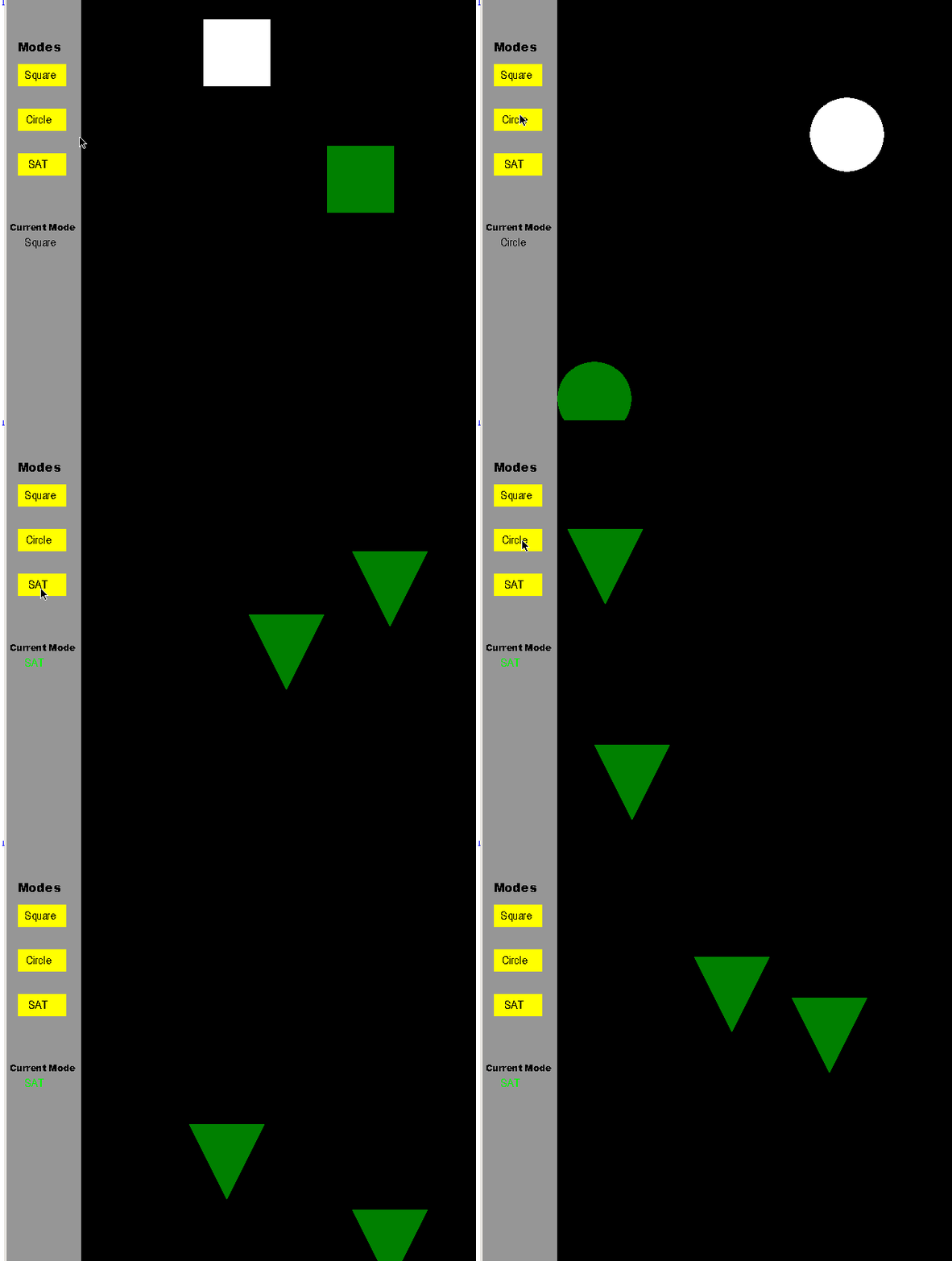
李兴球python三角形碰撞代码pygame
"""
   pygame国外留学生作业答案
   一个国外留学生让我帮他完善一个pygame程序,
   就是让单击sat按钮,像单击其它两个按钮一样有用。
   本来一大早要去晨练的,醒来看到这个, 就帮他完成了一下。
   本程序有圆形碰撞代码,矩形碰撞代码,三角形碰撞代码(只适合于本程序,不旋转)
"""
import pygame, sys
pygame.init()

#variable of x and y coordinates to move the square
xPlus1 = 5
yPlus1 = 5
xPlus2 = 5
yPlus2 = 5

#coordinates for the circle x and y coordinates
x = 150
y = 0
a = 150
b = 0

#circle size
width = 90
radius = 50
radius2 = 50

#variables for the mouse events
bMouseDown = False
bMouseUp = False

def _isinside(x1, y1, x2, y2, x3, y3, x, y):
    def crossProduct(x1, y1, x2, y2):
        return x1 * y2 - x2 * y1

    if crossProduct(x3-x1, y3-y1, x2-x1, y2-y1) >= 0:
        x2, x3 = x3, x2
        y2, y3 = y3, y2
    if crossProduct(x2-x1, y2-y1, x-x1, y-y1) < 0:
        return False
    if crossProduct(x3-x2, y3-y2, x-x2, y-y2) < 0:
        return False
    if crossProduct(x1-x3, y1-y3, x-x3, y-y3) < 0:
        return False
    return True
def check_Tri_Collision(x1,y1,x2,y2,x3,y3,x4,y4,x5,y5,x6,y6):

    if _isinside(x4,y4,x5,y5,x6,y6,x1,y1):return True
    if _isinside(x4,y4,x5,y5,x6,y6,x2,y2):return True
    if _isinside(x4,y4,x5,y5,x6,y6,x3,y3):return True
    if _isinside(x1,y1,x2,y2,x3,y3,x4,y4):return True
    if _isinside(x1,y1,x2,y2,x3,y3,x5,y5):return True
    if _isinside(x1,y1,x2,y2,x3,y3,x6,y6):return True


# Calculates collision between the two squares
def check_Rect_Collision(x, y, a, b):
    if a >= x and a <= x + width and b >= y and b <= y + width:
        return True
    elif x >= a and x <= a + width and y >= b and y <= b + width:
        return True
    return False

# Calculates collision between the two circles
def check_Ball_collision(x, y, a, b, radius, radius2):
    e = x-a
    f = y-b
    c = ((e**2)+(f**2))**0.5
    c = c - radius
    c = c - radius2
    if c > 0:
        return False
    return True

# Animates the square shape inside the set area
# Restricts the movement of the shape so that they don't bounce beyond the set area
def bounceShape1InBox(screen, color, xLow, xHigh, yLow, yHigh, radius):

    global x, y, xPlus1, yPlus1, width

    x += xPlus1
    y += yPlus1

    if x < xLow:
        xPlus1 = xPlus1 * -1
    if x > xHigh:
        xPlus1 = xPlus1 * -1
    if y < yLow:
        yPlus1 = yPlus1 * -1
    if y > yHigh:
        yPlus1 = yPlus1 * -1

    if radius == "":
        pygame.draw.rect(screen, color, [x, y, width, width])
    else:
        pygame.draw.circle(screen, color, (x+50, y+50), radius)

# Animates the first shape inside the set area
def bounceShape2InBox(screen, color, xLow, xHigh, yLow, yHigh, radius2):
    global a, b, xPlus2, yPlus2, width

    a += xPlus2 * 2
    b += yPlus2 * 2

    if a < xLow:
        xPlus2 = xPlus2 * -1
    if a > xHigh:
        xPlus2 = xPlus2 * -1
    if b < yLow:
        yPlus2 = yPlus2 * -1
    if b > yHigh:
        yPlus2 = yPlus2 * -1

    if radius2 == "":
        pygame.draw.rect(screen, green, [a, b, width, width])
    else:
        pygame.draw.circle(screen, color, (a+50, b+50), radius2)

def bounceShape3InBox(screen, color, xLow, xHigh, yLow, yHigh):
    global x, y, xPlus2, yPlus2, width

    x += xPlus2 * 2
    y += yPlus2 * 2

    if x < xLow:
        xPlus2 = xPlus2 * -1
    if x > xHigh:
        xPlus2 = xPlus2 * -1
    if y < yLow:
        yPlus2 = yPlus2 * -1
    if y > yHigh:
        yPlus2 = yPlus2 * -1
    points1 = (x,y),(x+100,y),(x+50,y+100)
    pygame.draw.polygon(screen, color, points1)

def bounceShape4InBox(screen, color, xLow, xHigh, yLow, yHigh):
    global a, b, xPlus1, yPlus1, width

    a += xPlus1
    b += yPlus1
    if a < xLow:
        xPlus1 = xPlus1 * -1
    if a > xHigh:
        xPlus1 = xPlus1 * -1
    if b < yLow:
        yPlus1 = yPlus1 * -1
    if b > yHigh:
        yPlus1 = yPlus1 * -1
    points1 = (a,b),(a+100,b),(a+50,b+100)
    pygame.draw.polygon(screen, color, points1)


# The measurements for the screen
window = (640, 600)

# Set colours
yellow = (255, 255, 0)
green = (0, 128, 0)
red = (255, 0, 0)
black = (0, 0, 0)
grey = (150, 150, 150)

white = pygame.Color(255, 255, 255)
green = pygame.Color(0, 128, 0)

clock = pygame.time.Clock()
screen = pygame.display.set_mode(window)

# Boolean values to indicate which mode to choose
bSquare = False
bCircle = False
bSAT = False

# Current mouse coordinates
posx = 0
posy = 0

# Boolean value for mouse event
bMouseDown = False

# Loops to reposition shapes
while True:

    screen.fill(black)
    for event in pygame.event.get():
        if event.type == pygame.QUIT:
            pygame.quit()
            sys.exit()
        if event.type == pygame.MOUSEBUTTONDOWN:
            # This gives a select area so that when user clicks a certain mode, the mode they choose shows up
            pos = pygame.mouse.get_pos()
            posx, posy = pos
            if posx >= 15 and posx <= 80 and posy >= 89 and posy <= 118:
                bSquare = True
                bCircle = False
                bSAT = False
            elif posx >= 15 and posx <= 80 and posy >= 150 and posy <= 180:
                bSquare = False
                bCircle = True
                bSAT = False
            elif posx >= 15 and posx <= 80 and posy >= 208 and posy <= 240:
                bSquare = False
                bCircle = False
                bSAT = True
            else:
                bMouseDown = True
        if event.type == pygame.MOUSEBUTTONUP:
            bMouseDown = False

    # This draws the selection menu
    pygame.draw.rect(screen, grey, [0, 0, 100, 600])

    # Modes label
    font = pygame.font.SysFont('Arial Black', 16)
    textsurface = font.render("Modes", False, (0, 0, 0))
    screen.blit(textsurface, (15, 55))

    # Square label
    pygame.draw.rect(screen, yellow, [15, 90, 65, 30])
    font = pygame.font.SysFont('Arial', 16)
    textsurface = font.render("Square", False, (0, 0, 0))
    screen.blit(textsurface, (25, 95))

    # Circle label
    pygame.draw.rect(screen, yellow, [15, 150, 65, 30])
    font = pygame.font.SysFont('Arial', 16)
    textsurface = font.render("Circle", False, (0, 0, 0))
    screen.blit(textsurface, (27, 155))

    # SAT label
    pygame.draw.rect(screen, yellow, [15, 210, 65, 30])
    font = pygame.font.SysFont('Arial', 16)
    textsurface = font.render("SAT", False, (0, 0, 0))
    screen.blit(textsurface, (30, 215))

    # Current Mode label
    font = pygame.font.SysFont('Arial Black', 12)
    textsurface = font.render("Current Mode", False, (0, 0, 0))
    screen.blit(textsurface, (5, 300))

    # If the user selects the square mode, it starts to run the square animation
    if bSquare == True:
        font = pygame.font.SysFont('Arial', 16)
        textsurface = font.render("Square", False, (0, 0, 0))
        screen.blit(textsurface, (25, 320))
        dt = clock.tick(20)
        bounceShape1InBox(screen, white, 100, 640 - width, 0, 600 - width, "")
        bounceShape2InBox(screen, green, 100, 640 - width, 0, 600 - width, "")

        # If the squares collide, it will turn red
        if check_Rect_Collision(x, y, a, b) == True:
            pygame.draw.rect(screen, red, [x, y, width, width])
            pygame.draw.rect(screen, red, [a, b, width, width])

    # If the user selects the circle mode, it starts to run the circle animation
    elif bCircle == True:
        font = pygame.font.SysFont('Arial', 16)
        textsurface = font.render("Circle", False, (0, 0, 0))
        screen.blit(textsurface, (25, 320))
        dt = clock.tick(20)
        bounceShape1InBox(screen, white, 100, 640 - width, 0, 600 - width, radius)
        bounceShape2InBox(screen, green, 100, 640 - width, 0, 600 - width, radius2)

        # If the circles collide, it will turn red
        if check_Ball_collision(x, y, a, b, radius, radius2) == True:
              pygame.draw.circle(screen, red, (x+50, y+50), radius)
              pygame.draw.circle(screen, red, (a+50, b+50), radius2)

    # If the user selects the SAT mode, it starts to run the SAT animation
    elif bSAT == True:
        font = pygame.font.SysFont('Arial', 16)
        textsurface = font.render("SAT", False, (0, 250, 0))
        screen.blit(textsurface, (25, 320))
        dt = clock.tick(20)

        bounceShape3InBox(screen, green, 110, 640 - 100, 0, 600 - 100)
        bounceShape4InBox(screen, green, 110, 640 - 100, 0, 600 - 100)

        # If  collide, it will turn red
        if check_Tri_Collision(x,y,x+100,y,x+50,y+100,a,b,a+100,b,a+50,b+100):
             points1 = (x,y),(x+100,y),(x+50,y+100)
             pygame.draw.polygon(screen, red, points1)
             points2 = (a,b),(a+100,b),(a+50,b+100)
             pygame.draw.polygon(screen, red, points2)


    # Moves the position of the shape to where you click
    if bMouseDown == True:
        x, y = pygame.mouse.get_pos()

    pygame.display.flip()

pygame.quit()

