
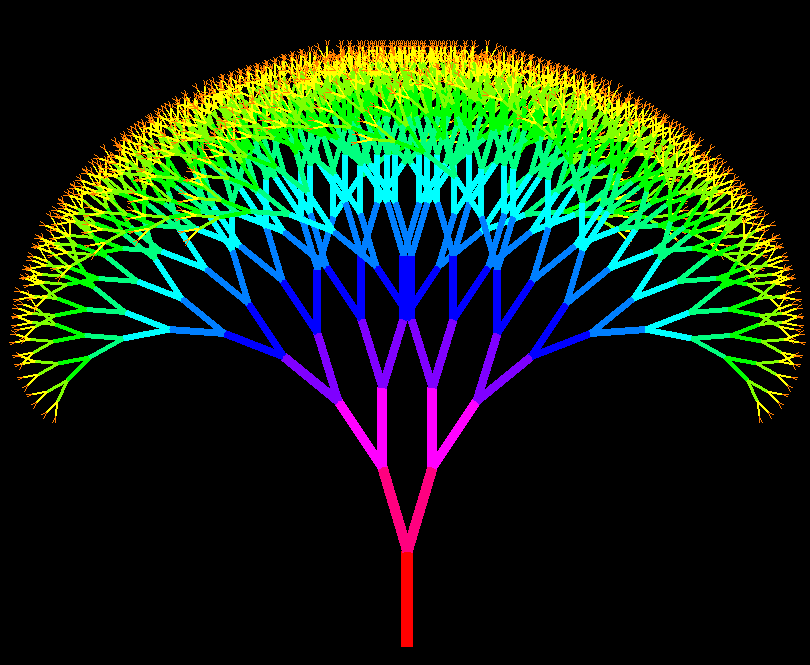
李兴球Python画tkinter彩树
本人编写的用tkinter模块的画布制作的一颗彩树。
"""
    tkinter彩树.py
    由于画布是左上角为原点,所以y坐标轴向下为正。
    角度方面的话,90度就变成向下了,-90度就变成向上了。
"""
import math, colorsys
from tkinter import *

offset = 17                 # 角度偏移量
width, height = 1000, 800   # 图像分辨率
maxd = 12                   # 最大递归深度
length = 8.0                # 分支长度扩大因子

root = Tk()                 # 新建窗口
root.title('tkinter彩树')   # 设定标题
canvas = Canvas(root,width=width,height=height,bg='black')  # 新建RGB画布
canvas.pack()

def draw_tree(x1, y1, angle, depth):
    if depth>= 0:
        # 计算分支的下一个顶点
        x2 = x1 + int(math.cos(math.radians(angle)) * depth * length)
        y2 = y1 + int(math.sin(math.radians(angle)) * depth * length)

        # 让分支的颜色和调用层次产生关联
        (r, g, b) = colorsys.hsv_to_rgb(float(depth) / maxd, 1.0, 1.0)
        r, g, b = int(255 * r), int(255 * g), int(255 * b)
        color = '#{:02x}{:02x}{:02x}'.format( r,g ,b)          # rgb2hex

        # 画树支
        canvas.create_line(x1, y1, x2, y2,fill=color,width=depth)

        # 左右各务两个更短的分支
        draw_tree(x2, y2, angle - offset, depth - 1)
        draw_tree(x2, y2, angle + offset, depth - 1)

#  调用递归函数开始绘画
x = int(width/2)
y = int(height * 0.9)
draw_tree(x,y, -90, maxd)

root.mainloop()

