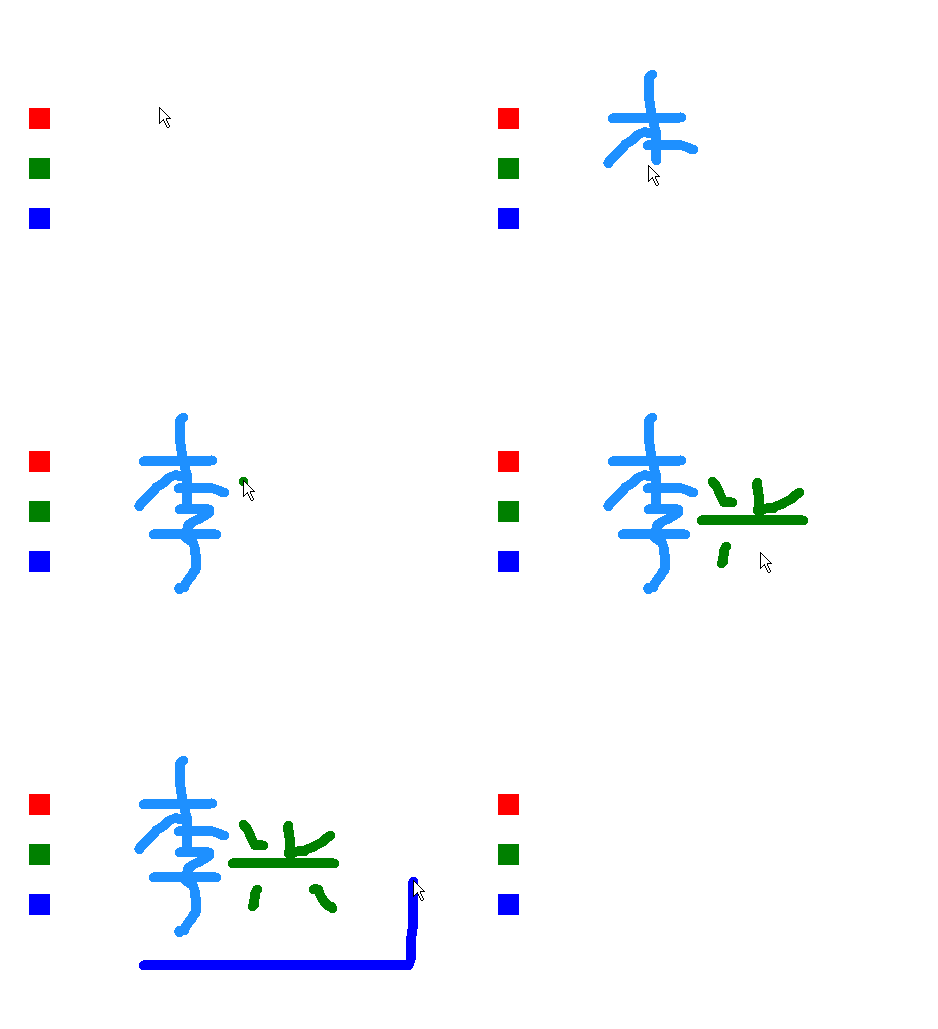
"""
简易画板.py
本程序演示了如何取消可拖动。
当取消了可拖动功能后,可用sprite.ondrag(sprite.drag),
或直接执行sprite.drag(0,0)来恢得角色的可拖动功能。
"""
from sprites import *
red = Sprite(shape='square',pos=(-300,100))
red.color('red')
red.ondrag(None)
green = Sprite(shape='square',pos=(-300,50))
green.color('green')
green.ondrag(None)
blue = Sprite(shape='square',pos=(-300,0))
blue.color('blue')
blue.ondrag(None)
p = Sprite(visible=False)
p.color('dodger blue')
p.pensize(10) # 画笔尺寸
m1 = Mouse(1) # 鼠标左键
m3 = Mouse(3) # 鼠标右键
while 1:
x,y = mouse_pos() # 获取鼠标指针坐标
x = max(x,-200)
p.goto(x,y)
if m1.down():
if x > -200 :p.down()
if red.collide_mouse(): p.color('red')
if green.collide_mouse(): p.color('green')
if blue.collide_mouse():p.color('blue')
else:
p.up()
if m3.down():p.clear()
-
- 2026 年 3 月
- 2026 年 2 月
- 2026 年 1 月
- 2025 年 12 月
- 2025 年 11 月
- 2025 年 10 月
- 2025 年 9 月
- 2025 年 6 月
- 2025 年 5 月
- 2025 年 3 月
- 2025 年 2 月
- 2025 年 1 月
- 2024 年 12 月
- 2024 年 8 月
- 2024 年 6 月
- 2024 年 5 月
- 2024 年 4 月
- 2024 年 3 月
- 2024 年 2 月
- 2023 年 11 月
- 2023 年 9 月
- 2023 年 6 月
- 2023 年 5 月
- 2023 年 4 月
- 2023 年 3 月
- 2023 年 2 月
- 2023 年 1 月
- 2022 年 12 月
- 2022 年 11 月
- 2022 年 10 月
- 2022 年 9 月
- 2022 年 8 月
- 2022 年 7 月
- 2022 年 6 月
- 2022 年 5 月
- 2022 年 4 月
- 2022 年 3 月
- 2022 年 2 月
- 2022 年 1 月
- 2021 年 12 月
- 2021 年 11 月
- 2021 年 10 月
- 2021 年 9 月
- 2021 年 8 月
- 2021 年 7 月
- 2021 年 6 月
- 2021 年 5 月
- 2021 年 4 月
- 2021 年 3 月
- 2021 年 2 月
- 2021 年 1 月
- 2020 年 12 月
- 2020 年 11 月
- 2020 年 10 月
- 2020 年 9 月
- 2020 年 8 月
- 2020 年 7 月
- 2020 年 6 月
- 2020 年 5 月
- 2020 年 4 月
- 2020 年 3 月
- 2020 年 2 月
- 2020 年 1 月
- 2019 年 12 月
- 2019 年 11 月
- 2019 年 10 月
- 2019 年 9 月
- 2019 年 8 月
- 2019 年 7 月
- 2019 年 6 月
- 2019 年 5 月
- 2019 年 4 月
- 2019 年 3 月
- 2019 年 2 月
- 2018 年 3 月
- 2018 年 1 月
- 2017 年 9 月
- 2017 年 5 月
- 2017 年 1 月

