
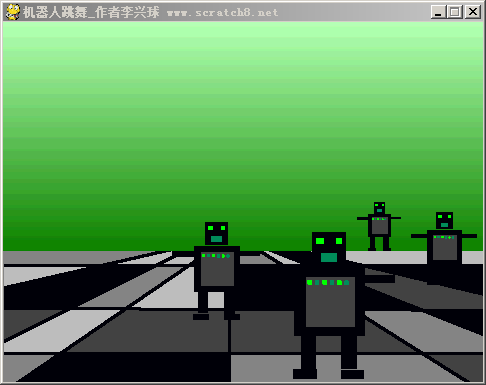
pygame robot dance animation机器人跳舞
"""pygame机器人跳舞动画演示程序,这个程序用到了图像变形功能,让几个机器人的大小和移动速度不一样。"""

import pygame
from pygame.locals import *
from random import randint

class Robot():
    def __init__(self,image,scale,x,y):
        rect = image.get_rect()
        self.image = pygame.transform.scale(image,(rect.width*scale//100,rect.height*scale//100))
        pass

    def move(self):
        self.rect.x = self.rect.x + self.水平速度
        pass

    def draw(self):
        screen.blit(self.image,self.rect)

pygame.init()
screen_width,screen_height=480,360
screen = pygame.display.set_mode((screen_width,screen_height))
pygame.display.set_caption("pygame机器人跳舞_作者:李兴球")
背景图片 = pygame.image.load("舞台背景.gif")
robotimage = pygame.image.load("robot1.gif")

allrobots=[]
r1 = Robot(robotimage,20,randint(50,screen_width-150),screen_height-180)
allrobots.append(r1)
r2 = Robot(robotimage,30,randint(50,screen_width-150),screen_height-170)
allrobots.append(r2)
r3 = Robot(robotimage,40,randint(50,screen_width-150),screen_height-160)
allrobots.append(r3)
r4 = Robot(robotimage,60,randint(50,screen_width-150),screen_height-150)
allrobots.append(r4)

# 以下三句话能让程序循环播放背景音乐
pygame.mixer.init()
pygame.mixer.music.load("firecracker-ymo.wav")
pygame.mixer.music.play(-1,0)

t = pygame.time.Clock()

以下代码省略......

pygame.quit()
如需要下载完整源代码及素材,请
需要浏览更多吗?
成为会员后,登陆才能继续浏览!联系微信scratch8即可办理会员。
(会员专属:能浏览所有文章,下载所有带链接的Python资源。)

