鼠标移动彩色光谱_鼠标指针跟随效果一例

Python鼠标移动彩色光谱

"""
    鼠标移动彩色光谱.py
"""
from random import randint
from coloradd import colorset
from turtle import Screen,Turtle,TurtleScreenBase

def _onmousemove(self, fun, add=None):
    """绑定鼠标移动事件"""    
    if fun is None:
        self.cv.unbind("" )
    else:
        def eventfun(event):
            x, y = (self.cv.canvasx(event.x)/self.xscale,
                    -self.cv.canvasy(event.y)/self.yscale)
            fun(x, y)
        self.cv.bind("", eventfun, add)

TurtleScreenBase.onmousemove = _onmousemove

screen = Screen()                               # 新建窗口
screen.tracer(0,0)                              # 关闭自动显示
screen.colormode(255)                           # 设定颜色模式为255 
screen.setup(480,360)                           # 设定窗口大小
screen.bgcolor("black")                         # 设定背景颜色

t = Turtle(visible=False,shape='circle')        # 新建圆形海龟
t.penup()
[t.stamp() for _ in range(100)]                  # 盖10个章  
ft = ('',32,'normal')                           # 设定字体风格 
def follow(x,y):
    screen.onmousemove(None)
    t.clearstamps(1)
    t.goto(x,y)
    cc = colorset(abs(x)+abs(y))
    t.color(cc)
    t.stamp()    
    screen.title(str(x) + "," + str(y))
    screen.update()
    screen.onmousemove(follow)

screen.onmousemove(follow)
screen.mainloop()

发表在 python, turtle | 标签为 | 留下评论

用pillow把多张image合成为pdf

from PIL import Image
import os

def picture2pdf( source_images, pdf_file_name ):
    """把source_images下面的图片合成pdf文件,请根据具体情况修改代码"""
    
    files = os.listdir( source_images )
    amounts = len(files)                        # 统计数量
    image_files = []

    for i in range(1,amounts+1):
        file = '幻灯片' + str(i) + ".JPG"
        image_files.append( source_images + file )
        
    output = Image.open(image_files[0])
    剩下的 = [Image.open(file) for file in image_files[1:] ]     
    
    output.save( pdf_file_name, "pdf", save_all=True, append_images=剩下的 )

if __name__ == "__main__":
    folder = os.getcwd() + os.sep + "pic" + os.sep
    pdfFile = "Python海龟手册_print.pdf"
    picture2pdf( folder, pdfFile )

发表在 pillow, python | 留下评论

Python二分查找练习程序

def find(sequence,data):
    """二分查找练习程序"""
    left = 0
    right = len(sequence)
    while left < right:
        mid = int((left + right)/2)            # 取序列中间索引号
        if data < sequence[mid]:right = mid    # 如果要找的数据比中间的小,则右边界为mid
        elif data > sequence[mid] :left = mid+1# 如果要找的数据比中间的大,则左边界为mid+1
        else: return mid                       # 否则刚好相等,则找到了
    return -1
        
nums = [3,7,16,23,33,99,133,155,331,776,889,1234]

# 下面是测试代码
assert find(nums,7)==1
assert not find(nums,33)==40

发表在 python | 标签为 | 留下评论

2021/12/10纯画笔贪吃蛇教学版本

做了不少贪吃蛇游戏,温故而创新。做好任何一件事,整理也是必要的,还包括计算机电脑文件的分门别类与备份等。下次做一个贪吃蛇专辑,应该在2022年元旦后就有点时间做了。这个版本是海龟的纯画笔版本,定义了一个叫Square的类。第一个实例化的方块表示蛇的头,其它的方块表示蛇的身体。默认的海龟负责渲染画面出来。此版本只有蛇,没有蛇吃的食物,能操作蛇上下左右移动,具备贪吃蛇游戏的核心代码。以下是代码:

"""
2021/12/10纯画笔贪吃蛇教学版本.py
"""
import turtle

def draw_rect(length,x,y):
    turtle.goto(x,y)
    turtle.bk(length/2)
    turtle.sety(turtle.ycor()+length/2)
    turtle.begin_fill()
    for _ in range(4):
        turtle.fd(length)
        turtle.right(90)
    turtle.end_fill()
    turtle.sety(turtle.ycor()-length/2)
    turtle.fd(length/2)
    
def draw_snakes():
    for snk in Square.bodies:
        draw_rect(snk.length,snk.x,snk.y)
        
class Square:
    bodies = []
    def __init__(self,length,x,y):
        """length:边长,x,y是中心点坐标"""
        self.length = length
        self.x = x
        self.y = y
        self.dx = 2
        self.dy = 0
        
    def toward_left(self):        
        self.dx = -2
        self.dy = 0

    def toward_right(self):        
        self.dx = 2
        self.dy = 0
        
    def toward_up(self):        
        self.dx = 0
        self.dy = 2
        
    def toward_down(self):        
        self.dx = 0
        self.dy = -2
        
    def move(self):
        self.x += self.dx
        self.y += self.dy

    def stamp(self):
        sq = Square(self.length,self.x,self.y)
        Square.bodies.append(sq)

    def clearstamps(self,n):
        Square.bodies = Square.bodies[n:]

turtle.tracer(0,0)
turtle.speed(0)
turtle.penup()
# 以下代码实例化蛇头和初始的40个蛇身体。

成为会员后,登陆才能继续浏览!联系微信scratch8即可办理会员。
(会员专属:能浏览所有文章,下载所有带链接的Python资源。)

发表在 python, turtle | 标签为 | 留下评论

Python排序算法练习(附本人自己设计的一种排序方法)

在做排序算法练习时,感觉就是找如何让数据移动次数最少的方法。以下是代码:

def select_sort(nums):
    """这个是原地排序"""
    for i in range(len(nums),0,-1):
        m = nums[0]
        p = 0
        for j in range(1,i):
            if nums[j]>m:
                m = nums[j]
                p = j
        nums[i-1],nums[p] = nums[p],nums[i-1]


def insert_sort(nums):
    """这个不是原地排序"""
    t = [nums[0]]
    for i in range(1,len(nums)):
        for j in range(len(t)):     # 找位置
            if nums[i]<=t[j]:
                t.insert(j,nums[i])
                break
        else:
             t.append(nums[i]) 
        
    return t
         
def shell_sort(nums):
    for gap in range(len(nums)//2,0,-1):
        start = 0
        while start+gapnums[start + gap]:
                 nums[start],nums[start + gap] = nums[start + gap],nums[start]
            start += gap
             
    return insert_sort(nums)


def mid_sort(nums):
    """本人自己设计的排序方法
       mid表示中间的一个数据的索引号
       mid左边的一个数和mid要身开始做为右边的一个数,进行比较,
       如果左边的数更大,则交换,(默认从小到大排序)
       一直到left或者right超出范围,再把mid增加1,这样就进行了一轮比较了。
       这个时候,可能还有没有排好序的数据,再把mid设为1从新开始,直到没有任何一次交换数据,
       则整个数据排序结束。
    """
    while True:
        flag = False
        mid = 1          
        while mid=0 and right

以下是原书代码:

发表在 python, turtle | 标签为 | 留下评论

测试哪种循环速度最快


import time

def test1():
    """普通for循环的列表相加法"""
    l = []
    for i in range(20000):
        l = l + [i]

def test2():
    """普通for循环的append方法"""
    l = []
    for i in range(20000):
        l.append(i)

def test3():
    """列表推导式"""
    l = [i for i in range(20000)]
    
def test4():
    """用list和range命令相结合"""
    l = list(range(20000))

def test5():
    """用while循环和insert"""
    c = 0
    l = []
    while c<20000:
        l.insert(0,c) # 由于每次都要整体往右移所有数据,所以最慢! O(n)!
        c += 1
        
start = time.time()
print(test1(),time.time()-start)
print()

start = time.time()
print(test2(),time.time()-start)
print()

start = time.time()
print(test3(),time.time()-start)
print()

start = time.time()
print(test4(),time.time()-start)
print()


start = time.time()
print(test5(),time.time()-start)
print()


发表在 python | 留下评论

看图编函数Python练习骷髅人头

Python骷髅人头函数
给初学入门Python的小朋友准备的一个函数练习。

def draw_head(x,y,size):
    """circle in circle"""
    penup()
    goto(x,y)
    setheading(0)
    dot(size,'red')
    sety(ycor()+size/8)
    fd(size/4)
    dot(size/4,'white')
    bk(size/2)
    dot(size/4,'white')
    fd(size/4)
    sety(ycor()-size/3)
    dot(size/4,'white')
    goto(x,y)
发表在 python, turtle | 标签为 | 留下评论

看图编函数练习Python张大嘴巴的吃豆人?

看图编函数练习Python张大嘴巴的吃豆人
一个小练习,不好取什么名字,要的拿去。以下是函数的代码:

def draw_arc(x,y,size):
    yanse = ['red','orange','yellow','green','cyan']
    penup()
    goto(x,y)
    setheading(0)
    right(90)
    pendown()
    for _ in range(2):
        color( yanse[_] )
        begin_fill()
        circle(size/2,90)
        end_fill()
        circle(size/2,-90)       
        circle(-size/2,90)
        begin_fill()
        circle(-size/2,-90)
        end_fill()        
        right(180)
发表在 python, turtle | 留下评论

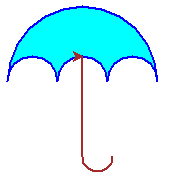
看图编函数练习Python小蓝伞circle命令运用

Python看图练习编程circle伞
看图画伞,一个顺序结构的案例。以下是参考代码:

from turtle import Screen,Turtle

def draw_12(x,y,size):
    """画伞 colored umbrella"""
    size2 = size/2
    size3 = size/3
    size6 = size/6
    penup()
    pensize(2)
    pencolor('blue')
    goto(x,y)
    setheading(0)
    pendown()
    fillcolor('cyan')
    begin_fill()
    circle(-size6,90)
    right(180)
    circle(-size6,180)
    right(180)
    circle(size/2,180)
    right(180)
    circle(-size6,180)
    right(180)
    circle(-size6,90)
    end_fill()
    right(90)
    color('brown')
    fd(size/1.5)
    circle(size/10,180)    
    pensize(1)
    penup()
    goto(x,y)
    setheading(0)

speed(0)        
draw_12(0,0,150)
 

就等你了, 成为本人会员可获得最大的技术支持噢。

发表在 python, turtle | 标签为 | 留下评论

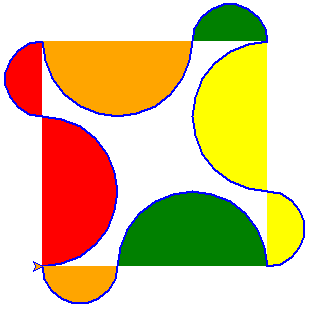
看图编函数练习Python半彩圆图腾

python半彩圆图腾
上面的图形不是很复杂,稍微琢磨一下应该能画出来。名字不知道取什么好,就取名为:Python半彩圆图腾吧。 以下是参考代码:

from turtle import *

def draw_13(x,y,size):
    """画 colored semicircle pattern"""
    cs = ['red','orange','yellow','green']
    size = size/2
    size2 = size/2    
    penup()
    pensize(2)
    pencolor('blue')
    goto(x,y)
    setheading(0)
    pendown()     
    for i in range(4):
        fillcolor(cs[i])
        begin_fill()
        circle(size,180)
        end_fill()
        fillcolor(cs[-i])
        begin_fill()
        circle(-size2,180)
        end_fill()
        right(90)
    pensize(1)
    penup()
    goto(x,y)
    setheading(0)           
    
speed(0)        
draw_13(0,0,150)

发表在 python, turtle | 标签为 | 留下评论

Python递归练习求最小值

不用min,本程序通过递归法求列表中最小的数值。

def recursiveMin(numbers,length):
    """numbers是一个列表,length是它的数据的数量"""
    if length==1:return numbers[0]
    n = numbers[-1]
    m = recursiveMin(numbers[:-1],length-1)
    if n
							
发表在 python | 标签为 | 留下评论

汉诺塔动态演示程序,可用于Python算法递归演示教学

Python汉诺塔演示动图

"""
   汉诺塔演示程序.py
   本程序需要最新版本sprites模块支持,请用cmd命令打开管理员窗口并且输入以下进行安装:
   pip install sprites
"""
import time
from sprites import Sprite ,Screen,txt2image

__author__ = '李兴球'
__date__ = '2021/12/1'
__blog__ = 'www.lixingqiu.com'

N = 2                                 # n个盘子 
SPEED = 5                             # 全局速度
stack = []
def _custom_setup(self,p=[]):
    if p:
      self.speed(0)
      self.stackid = 0
      self.shapesize(1,p[0])
      self.color('brown','blue')      
Sprite.custom_setup = _custom_setup

def _rise(self):
    """上升"""
    while self.ycor() < 240:self.addy(0.1*SPEED)
    self.wait(0.2*(1/SPEED))    
Sprite.rise = _rise

def _fall(self):
     """下降"""
     if stack[self.stackid]:
           pz = stack[self.stackid][-1]    # 即将下落的stack的最上面的盘子的y坐标
           y = pz.ycor()
     else:
           y = -20
     while self.ycor() > y+20: self.addy(-0.1 * SPEED)
Sprite.fall = _fall

class Stack(list):
    """装盘子的"""
    def __init__(self, values=[],x=0,y=0):
        list.__init__([])
        self.x = x
        self.y = y
        self.extend(values)
        for pz in values:               # 每一个盘子
            pz.goto(x,y)
            y = y + 20
            pz.show()

def hanota(n,a,b,c):
    """把n个盘子从a经过b移到c"""    
    if n>1:       
        hanota(n-1,a,c,b)
        hanota(1,a,b,c)
        hanota(n-1,b,a,c)
    else:
        print(a,'->',c)
        plate = stack[a].pop()
        plate.rise()                      # 盘子升起
        plate.stackid = c                 # 修改盘子所在的stack的id
        plate.slide(stack[c].x,delay=2000*(1/SPEED))   # 设定盘子到所在的stack同一x坐标,平移时y坐标不变
        plate.setx(stack[c].x)             # 校准坐标
        plate.wait(0.2*(1/SPEED))
        plate.fall()                      # 盘子下落
        stack[c].append(plate)            # 把盘子装在编号为c的stack里

def make_plates(n):
    """制作n个盘子放到列表中,不要太多了!!!"""
    plates = []
    for length in range(1,n+1):
        p = Sprite(shape='square',visible=False)
        p.custom_setup([length])
        plates.insert(0,p)               #  要让前面的盘子更大所以用插入0号索引
    return plates

def destory_plates(N):
    global stack
    if len(stack)==0:return   
    for pz in stack[2]: pz.kill()
    stack = []
        
def draw_line():
    # 画一根横线和三根竖线
    dummy = Sprite(visible=False)
    dummy.pensize(2)
    dummy.color('gray')
    dummy.sety(-10)
    dummy.pendown()
    dummy.bk(300)
    dummy.fd(600)
    dummy.bk(150)
    dummy.left(90)
    dummy.fd(220)                       # 升220
    dummy.bk(220)                       # 降220
    dummy.left(90)
    dummy.fd(150)
    dummy.right(90)
    dummy.fd(220)
    dummy.bk(220)
    dummy.left(90)
    dummy.fd(150)
    dummy.right(90)
    dummy.fd(220)

def panzi_zenjia(x,y,pz_n):
    global N
    N = N + 1
    N = min(10,N)
    pz_n.clear()
    pz_n.write(N,font=('',16,'normal'))
    
def panzi_jianshao(x,y,pz_n):
    global N
    N = N - 1
    N = max(1,N)
    pz_n.clear()
    pz_n.write(N,font=('',16,'normal'))

def sd_zenjia(x,y,sd_n):
    global SPEED
    SPEED = SPEED + 1
    SPEED = min(20,SPEED)
    sd_n.clear()
    sd_n.write(SPEED,font=('',16,'normal'))
    
def sd_jianshao(x,y,sd_n):
    global SPEED
    SPEED = SPEED - 1
    SPEED = max(1,SPEED)
    sd_n.clear()
    sd_n.write(SPEED,font=('',16,'normal'))  
    
def display_operation():
    pz_w = Sprite(visible=False,pos=(-200,-100))
    pz_w.write('盘子数:')
    
    pz_n = Sprite(visible=False,pos=(-130,-100))
    pz_n.write(N,font=('',16,'normal'))
    
    txt2image('增加','res/zj.png')
    pz_add = Sprite(shape='res/zj.png',pos=(-80,-90))
    pz_add.onclick(lambda x,y:panzi_zenjia(x,y,pz_n))
    
    txt2image('减少','res/js.png')
    pz_sub = Sprite(shape='res/js.png',pos=(-30,-90))
    pz_sub.onclick(lambda x,y:panzi_jianshao(x,y,pz_n))

    
    sd = Sprite(visible=False,pos=(-220,-150))
    sd.write('全局速度:')    
    
    sd_n = Sprite(visible=False,pos=(-130,-150))
    sd_n.write(SPEED,font=('',16,'normal'))
    
    txt2image('增加','res/zjsd.png')
    sd_add = Sprite(shape='res/zjsd.png',pos=(-80,-140))
    sd_add.onclick(lambda x,y:sd_zenjia(x,y,sd_n))
    
    txt2image('减少','res/jssd.png')
    sd_sub = Sprite(shape='res/jssd.png',pos=(-30,-140))
    sd_sub.onclick(lambda x,y:sd_jianshao(x,y,sd_n))

    txt2image('开始演示','res/begin0.png',fontsize=30)
    txt2image('演 示 中...','res/begin1.png',fontsize=30,color=(128,127,122))
    begin_button = Sprite(shape=['res/begin0.png','res/begin1.png'],pos=(-100,-200))

    addsubbiao = [pz_add,pz_sub,sd_add,sd_sub]
    begin_button.onclick(lambda x,y:start_demo(x,y,begin_button,addsubbiao))

def start_demo(x,y,begin_button,addsubbiao):
    global stack
    
    [b.hide() for b in addsubbiao]
    begin_button.onclick(None)
    begin_button.shape('res/begin1.png')
    
    destory_plates(N)             # 销毁以前的stack3中的N个盘子
    plates = make_plates(N)
    stack1 = Stack(plates,-150)   # 最左边的stack有n个盘子,最下面的是最长的            
    stack2 = Stack([])
    stack3 = Stack([],150)
    stack.extend([stack1,stack2,stack3])
    begin_button.wait(2)
    hanota(N,0,1,2)               # 0,1,2,分别表示3个stack的索引号     
    begin_button.shape('res/begin0.png')
    begin_button.onclick(lambda x,y:start_demo(x,y,begin_button,addsubbiao)) # 重新绑定,可以开始单击了
    [b.show() for b in addsubbiao]
    
def main():
    w = Sprite(visible=False,pos=(0,250))
    w.write("汉诺塔演示程序",align='center',font=('楷体',22,'underline'))
    draw_line()                  # 画线条  
    display_operation()
    w.screen.mainloop()
    
if __name__ == "__main__":

    main()

发表在 python, sprites | 标签为 | 留下评论

使用动态规划求Y到G的最短路径解决方案

python动态规划最短路径用class和递归
上面的图是自己画的,每个点之间的费用已经写明。每天练习编程,自己给自己出题,快速解决以上从Y点到G点的最便宜路径问题。
承接国内外留学生Python Homework ,assignment,代写Python家庭作业。Python留学生教学辅导。Python留学生作业辅导。

"""
使用动态规划求Y到G的最短路径解决方案,
以下程序设计了一个Node类。它表示一个节点,每个节点有前置节点及到前置节点的权值。
即一个节点到另一个节点的费用。
"""
class Node:
    def __init__(self,name,prenodes):   # prenodes = {a:10,b:20,c:30},a,b,c也是节点
        """prenodes是它的前趋节点字典"""
        self.name = name                # 节点的名字
        self.prenodes = prenodes        
        
def f(node):
    """node:一个节点"""   
    if node.prenodes:          # 如果它有前置节点
       dist = []       
       for n in node.prenodes: # 遍历它的所有前置节点
           dist.append( f(n)+node.prenodes[n] ) #
       return min(dist)
    else:
        return 0        

y = Node('y',{})     # 第一个节点,没有前置节点
d = Node('d',{y:5})  # 这个节点有一个前置节点
e = Node('e',{y:8})
x = Node('x',{y:2})

a = Node('a',{d:9,e:3})
b = Node('a',{e:2})
c = Node('c',{x:1})

g = Node('g',{a:3,b:2,c:8})
print(f(g))

承接国内外留学生Python Homework ,assignment,代写Python家庭作业。Python留学生教学辅导。Python留学生作业辅导。

发表在 python | 标签为 , , , , | 留下评论

做了一个元宇宙的梦,

梦见有人破解了新冠状病毒的基因,然后用Python把它编制成了算法,植入到了一些程序中。
这些程序在运行时,就悄悄的把全世界的电脑都感染了这种病毒。
这样,本来是生物界的病毒,就移植到了数字世界了。

可这样就遭糕了,人们在进入元宇宙的时候,会把自己的意识上传到元宇宙中。
这时候人的身体处于植物人状态,随着元宇宙越来越“真实”。里面的人可以为所欲为,如,创造一个太阳系,自己当上帝,人们可以当超人,回到过去,乱改时间线。越来越多的人爱上元宇宙的生活,逐渐,由于肉体长久不再使用,人类最终全部放弃了自己的肉体,让真实的生物世界由机器人管理。

当然,由于元宇宙感染病毒等越来越多的原因,元宇宙渐渐地变成了一座地狱。那个时候的人们已经习惯了元宇宙了,并且很多人把自己的肉体都搞丢了。总之,来到物理世界根本无法生存。
只有最富有的人才能购买新的肉体或者把自己的意识下载到机器人大脑,有机会重新回到真实世界里,感受一下真正的物理世界。人们费尽心事,打造元宇宙,最终却变成了炼狱,想回到真实世界还不行了,这不就是搬起石头砸自己的脑壳吗。

科技的进步,会把人类引向何方?如果真的人们能把自己的意识上传到虚拟空间,那么真实世界的管理者只要一关电源,全人类就瞬间灰飞烟灭了。当然,人类肯定不会这么如此愚蠢。可是,宇宙如果本来没有地球,宇宙也“活得”挺好的吧。地球既然已经诞生了,那么就已经是种必然了。我们生活在这个地球上,那应该好好感受感受,而所谓的感受也靠器官而已,本质还是对物理世界的反馈。

发表在 杂谈 | 留下评论

Python小孩分糖果 10个小孩围成一圈分糖果,老师顺次分给每个人的糖块数为12,2,8,22,16,4,10,6, 14,20。 然后按下列规则调整,所有小孩同时把自己的糖果分一半给右边的小孩,糖块数变为奇数的人, 再向老师补要一块,问经过多少次调整后,大家的糖块一样多,且每人多少块。

Python小孩分糖果我的解法

10个小孩围成一圈分糖果,老师顺次分给每个人的糖块数为12,2,8,22,16,4,10,6, 14,20。
然后按下列规则调整,所有小孩同时把自己的糖果分一半给右边的小孩,糖块数变为奇数的人,
再向老师补要一块,问经过多少次调整后,大家的糖块一样多,且每人多少块。

sugars = [10,2,8,22,16,4,10,6,14,20]
t = [0,0,0,0,0,0,0,0,0,0]
i = 0
while True:     
    for i in range(10):
        if sugars[i]%2==1:sugars[i] += 1
        t[i] = sugars[i] = int(sugars[i]/2)            
   
    for i in range(0,10):
        sugars[i] += int(t[i-1])       # 右边的得到前面糖果的一半   
    print(sugars)
    if len(set(sugars))==1:break

发表在 python | 留下评论

Python解决逻辑题_抓捕交通犯.py

抓捕交通犯.py
一辆卡车的撞人后逃跑。有三位目击证人,都没记住车牌。
甲说,我记得车牌号前面两个数字是相同的。
乙说,我记得车牌号后面两个数字是相同的,但和前面的数字不同。
丙说,我记得这个牌号是4位数,而是刚好是一个整数的平方!
请根据以上线索求出车牌号。

import math

start = int(math.sqrt(1000)) + 1
end = 100

for n in range(start,end):
    paizhao = n*n
    g = paizhao%10       # 个位
    s = paizhao//10%10   # 十位
    b =paizhao//100%10   # 百位
    q = paizhao//1000    # 千位
    if g==s and b==q and g!=b :
        print(paizhao)
        break            # 车牌号唯一,找到了没必要再找了
    

发表在 python | 标签为 | 留下评论

八皇后问题回溯法动态演示2021_11_18版by李兴球

遥记我20岁左右的时候,拿着一本数据结构与算法书,PASCAL的,那个时候也是否对计算机编程充满了热爱和向往。时光飞速,我还是那个“少年”。仍旧兴趣盎然地在编程,想想我曾经是熟练的掌握了汇编语言的,可是现在我却看不懂了。写的八皇后算法那代码好糟糕。去年用我自己编写的精灵模块把八皇后代码重写了一遍,最近再次学习数据结构与算法,对动态规划、哈夫曼树、汉密尔顿路径等,感觉又有较大的长颈,确实体验到了温故而知新,收获不少。今天又把八皇后算法写了一遍,逻辑清晰了很多,对程序=数据结构+算法有了更深刻的体验。

Python八皇后演示动图

这个程序使用一个stack列表存储皇后的位置,当成栈使用。使用常见的回溯法,不断地去试探下一个位置,如果和前面的位置有冲突,则继续尝试。如果一行所有的列都尝试完了,再次回溯。代码中有注释,详情见代码:


import turtle
from eight_queen import *

def check_collision(stack):
    """检测皇后在row,col位置是否和其它皇后冲突"""
    row,col = stack[-1]                          # 最后摆放的  
    for x,y in stack[:-1]:
       if  abs(y-col) in (0,row-x) :return True # 列的差值等于0或者和最后一行到x行的差值一样
     
    return False           

def traceback(chess,):
    """从栈中弹出上次坐标,清除所盖图章"""
    i,j = stack.pop()
    chess[i][j] = 0     
    turtle.clearstamps(-1)  # 清除这个坐标的皇后
    j = j + 1               # 上一行的下一列位置
    return i,j
           
def output(stack):          # 以文本方式输出一个解
    for i,j in stack:
        print(j,end='')
    print()
           
chess = [[0,0,0,0,0,0,0,0],
         [0,0,0,0,0,0,0,0],
         [0,0,0,0,0,0,0,0],
         [0,0,0,0,0,0,0,0],
         [0,0,0,0,0,0,0,0],
         [0,0,0,0,0,0,0,0],
         [0,0,0,0,0,0,0,0],
         [0,0,0,0,0,0,0,0]]

turtle.setup(800,800)
turtle.speed(0)
draw_cross(770)                # 画坐标线
draw_grid(8,70)                # 画格子
turtle.penup()                 # 抬笔
turtle.addshape('queen.gif')
turtle.shape('queen.gif')
turtle.speed(1)
turtle.title('八皇后问题回溯法动态演示2021_11_18版by李兴球')
w = turtle.Turtle(visible=False)
w.penup()
w.sety(300)
ft = ('黑体',32,'normal')
w.write("八皇后问题回溯法动态演示",align='center',font=ft)

stack = []                    # 新建一个列表存储当前皇后坐标,当栈用
i ,j = 0,0

while True:
    if j<8:
       chess[i][j] = 1         # 放皇后
       place_queen(8,70,i,j)   # 在棋盘上放置皇后(盖图章)
       
    else:                      # 一行都尝试完了,超过最右边了,需要回溯
        if stack:              # 如果栈不是空的    
           i,j = traceback(chess) # 回溯到上一个位置的右边一列
           continue
        else:
           break
        
    stack.append((i,j))        # 放入stack中,保存以便回到上一个位置
    
    if check_collision(stack)  :# 发生冲突       
       i,j = traceback(chess)     # 和其它皇后发生冲突,需要回溯
       continue
    else:        
       i = i + 1               # 到下一行
       j = 0                   # 从0开始放皇后
       
       if i==8:           
           output(stack)       # 到了最后输出一个解
           i,j = traceback(chess) # 这当然也要继续到上一行继续试探
           xsleep(3)       


发表在 python, turtle | 标签为 | 留下评论

关于举办2021年江西省青少年创意编程与智能设计大赛的通知(Scratch创意编程作品与Python创意编程作品)

本人10多年来长期帮人设计Scratch创意编程作品与Python创意编程作品,有需要请联系本人微信scratch8。

各设区市青少年科技辅导员协会(青少年科技教育协会):

为深入贯彻落实国务院《新一代人工智能发展规划》的任务要求,向全省广大青少年普及推广编程与智能设计相关知识和技能,提高青少年对人工智能的认知和初步应用能力。根据中国青少中心关于竞赛举办的有关规定,结合新冠肺炎疫情常态化防控实际,江西省科学技术馆(江西省青少年科 技中心)、江西省青少年科技教育协会将于2021年12月11日在省科技馆举办“2021年江西省青少年创意编程与智能设计大赛”(以下简称“大赛”),本届大赛将采取线上形式举行。现将有关事项通知如下:

一、大赛主题

智能时代  逐梦成长

二、组织单位

江西省科学技术馆(江西省青少年科技中心)

江西省青少年科技教育协会

三、大赛内容:

设立创意编程比赛及智能设计比赛。创意编程比赛中设立Scratch创意编程比赛、Python创意编程比赛;智能设计比赛中设立Arduino智能设计比赛、Micro:bit智能设计比赛。

四、参加对象

全省各地小学、初中、高中(含中等职业学校)在校学生以所在地区报名方式参加大赛。

五、奖项设置

大赛设置一、二、三等奖,按参赛项目的50%设奖。

六、举办时间

时间:省级终评12月11日

七、报名方式

各设区市青少年科技辅导员协会将报名表发送至电子邮箱,并将纸质件加盖公章寄大赛组委会办公室。

八、报名时间

11月16日——11月30日

九、大赛联系方式

联系人:李芷芸、万昱汐

联系方式:0791-88501201   手机号:13027225310

电子邮箱:1137572551@qq.com

地址:南昌市青山湖区洪都中大道248号江西省青少年科技中心

邮编:330002

附件:报名表


江西省科学技术馆(江西省青少年科技中心)

江西省青少年科技教育协会

2021年11月16日


附件

报名表
项目名称 参赛学校 参赛选手 指导老师 联系电话


本人10多年来长期帮人设计Scratch创意编程作品与Python创意编程作品,有需要请联系本人微信scratch8。

发表在 python, turtle | 标签为 , | 留下评论

CSE 30 Fall 2021 – Homework 10 Graphs图的Python作业答案

以下关于Graphs图的作业已完成,需要请联系本人微信scratch8(李兴球, 406273900@qq.com)

本人提供国内外大学生Python作业辅导,Python作业答疑,C语言作业辅导与答疑,大中小学生编程培训服务。

以下蓝色*线以下文本格式请忽视, 只是为了搜索引擎抓取的需要,及让您知道,本人已经解决了这问题。

*************************************************************************************

Before you turn this problem in, make sure everything runs as expected. First, restart the kernel (in the menubar, select Kernel      Restart) and then run all cells (in the menubar, select Cell                                                                       Run All).

Make sure you fill in any place that says YOUR CODE HERE or “YOUR ANSWER HERE”, as well as your name and collaborators below:

NAME = “” COLLABORATORS = “”

CSE 30 Fall 2021 – Homework 10 家庭作业10

Graphs 图

Instructions  介绍

Please disregard the YOUR NAME and COLLABORATORS above. They are put there atomatically by the grading tool. You can find instructions on how to work on a homework on Canvas. Here is a short summary:

Submitting your work 提供你的作业

To submit your work:

First, click on “Runtime > Restart and run all”, and check that you get no errors. This enables you to catch any error you might have introduced, and not noticed, due to your running cells out of order.

Second, download the notebook in .ipynb format (File > Download .ipynb) and upload the

.ipynb file to this form.

You can submit multiple times; the last submission before the deadline is the one that counts.

Homework format  家作格式

For each question in this notebook, there is: 每个问题

A text description of the problem. 都有一个描述

One or more places where you have to insert your solution. You need to complete every place marked:  在下面的位置写上你的代码

# YOUR CODE HERE

and you should not modify any other place.

One or more test cells. Each cell is worth some number of points, marked at the top. You should not modify these tests cells. The tests pass if no error is printed out: when there is a statement that says, for instance:

assert x == 2

then the test passes if x has value 2, and fails otherwise. You can insert a print(x) (for this case!) somewhere if you want to debug your work; it is up to you.

Notes:

Your code will be tested both according to the tests you can see (the assert statements you can see), and additional tests. This prevents you from hard-coding the answer to the particular questions posed. Your code should solve the general intended case, not hard-code the particular answer for the values used in the tests.

Please do not delete or add cells! The test is autograded, and if you modify the test by adding or deleting cells, even if you re-add cells you delete, you may not receive credit.

Please do not import modules that are not part of the standard library. You do not need any, and they will likely not available in the grading environment, leading your code to fail.

If you are inactive too long, your notebook might get disconnected from the back-end. Your work is never lost, but you have to re-run all the cells before you continue.

You can write out print statements in your code, to help you test/debug it. But remember: the code is graded on the basis of what it outputs or returns, not on the basis of what it prints.

TAs and tutors have access to this notebook, so if you let them know you need their help, they can look at your work and give you advice.

Grading

Each cell where there are tests is worth a certain number of points. You get the points allocated to a cell only if you pass all the tests in the cell. 每个单元有提供一些测试的地方,你可以自己测试下自己的代码能不能通过。

The tests in a cell include both the tests you can see, and other, similar, tests that are used for grading only. Therefore, you cannot hard-code the solutions: you really have to solve the essence of the problem, to receive the points in a cell.

Code of Conduct

Work on the test yourself, alone.  你可以自己单独测试

You can search documentation on the web, on sites such as the Python documentation sites, Stackoverflow, and similar, and you can use the results. 你可以在网上搜索文档资料,例如Python的文档站,或Stackoverflow及相似的网站,使用相关的结果。

You cannot share your work with others or solicit their help.

一个有向图G=(V,E)由一系列的顶点和边组成。

A (directed) graph G = (V , E) consists of a set of vertices (or nodes)      , and a set of edges

E ⊆ V × V .

图的一个例子

An example of a graph with V  = {a, b, c, d, e, f, g} and

E = {(a, b), (a, c), (a, d), (b, d), (c, a), (c, e), (d, b), (d, c), (f, g), (g, f)}.

如何表示图呢?  就像真实生活一样,直接用一系列顶点和边表示图就行了。

How should we represent a graph? A general principle of software development — really, of life — is: failing special reasons, always go for the simplest solution. So our first attempt consists in storing a graph exactly according to its definition: as a set of vertices and a set of edges.

class Graph(object):

def   init  (self, vertices=None, edges=None):

# We use set below, just in case somebody passes a list to the initializer. self.vertices = set(vertices or [])

self.edges = set(edges or [])

g = Graph(vertices={‘a’, ‘b’, ‘c’, ‘d’, ‘e’, ‘f’, ‘g’},

edges={(‘a’, ‘b’), (‘a’, ‘c’), (‘a’, ‘d’), (‘b’, ‘d’),

(‘c’, ‘a’), (‘c’, ‘e’), (‘d’, ‘b’), (‘d’, ‘c’), (‘f’, ‘g’), (‘g’, ‘f’)})

不错,但是,如何显示图呢?

Great, but, how do we display graphs? And what can we do with them?

我们给图增加show方法,使用networkx这个库来显示图。

Let’s first of all add a method .show() that will enable us to look at a graph; this uses the library

 networkx.

import networkx as nx # Library for displaying graphs.


class Graph(object):

def   init  (self, vertices=None, edges=None):

# We use set below, just in case somebody passes a list to the initializer. self.vertices = set(vertices or [])

self.edges = set(edges or [])

def show(self):

g = nx.DiGraph() g.add_nodes_from(self.vertices) g.add_edges_from(self.edges) nx.draw(g, with_labels=True)


g = Graph(vertices={‘a’, ‘b’, ‘c’, ‘d’, ‘e’, ‘f’, ‘g’},

edges={(‘a’, ‘b’), (‘a’, ‘c’), (‘a’, ‘d’), (‘b’, ‘d’),

(‘c’, ‘a’), (‘c’, ‘e’), (‘d’, ‘b’), (‘d’, ‘c’), (‘f’, ‘g’), (‘g’, ‘f’)})

g.show()

这和我们手工画的图相比还不太完美? 但它确实表明了此图的含义。

Ok, this is not nearly as pretty as what we generated by hand, but it will have to do.


One-Step Reachability and Graph  Representations

图的常见操作是什么? 基本操作是增加顶点和增加边。

What are conceivable operations on graphs? There are some basic ones, such as adding a vertex and adding an edge. These are easily taken care of.


import networkx as nx # Library for displaying graphs. class Graph(object):

def   init  (self, vertices=None, edges=None):

# We use set below, just in case somebody passes a list to the initializer. self.vertices = set(vertices or [])

self.edges = set(edges or [])

def show(self):

g = nx.DiGraph() g.add_nodes_from(self.vertices) g.add_edges_from(self.edges) nx.draw(g, with_labels=True)

def add_vertex(self, v): self.vertices.add(v)

def add_edge(self, e):

self.edges.add(e)

进一步地说,一张图表示一系列顶点的连接,一个通常的问题是是否一个点能通过一条边或更多的边到达另一个点?

Further, a graph represents a set of connections between vertices, so a very elementary question to ask is the following: if we are at vertex       , can we get to another vertex       by following one or more edges?

As a first step towards the solution, we want to compute the set of vertices reachable from    in one step, by following one edge; we call these vertices the successors of

写一个函数,叫g.successors(u),表示u点的后续顶点。                         .

Writing a function g.successors(u) that returns the set of successors of     is simple enough. Note that the code directly mimicks the mathematical definition:

Successors(u) = {v ∈ V ∣ (u, v) ∈ E} .

import networkx as nx # Library for displaying graphs. class Graph(object):

def   init  (self, vertices=None, edges=None):

# We use set below, just in case somebody passes a list to the initializer. self.vertices = set(vertices or [])

self.edges = set(edges or [])


def show(self):

g = nx.DiGraph() g.add_nodes_from(self.vertices) g.add_edges_from(self.edges) nx.draw(g, with_labels=True)

def add_vertex(self, v): self.vertices.add(v)

def add_edge(self, e): self.edges.add(e)

def successors(self, u):

“””Returns the set of successors of vertex u”””

return {v for v in self.vertices if (u, v) in self.edges}

g = Graph(vertices={‘a’, ‘b’, ‘c’, ‘d’, ‘e’, ‘f’, ‘g’},

edges={(‘a’, ‘b’), (‘a’, ‘c’), (‘a’, ‘d’), (‘b’, ‘d’),

(‘c’, ‘a’), (‘c’, ‘e’), (‘d’, ‘b’), (‘d’, ‘c’), (‘f’, ‘g’), (‘g’, ‘f’)})

g.successors(‘a’)


But there’s a rub. The method successors, as written, requires us to loop over the whole set of vertices. Because self.edges is a set, represented as a hash table, once we have a pair (u, v), checking

(v, u) in self.edges

is efficient. But typically, graphs have a locality structure, so that each node is connected only to a small subset of the total vertices; having to loop over all vertices to find the successors of a vertex is a great waste. It is as if I asked you to what places you can get from San Francisco with a direct flight, and to answer, you started to rattle off all of the world’s cities, from Aachen, Aalborg, Aarhus,

…, all the way to Zürich, Zuwarah, Zwolle, and for each city you checked if there’s a flight from San Francisco to that city! Clearly not the best method.

Given that our main use for graphs is to answer reachability-type questions, a better idea is to store the edges via a dictionary that associates with each vertex the set of successors of the vertex. The vertices will simply be the keys of the dictionary.


import networkx as nx # Library for displaying graphs. class Graph(object):

def init (self, vertices=None, edges=None): self.s = {u: set() for u in vertices or []} for u, v in (edges or []):

self.add_edge((u, v))

def show(self):

g = nx.DiGraph() g.add_nodes_from(self.s.keys())

g.add_edges_from([(u, v) for u in self.s for v in self.s[u]]) nx.draw(g, with_labels=True)

def add_vertex(self, v): if v not in self.s:

self.s[v] = set()

def add_edge(self, e): u, v = e self.add_vertex(u) self.add_vertex(v) self.s[u].add(v)

@property

def vertices(self):

return set(self.s.keys())

def successors(self, u):

“””Returns the set of successors of vertex u””” return self.s[u]

g = Graph(vertices={‘a’, ‘b’, ‘c’, ‘d’, ‘e’, ‘f’, ‘g’},

edges={(‘a’, ‘b’), (‘a’, ‘c’), (‘a’, ‘d’), (‘b’, ‘d’),

(‘c’, ‘a’), (‘c’, ‘e’), (‘d’, ‘b’), (‘d’, ‘c’), (‘f’, ‘g’), (‘g’, ‘f’)})

g.show() print(g.successors(‘a’))

Graph Reachability 图的可到达性


We now come to one of the fundamental graph algorithms, in fact, perhaps the most fundamental algorithm for graphs: computing the set of vertices reachable from a given starting vertex.

Exploring what is reachable from a graph vertex is a truly basic task, and variations on the algorithm can be used to answer related questions, such as whether a vertex is reachable from a given starting vertex.

The algorithm keeps two sets of vertices:  这个算法包括两个顶点的集合。

The set of open vertices: these are the vertices that are known to be reachable, and whose successors have not yet been explored.

The set of closed vertices: these are the vertices that are known to be reachable, and whose successors we have already explored.

Intially, the set of open vertices contains only the starting vertex, and the set of closed vertices is empty, as we have completed no exploration. Repeatedly, we pick an open vertex, we move it to the closed set, and we put all its successor vertices — except those that are closed already — in the open set. The algorithm continues until there are no more open vertices; at that point, the set of

reachable vertices is equal to the closed vertices.

If there is one graph algorithm that you must learn by heart, and that you should be able to write even when you hang upside down from monkeybars, this is it.

Let us write the algorithm as a function first.

def reachable(g, v):

“””Given a graph g, and a starting vertex v, returns the set of states reachable from v in g.”””

vopen = {v} vclosed = set()

while len(vopen) > 0: u = vopen.pop() vclosed.add(u)

vopen.update(g.successors(u) – vclosed) return vclosed


print(reachable(g, ‘a’))

print(reachable(g, ‘g’))


To visualize the algorithm, let us write a version where at each iteration, open vertices are drawn in red and closed ones in green

def reachable(g, v):

“””Given a graph g, and a starting vertex v, returns the set of states reachable from v in g.”””

vopen = {v} vclosed = set()

while len(vopen) > 0: u = vopen.pop() vclosed.add(u)

vopen.update(g.successors(u) – vclosed) return vclosed


reachable(g, ‘a’)


Breadth-First and Depth-First Search 宽度和深度优先搜索

Breadth First  广度优先搜索

In breadth-first search, we explore in concentric circles emanating from the starting point: first all vertices at distance 1, then all vertices at distance 2, and so on. In general, we explore all vertices at distance ≤ n before we explore vertices at distances    .

To implement breadth-first search, we store the open vertices vopen as a list rather than a set. We then explore vertices in the order they have been added to vopen : this ensures that vertices closer to the search origin are explored earlier than farther-away vertices.

The difference in code between reachability search, and its specialized breadth-first version, is minimal.


def breath_first(g, v):

“””Given a graph g, and a starting vertex v, returns the set of states reachable from v in g.”””

# vopen is a FIFO: first in, first out. Like a normal queue.

# we add elements from the end, and pop them from the beginning. vopen = [v]

vclosed = set()

while len(vopen) > 0:

u = vopen.pop(0) # Pop from the beginning vclosed.add(u)

# vopen.update(g.successors(u) – vclosed) for w in g.successors(u) – vclosed:

if w not in vopen:

vopen.append(w) # Add to the end return vclosed

gg = Graph(vertices={},

edges={(‘a’, ‘b’), (‘b’, ‘c’), (‘c’, ‘d’),

(‘a’, ‘u’), (‘u’, ‘v’), (‘v’, ‘w’), (‘u’, ‘z’)})

breath_first(gg, ‘a’)

We see that we explore    and      before any of their successors are explored, and similarly, we explore  ,            , and   before or             .

Depth-First Search   深度优先搜索

In depth-first search, we follow a path as long as possible, and only when we come to an end do we explore other nodes. In depth-first search, the most recent visited vertex, the one added last to the list of open vertices, is the one that will be explored first.

The difference in code from breadth-first search is minimal. In breadth-first search, the vertex to be explored next is the oldest among the open ones:

u = vopen.pop(0)

In depth-first search, it will be the newest among the open ones:


u = vopen.pop()

That’s the whole difference.


def depth_first(g, v):

“””Given a graph g, and a starting vertex v, returns the set of states reachable from v in g.”””

# vopen is a stack / LIFO: last in, first out. Like a stack.

# we add elements from the end, and pop them from the end. vopen = [v]

vclosed = set()

while len(vopen) > 0:

u = vopen.pop() # THIS is the difference: there is no 0 in the parentheses. vclosed.add(u)

# vopen.update(g.successors(u) – vclosed) for w in g.successors(u) – vclosed:

if w not in vopen: vopen.append(w)

return vclosed

depth_first(gg, ‘a’)


We see how in depth-first search we explore completely one side of the successors of   , consisting


z

of u, v, w,

, before exploring the other side b, c, d.


Problem 1: Returning the edges 第一个问题,返回所有边


In our latest implementation, we do not have direct access to the edges of the graph. In other words, for a graph g, we cannot do:

for (u, v) in g.edges:


We ask you to write an iterator over edges, to make the above code work. The iterator should yield the edges of the graph, one by one.


### An iterator for the set of edges

def graph_edges(self):

“””Yields the edges of the graph, one by one. Each edge is yielded as a pair of vertices (source, destination). “””

# YOUR CODE HERE

Graph.edges = property(graph_edges)

# YOUR CODE HERE

Here are some tests.

### 10 points: simple tests e = [(1, 2), (1, 3), (2, 3)]

g = Graph(vertices=[1, 2, 3], edges=e) assert set(g.edges) == set(e)

import types

# You need to build a generator, one of those things with the yield statement. assert isinstance(g.edges, types.GeneratorType)

Here are some randomized test.

### 10 points: random tests import random

for _ in range(10):

num_vertices = random.randint(4, 10)

num_edges = random.randint(1, num_vertices * num_vertices) vertices = random.sample(range(0, 1000), num_vertices)

edges = {(random.choice(vertices), random.choice(vertices)) for _ in range(num_edges)} g = Graph(vertices=vertices, edges=edges)

assert set(g.edges) == edges

Problem 2: Is a graph a tree?   第二个问题,图是一棵树吗?

A tree is a graph (V , E) with two special properties: Every vertex has at most one incoming edge.

Either there are no vertices, or there is a vertex with no incoming edges, called the root, from which all other vertices are reachable.

If the second property does not hold, incidentally, the graph is called a forest.

Write an is_tree function such that is_tree(g) returns True if the graph g is a tree, False otherwise.

### Implementation of tree test


def is_tree(g):

“””Returns True iff the graph is a tree.”””

# YOUR CODE HERE

### 10 points: Tests for `is_tree`


g = Graph(vertices=[1, 2, 3], edges=[(1, 2), (1, 3)])
assert is_tree(g)
g = Graph(vertices=[1, 2, 3], edges=[(1, 2), (2, 3), (1, 3)])
assert not is_tree(g)
g = Graph(vertices=[1, 2, 3], edges=[(1, 3), (2, 3)])
assert not is_tree(g)

### 10 points: More tests for `is_tree`


g = Graph() assert is_tree(g)

Problem 3: Reachability using either of two  graphs 第三个问题,两图的可到达性。

In this problem, you are given two graphs g1 , g2 , that share the same set of vertices. You have to write a function can_reach(v, g1, g2, w) , which returns True iff you can go from vertex v to vertex w using either edges of g1 or g2 . Note that to go from v to w , you can use one or more edges from g1 and one or more edges of g2 , mixed in any way you like. To solve the problem, you have to modify the reachability algorithms so that edges from either graph can be used.

Hint: Modify the reachability algorithm.


def can_reach(v, g1, g2, w):

“””Given two graphs g1, g2 that share the same vertices, and two verteces v, w, returns True if you can go from v to w using edges of either g1 or g2 (mixed any way you want) and False otherwise.”””

# YOUR CODE HERE

### 10 points: simple tests for can_reach

vertices = {1, 2, 3, 4, 5, 6, 7}

g1 = Graph(vertices=vertices, edges=[(1, 2), (3, 4)])

g2 = Graph(vertices=vertices, edges=[(2, 3), (4, 5), (6, 7)]) assert can_reach(1, g1, g2, 2)

assert can_reach(1, g1, g2, 3) assert can_reach(1, g1, g2, 4) assert can_reach(1, g1, g2, 5) assert not can_reach(1, g1, g2, 6) assert not can_reach(1, g1, g2, 7)

### 10 points: more advanced tests for can_reach vertices = set(range(100))

# g1 edges go from n to 2n, g2 edges go from n to 3n.

g1 = Graph(vertices=vertices, edges=[(n, 2 * n) for n in range(100) if 2 * n < 100]) g2 = Graph(vertices=vertices, edges=[(n, 3 * n) for n in range(100) if 3 * n < 100]) assert can_reach(1, g1, g2, 6)

assert can_reach(1, g1, g2, 24) assert can_reach(1, g1, g2, 32) assert can_reach(1, g1, g2, 9) assert not can_reach(1, g1, g2, 15) assert not can_reach(1, g1, g2, 60) assert can_reach(5, g1, g2, 15) assert can_reach(5, g1, g2, 30)


提供国内外大学生Python作业辅导,Python作业答疑,C语言作业辅导与答疑,有偿服务。

发表在 python | 标签为 , , , , , | 留下评论

Python动态规划算法练习之最短路径

本程序体现了程序=数据结构+算法的最佳结合。采用动态规划求出从A点到G点的最短距离是11。
图:python最短路径图动态规划

def shortest_path(node):
    """node:节点,是一个元组,包含了所连接的其它点,
      如,f点,它的内容是((d,4),(e,2)),取出f点到d点的式子是:
      f[0][1]
      """
    if node!=tuple():
        dis = []
        for n in node:
            d = shortest_path(n[0]) + n[1]
            dis.append(d)
        return min(dis)
    else:
        return 0

# 设计的数据结构是用元组表示一个结点,而不是邻接矩形或邻接链表。
# 图1数据
##a = tuple()           # 起点是空元组
##b = ((a,2),)          # b点到a点的距离是2
##c = ((a,4),)
##d = ((b,2),(c,1))     # d点到b点的距离是2,到c点的距离是1
##e = ((b,3),(c,2))
##f = ((d,4),(e,2))

# 图2数据
a = tuple()

b = ((a,6),)                # 表示ab的长度是6
c = ((a,3),)                # 表示ac的长度是3
d = ((a,8),)

e = ((b,6),(c,5))           # 表示be的长度是5,ce的长度是5
f = ((c,3),(d,4))

g = ((e,6),(f,5))

print(shortest_path(g))

python数据结构与算法动态规划最短路径采用元组这种数据结构我认为还是非常容易理解的,当然也可以用字典,注意字典的键要是不可变类型。

发表在 python | 标签为 | 留下评论

Python少儿编程教学探索索一例_姓名抽奖程序填充与扩展教学简介

年级:四年级到初中的都有,平均年级为6年级。

人数:12个,有 两个女生,

学习过程:讲解程序,但有四个空,需要填充。所有空都填充好后,需要把每次显示的姓名的颜色也更换一下,接着继续修改程序,让每个字的颜色都不一样(这个时候不用for循环)。继续修改程序,让names列表中的姓名有三个字的,有四个字的,所以要再次修改程序以适合新的names列表(这时用for循环去实现)。最后让每个同学上台讲解程序。

基础程序如下所示:

"""
    姓名抽奖程序_教学版.py
"""
import time
import random
import turtle

ts = ['楷体','黑体','宋体','仿宋','幼圆']
ms = ['normal','bold','italic','bold italic','underline']
names = ['张三','李四','王五','赵六','田七','翠花','大壮','小黑']
ys = ['red','orange','yellow','green','cyan','blue','purple','pink']

turtle.penup()
turtle.bgcolor('black')

for x in range(30):                     # 在30的范围循环x的值,x=0,1,2,...29
    turtle.clear()                      # 清除
    name = random.choice(names)         # 从names列表中随机选择一个名字叫name
    t = random.choice(ts)
    m = random.choice(ms)               # 随机选择一种字体风格,赋值给m
    c = random.choice(ys)               # 从ys表中随机选择一种颜色,赋值给c 
    dx = random._______(30,70)          # 产生30到70范围内的整数

    turtle.color(c)
    turtle.write(name,font=(___,___,_____)) # 写字   
    
    time.sleep(0.01)                     # 等待0.2秒   

发表在 python, turtle | 标签为 | 留下评论

Python少儿编程教学探索之用记事本编程

Python少儿编程教学探索之用记事本编程

在几个年龄大小不一的班上尝试让学让用记事本编写程序,然后用cmd打开管理员窗口,用python程序去运行程序。
通过实践,学生更加深入的明白了IDLE并不是Python。它只是一个Python提供的编辑器而已。
本节授课涉及到DOS等知识,步骤如下:

1. 从开始菜单的附件里找到记事本程序,或者打开运行对话框输入notepad打开记事本。

2. 打开用记事本编制好程序
2. 按住windows键 + R键,调出运行对话框

3. 输入cmd,打开管理员,即命令提示符窗口

4. 转到你所编制的程序的路径,如路径为D:\desktop,那么输入 cd /d D:\desktop

5. 在命令提示符即 D:\desktop> 下输入: python 程序文件名,从而运行文件里面的代码.

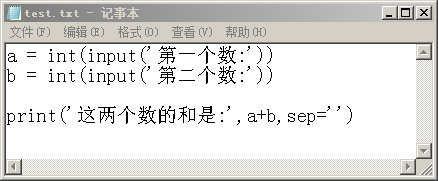
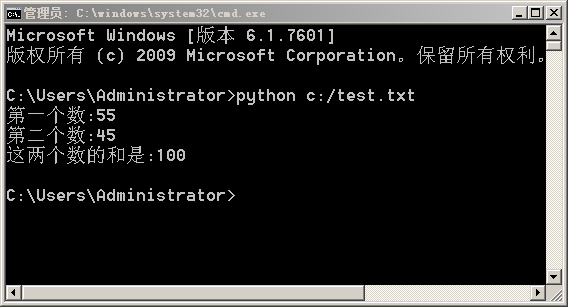
以下是运行C盘的test.txt这个文件, Python这个程序会读取文件的内容,对每一行进行解释.

记事本编写Python代码

python运行txt文件

解释:Python是解释型计算机语言而,它会一行一行的解释代码,呈现运行结果。

下面的练习题目,用记事本编写,然后用python去执行程序。

1. 产生两个整数,范围是1到1000,如果它们的乘积大于1000,就输出它们的和,否则输出它们的积。

2. 编写程序,程序运行后要求输入十门功课的成绩,然后经过计算后输出平均分。

3.编写程序,要求用户输入一个年份,输出这个年份是否是闰年。
如果是闰年,则显示yes,否则显示no。
所谓闰年就是能被4整除但不能被100整除,或者能被400整除的年份。

以上程序编写完后,把判断闰年的程序段定义成一个函数。这个函数有一个参数叫y。
如果y是闰年,则返回真,否则返回假。

本节练习:用记事本编程,用本课所说的方法,即用cmd打开管理员窗口,去运行程序。
程序运行后,会自动产生1到1000的整数共10个,然后会输出最大的那个数。

发表在 python | 标签为 , | 留下评论

风火轮编程素养摸底评估测验题

以下题目可以用Scratch或者Python作答。先在计算机桌面上建立自己姓名的文件夹,把所答的程序放在这个文件夹中。如第一题目叫“变量与随机数”,那么文件名就是“变量与随机数.py”或者“变量与随机数.sb2”。 所答程序逻辑越清晰,代码最简洁,解决方案越佳者评估得分更高。


  1. 变量与随机数 

产生两个整数,范围是1到1000,如果它们的乘积大于1000,就输出它们的和,否则输出它们的积。

(Scratch用”说话”积木标明行显示)


2.圆的面积 

编写程序,程序运行后要求输入圆的半径,然后经过计算后会输出圆的面积。

(用Scratch作答的话,可以侦测里面的询问…并等待来接收用户输入,用外观的说话积木进行显示输出,下同)


3.求平均分 

编写程序,程序运行后要求输入三门功课的成绩,然后经过计算后输出平均分。


4.把5的倍数输出到列表 

编写程序把1000以内所有5的倍数放在一个列表中。

(Scratch答题的话可以先手工建立一个空列表)


5.判断闰年 

编写程序,要求用户输入一个年份,输出这个年份是否是闰年。

如果是闰年,则显示yes,否则显示no。

所谓闰年就是能被4整除但不能被100整除,或者能被400整除的年份。


6.交换数据 

编写程序,要求用户输入两个数,程序会交换它们的大小。


7.三数找最大 

编写程序,让计算机随机产生三个从1到1000的整数分别叫a,b,c,输出最大的那个数据(不考虑相等的情况)。


8.二进制 

二进制是最简单的数字系统,其中只包含两个数字:0和1。

如果要表示十进制的2,则用10,如果要表示3,则用11表示,

如果表示4,则用100表示,即逢二进一。

请用Scratch或者Python输出十进制0到9的十个二进制表示。

即输出0,1,10,11,100……。(省略号的补充下即可,用Scratch可以让角色依次报出。)


9.正多边形 

编写程序,定义一个画正多边形的函数(用Scratch则用自定义积木块)。

它有两个参数,一个叫n,表示边数。另一个叫length表示边长。

调用它在区域范围宽480,高360内画10个边数,边长各不相同的正多边形。


  1. 画二叉树

 用scratch或者python画出以下图形,基本相似即可。

python画二叉树


  1. 三角形的分类

    三角形分为等边三角形,等腰三角形和不等边三角形。编制程序输入三条边的长度,判断它们能否组成哪种类型的三角形,或者不能组成三角形。输出为“等边三角形”,“等腰三角形”,“不等边三角形”及“不能组成三角形”即可。


  1. 十二生肖判定

    输入年份,判断它的生肖。已知2000年是龙年,依次是蛇马羊猴,鸡狗猪鼠牛,虎兔。


  1. 定义求正多边形面积的函数。 ( Scratch则为自定义积木,下同)

     正多边形的面积公式是:  (n * length * length )  /  ( 4 * (π / n) )

其中 n表示正多边形的边数,length表示正多边形的边长,π表示圆周率。


  1. 摄氏温度转华氏温度

     小知识:  把摄氏温度值乘以1.8再加上32,即得到华氏温度所表示的温度值。

编制程序输入摄错温度数值,输出华氏温度数值,返过来输入华氏温度值,亦能输出摄氏温度值。


  1. 交换列表头与尾数值

    程序运行后会生成一个有10个数据的列表,每个整数的范围是1到1000。

接着程序会显示第一个数据和最后一个数据的值,然后交换它们的值,再次显示首尾数据的值。


  1. 判断回文字符串

     从键盘输入一个字符串,如12321,判断它是否是回文字符串,如果是则显示yes,否则显示no。所谓回文字符串是正念和反念都是一样的字符串。

17 . 反序列表

     程序运行后会生成一个有10个数据的列表,每个数据的范围是1到1000。

接着程序显示列表所有数值,然后把列表所有元素反序,再次显示列表所有数值。

(如果用Python作答,则不要用内置的命令回答,下同。)

  1. 二次函数的根

二次函数是y=ax²+bx+c,参考以下例图,编制作程序求二次函数的根。具体步骤为,程序运行时先要求输入三个数,分别是a,b,c。然后会算出delta = b*b – 4*a*c的值,再根据delta的值算出这三个数所对应的二次函数的根,最后用turtle模块先画好坐标轴,再画出这个二次函数的图像,自变量x的范围是-100到100。

附,二次函数求根公式:,提示::求平方根用math.sqrt命令。先导入math模块即可使用。

 Python二次函数求根

19. 算三角形的面积

 程序运行后要求输入三个坐标点,先判断这三个坐标点能不能组成一个三角形,

如果能组成,则把它画出来,并且运用海伦公式输出面积。

三个坐标点可以用x1,y1, x2,y2,x3,y3表示。海伦公式为:

其中p是周长的一半,a,b,c分别表示三条边的长度。


  1. 计算点积

   点积又叫数量积,假设两个列表a = [1,2,3],b = [4,5,6],那么它们的点积是1*1 + 2*5 + 3*6,得到29。

编写程序,生成两个10个数据的列表,分别叫a和b,数据范围是1到100,输出它们的点积。


发表在 python | 标签为 , | 留下评论

地理老师的异或逻辑

下面这一道题可以用传统的逻辑推理解决,也可以用Python编程解决,这里用到了异或,以下是题目:

”’
地理老师在黑板上画了一幅世界五大洲的图形,亚洲,欧洲,非洲,美洲,大洋洲,
并给每一个洲都写上一个代号。
然后,他请五个同学每人认出两个大洲来。五个同学的回答是:

  甲:3号是欧洲,2号是美洲;

  乙:4号是亚洲,2号是大洋洲;

  丙:1号是亚洲,5号是非洲;

  丁:4号是非洲,3号是大洋洲;

  戊:2号是欧洲,5号是美洲。

  地理老师说:”你们每个人都认对了一半。”

  请问:每个号码各代表的是哪一个大洲呢?

”’
以下是Python的编程解法:

成为会员后,登陆才能继续浏览!联系微信scratch8即可办理会员。
(会员专属:能浏览所有文章,下载所有带链接的Python资源。)

发表在 python | 留下评论

教数据结构与算法二叉树前先画个动态的二叉树给学生们看看

python turtle 动态的二叉树
数据结构与算法是编程的核心,这里先做一些准备工作。
以下是画上面的动态图像的代码,有需要的朋友可以直接加微信scratch8和本人索取。

import math
import time
import turtle
# 这是画二叉树的函数,直接复制可以使用。
def draw_tree(length,angle,level):
    if level>0:
        turtle.dot(level*6)
        turtle.right(angle)
        turtle.fd(length)
        turtle.left(angle)
        draw_tree(length/2,angle,level-1)
        turtle.right(angle)
        turtle.bk(length)
        turtle.left(angle*2)
        turtle.fd(length)
        turtle.right(angle)
        draw_tree(length/2,angle,level-1)
        turtle.left(angle)
        turtle.bk(length)
        turtle.right(angle)
    else:
        turtle.dot()

成为会员后,登陆才能继续浏览!联系微信scratch8即可办理会员。
(会员专属:能浏览所有文章,下载所有带链接的Python资源。)

发表在 python, turtle | 标签为 , | 留下评论

用python turtle画图时如何生成gif?_生成png_生成jpg

用python的turtle模块画图的时候,我们能看到小海龟欢块的在屏幕的画布上跑来跑去。于时有些人就想到如果能把这个动画生成gif图形该多好。当然这是完全可以的,生成一帧png或者jpg图形都是滑问题的。下面是我原创代码(支持填充块)。需要的同学可以成为本站会员免费下载。或者联系本人微信scratch8单独索取。

import turtle

turtle.tracer(0,0)
turtle.bgcolor(‘light green’) # 设定背景颜色为淡绿色
turtle.setup(480,360) # 设定窗口宽度和高度
turtle.pensize(4) # 设定画笔线宽
turtle.speed(0)

screen = turtle.getscreen()
cv = screen.getcanvas()

left = cv.winfo_rootx() + 4
top = cv.winfo_rooty() + 4

frames = [] # 建立帧列表,保存所绘的每一帧
print(left,top)

成为会员后,登陆才能继续浏览!联系微信scratch8即可办理会员。
(会员专属:能浏览所有文章,下载所有带链接的Python资源。)

发表在 pillow, python, turtle | 标签为 , , | 留下评论

CSE 30 Fall 2021 – Homework 5 Python作业定义Fraction类

CSE 30 Fall 2021 – Homework 5 以下是描述,需要答案请联系微信scratch8。专业承接大中小学生Python作业培训与辅导。

Instructions

Please disregard the YOUR NAME and COLLABORATORS above. They are put there atomatically by the grading tool. You can find instructions on how to work on a homework on Canvas. Here is a short summary:

Submitting your work

To submit your work:


First, click on “Runtime > Restart and run all”, and check that you get no errors. This enables you to catch any error you might have introduced, and not noticed, due to your running cells out of order.

Second, download the notebook in .ipynb format (File > Download .ipynb) and upload the

.ipynb file to this form.


You can submit multiple times; the last submission before the deadline is the one that counts.


Homework format

For each question in this notebook, there is:


A text description of the problem.


One or more places where you have to insert your solution. You need to complete every place marked:

# YOUR CODE HERE


and you should not modify any other place.


One or more test cells. Each cell is worth some number of points, marked at the top. You should not modify these tests cells. The tests pass if no error is printed out: when there is a statement that says, for instance:

assert x == 2


then the test passes if x has value 2, and fails otherwise. You can insert a print(x) (for this case!) somewhere if you want to debug your work; it is up to you.

Notes:


Your code will be tested both according to the tests you can see (the assert statements you can see), and additional tests. This prevents you from hard-coding the answer to the particular questions posed. Your code should solve the general intended case, not hard-code the particular answer for the values used in the tests.

你的代码将会被你看到的语句进行测试及额外的测试。这阻止你进行硬编码。

请不要删除或添加单元。

Please do not delete or add cells! The test is autograded, and if you modify the test by adding or deleting cells, even if you re-add cells you delete, you may not receive credit.

Please do not import modules that are not part of the standard library. You do not need any, and they will likely not available in the grading environment, leading your code to fail.

If you are inactive too long, your notebook might get disconnected from the back-end. Your work is never lost, but you have to re-run all the cells before you continue.

You can write out print statements in your code, to help you test/debug it. But remember: the code is graded on the basis of what it outputs or returns, not on the basis of what it prints.

TAs and tutors have access to this notebook, so if you let them know you need their help, they can look at your work and give you advice.

Grading

Each cell where there are tests is worth a certain number of points. You get the points allocated to a cell only if you pass all the tests in the cell.

The tests in a cell include both the tests you can see, and other, similar, tests that are used for grading only. Therefore, you cannot hard-code the solutions: you really have to solve the essence of the problem, to receive the points in a cell.

Code of Conduct


Work on the test yourself, alone.

You can search documentation on the web, on sites such as the Python documentation sites, Stackoverflow, and similar, and you can use the results.

You cannot share your work with others or solicit their help.


We have seen in the chapter on classes how to implement complex numbers: 下面是一个复数类:


import math


class Complex(object):


def init (self, r, i): self.r = r # Real part

self.i = i # Imaginary part


def   add  (self, other):

return Complex(self.r + other.r, self.i + other.i)


def   sub  (self, other):

return Complex(self.r – other.r, self.i – other.i)


def   mul  (self, other):

return Complex((self.r * other.r – self.i * other.i), (self.r * other.i + self.i * other.r))


@property

def modulus_square(self):

return self.r * self.r + self.i * self.i


@property

def modulus(self):

return math.sqrt(self.modulus_square)


def inverse(self):

m = self.modulus_square # to cache it return Complex(self.r / m, – self.i / m)


def  truediv  (self, other): return self * other.inverse()


def   repr (self):

“””This defines how to print a complex number.””” if self.i < 0:

return “{}-{}i”.format(self.r, -self.i)

return “{}+{}i”.format(self.r, self.i)


def   eq  (self, other):

“””We even define equality”””

return self.r == other.r and self.i == other.i


There are several ideas above:


To implement the mathematical operations + , – , * , / , between complex numbers, we implement the methods     add         ,     sub                       ,     mul     ,      truediv                                             . You can find more information in the documentation for the P ython data model.

Similarly, to define equality we define     eq                                                           , and to define  < we define     lt                            .

We will now do something similar to define fractions.

Problem 1: Implement Fractions 作业就是模仿上面的复数类,定义一个分数类,它能表示一个分数。 要有分数的加减乘除和判断相等以及小于。

We want to define a class Fraction to represent a fraction, with integers as numerator and denominator.

Similarly to the Complex class above, you need to implement the methods necessary to define + , – ,

* , / among fractions, as well as equality.

You will represent fractions in normal form, such that:


numerator and denumerator which do not have common factors (common divisors), except for 1 (of course),

the denominator is positive.

For example, when you create a fraction via:


r = Fraction(8, 6)


and then ask for the denominator,


r.numerator


the result will be 4, and


r.denominator


will be 3.

To remove the common factors from a fraction m/n, simply compute the greatest common divisor d = gcd(m, n) via Euclid’s algorithm (see the chapter on recursion), and reduce the fraction to (m/d)/(n/d).

We advise you to reduce a fraction into normal form directly into the constructor of the class (the

    init method).

Here is the code for Fraction ; we leave the interesting bits for you to do.


# Definition of Fraction class


# Here is the gcd function, as it may well be useful to you. def gcd(m, n):

# This is the “without loss of generality” part. m, n = (m, n) if m > n else (n, m)

m, n = abs(m), abs(n)

return m if n == 0 else gcd(m % n, n) class Fraction(object):

def init (self, numerator, denominator): assert isinstance(numerator, int) assert isinstance(denominator, int) assert denominator != 0

# YOUR CODE HERE


def   repr (self):

“””Pretty print a fraction.”””

return “{}/{}”.format(self.numerator, self.denominator)


## Here, implement the methods for +, -, *, /, =, and <.

## Done quite at leisure, with spaces and all, this can be done in about

## 25 lines of code.

# YOUR CODE HERE


## Here is an example. Feel free also to use this cell to test your code. Fraction(8, 6)


Here are some tests.


## 5 points: creating a fraction.


## First, let us check that you correctly put the fraction into normal form,

## without common factor between numerator and denominator, and with a

## positive denominator.


f = Fraction(8, 6)

assert f.numerator == 4 and f.denominator == 3


f = Fraction(-8, 6)

assert f.numerator == -4 and f.denominator == 3


f = Fraction(8, -6)

assert f.numerator == -4 and f.denominator == 3


f = Fraction(-8, -6)

assert f.numerator == 4 and f.denominator == 3


f = Fraction(0, 10)

assert f.numerator == 0 and f.denominator == 1


### 5 points: hidden tests for fraction creation.


## 5 points: tests for fraction operations. f = Fraction(8, 6) + Fraction(25, 20)

assert f.numerator == 31 and f.denominator == 12 assert f == Fraction(31, 12)

assert f == Fraction(62, 24)


assert Fraction(6, 4) + Fraction(-8, 6) == Fraction(6, 4) – Fraction(8, 6)

assert not (Fraction(6, 4) + Fraction(-8, 6) == Fraction(6, 5) – Fraction(8, 6))


## 5 points: Hidden tests for fraction operations.


## 5 points: more tests for fractions operations.


assert Fraction(3, 2) * Fraction(2, 3) == Fraction(1, 1)

assert Fraction(3, 2) / Fraction(2, 3) == Fraction(9, 4)

assert Fraction(3, 2) / Fraction(6, 4) == Fraction(1, 1)

assert Fraction(32, 16) == Fraction(2, 1) assert not Fraction(33, 16) == Fraction(4, 2)


## 5 points: More hidden tests for fraction operations.


## 5 points: tests for fraction comparison. assert Fraction(5, 7) < Fraction(5, 6)

assert Fraction(-3, 2) < Fraction(0, 3)


## 5 points: hidden tests for fraction comparisons.


## 10 points: Let’s check you leave things unchanged. a = Fraction(7, 8)

b = Fraction(-4, 5) a + b

a / b


a < b

a * b

assert a == Fraction(7, 8) assert b == Fraction(-4, 5)

## 10 points: And finally, some random tests. import random

for _ in range(1000):

a = Fraction(random.randint(-200, 200), random.randint(1, 100))

b = Fraction(random.randint(-200, 200), random.randint(1, 100))

c = Fraction(random.randint(-200, 200), random.randint(1, 100)) assert Fraction(-1, 1000) < (a – b) * (a – b)

assert (a – b) * (a + b) == a * a – b * b z = Fraction(0, 1) # Zero, as a fraction. if not ((a == z) or (b == z) or (c == z)):

assert (a / b) * b == (a / c) * c

assert (a / b) * (a / c) == (a * a) / (b * c) assert (a / b) / (b / c) == (a * c) / (b * b) assert (a * a * b * c) / (a * c) == a * b


Question 2: An Int class


To define the value 7, you can write Fraction(14, 2) or  Fraction(7, 1) (it’s the same), but this is a bit inconvenient. Write a subclass Int of Fraction , so that Int(7) generates a fraction with value 7.


class Int(Fraction):


# YOUR CODE HERE


## You can test your solution here.


And now for some tests.


## 5 points: tests for int class.


assert Int(3) / Int(2) == Fraction(3, 2)

assert Int(3) * Int(4) / (Int(5) + Int(2)) == Fraction(12, 7) assert Int(3) * Int(4) / (Int(5) + Int(1)) == Fraction(2, 1)

这个家庭作业是仿照complex类,即复数类,定义一个Fraction类,即表示分数的类。

以上是作业的描述,需要答案请联系微信scratch8。专业承接大中小学生Python作业培训与辅导。

发表在 python | 标签为 , , , | 留下评论

CSE 30 Fall 2021 – Homework 4Python家庭作业4写生成器

以下是作业原文,需要答案请联系微信scratch8。

Instructions

Please disregard the YOUR NAME and COLLABORATORS above. They are put there atomatically by the grading tool. You can find instructions on how to work on a homework on Canvas. Here is a short summary:

Submitting your work To submit your work:

First, click on “Runtime > Restart and run all”, and check that you get no errors. This enables you to catch any error you might have introduced, and not noticed, due to your running cells out of order.

Second, download the notebook in .ipynb format (File > Download .ipynb) and upload the

.ipynb file to this form.


You can submit multiple times; the last submission before the deadline is the one that counts.


Homework format

For each question in this notebook, there is:


A text description of the problem.


One or more places where you have to insert your solution. You need to complete every place marked:

# YOUR CODE HERE  在这里写上你的代码。


and you should not modify any other place.


One or more test cells. Each cell is worth some number of points, marked at the top. You should not modify these tests cells. The tests pass if no error is printed out: when there is a statement that says, for instance:

assert x == 2


then the test passes if x has value 2, and fails otherwise. You can insert a print(x) (for this case!) somewhere if you want to debug your work; it is up to you.

Notes:


Your code will be tested both according to the tests you can see (the assert statements you can see), and additional tests. This prevents you from hard-coding the answer to the particular questions posed. Your code should solve the general intended case, not hard-code the particular answer for the values used in the tests.

Please do not delete or add cells! The test is autograded, and if you modify the test by adding or deleting cells, even if you re-add cells you delete, you may not receive credit.

Please do not import modules that are not part of the standard library. You do not need any, and they will likely not available in the grading environment, leading your code to fail.

If you are inactive too long, your notebook might get disconnected from the back-end. Your work is never lost, but you have to re-run all the cells before you continue.

You can write out print statements in your code, to help you test/debug it. But remember: the code is graded on the basis of what it outputs or returns, not on the basis of what it prints.

TAs and tutors have access to this notebook, so if you let them know you need their help, they can look at your work and give you advice.

Grading

Each cell where there are tests is worth a certain number of points. You get the points allocated to a cell only if you pass all the tests in the cell.

The tests in a cell include both the tests you can see, and other, similar, tests that are used for grading only. Therefore, you cannot hard-code the solutions: you really have to solve the essence of the problem, to receive the points in a cell.

Code of Conduct


Work on the test yourself, alone.

You can search documentation on the web, on sites such as the Python documentation sites, Stackoverflow, and similar, and you can use the results.

You cannot share your work with others or solicit their help.


Problem 1


Write a generator for the Fibonacci Numbers

Build a generator that returns the Fibonacci numbers:  0, 1, 1, 2, 3, 5, and so on.


def fibonacci_generator():

“””Generates all Fibonacci numbers.”””

# YOUR CODE HERE


## Here you can test your code.

## What you write here will be removed.


# Visible tests: 5 points r = []

for n in fibonacci_generator(): r.append(n)

if n > 100:

break

assert r == [0, 1, 1, 2, 3, 5, 8, 13, 21, 34, 55, 89, 144]


# Hidden tests, 5 points


# These tests check basically that you generate Fibonacci numbers, forever — without stoppin

# It is the reader (the user) of the function that decides when to stop.


Problem 2


Write a prime number generator

Write a generator that returns all the prime numbers. The idea is to loop over all positive integers, test each one to see if it is prime, and if it is,  yield it.


# My solution is simple and not particularly optimized,

# and it is 12 lines long.


def prime_number_generator():

“””This generator returns all prime numbers.”””

# YOUR CODE HERE


## Here you can test your code.


## What you write here will be removed.


## Visible tests: 5 points


initial_primes = [2, 3, 5, 7, 11, 13, 17, 19, 23]


idx = 0

for p in prime_number_generator(): assert p == initial_primes[idx] idx += 1

if idx == len(initial_primes): break


## Hidden tests: 10 points


# We test that the generator goes on and on and on.

发表在 python | 标签为 , , , , | 留下评论

CSE 30 Fall 2021 – Homework 3Python二分查找作业与答案

以下是Python作业描述,需要答案请联系本人微信scratch8。

CSE 30 Fall 2021 – Homework 3

Instructions

Please disregard the YOUR NAME and COLLABORATORS above. They are put there atomatically by the grading tool. You can find instructions on how to work on a homework on Canvas. Here is a short summary:

Submitting your work To submit your work:

First, click on “Runtime > Restart and run all”, and check that you get no errors. This enables you to catch any error you might have introduced, and not noticed, due to your running cells out of order.

Second, download the notebook in .ipynb format (File > Download .ipynb) and upload the

.ipynb file to this form.

You can submit multiple times; the last submission before the deadline is the one that counts.

Homework format

For each question in this notebook, there is:

A text description of the problem.

One or more places where you have to insert your solution. You need to complete every place marked:

# YOUR CODE HERE 在下面填写你的代码


and you should not modify any other place.


One or more test cells. Each cell is worth some number of points, marked at the top. You should not modify these tests cells. The tests pass if no error is printed out: when there is a statement that says, for instance:

assert x == 2


then the test passes if x has value 2, and fails otherwise. You can insert a print(x) (for this case!) somewhere if you want to debug your work; it is up to you.

Notes:


Your code will be tested both according to the tests you can see (the assert statements you can see), and additional tests. This prevents you from hard-coding the answer to the particular questions posed. Your code should solve the general intended case, not hard-code the particular answer for the values used in the tests.

Please do not delete or add cells! The test is autograded, and if you modify the test by adding or deleting cells, even if you re-add cells you delete, you may not receive credit.

Please do not import modules that are not part of the standard library. You do not need any, and they will likely not available in the grading environment, leading your code to fail.

If you are inactive too long, your notebook might get disconnected from the back-end. Your work is never lost, but you have to re-run all the cells before you continue.

You can write out print statements in your code, to help you test/debug it. But remember: the code is graded on the basis of what it outputs or returns, not on the basis of what it prints.

TAs and tutors have access to this notebook, so if you let them know you need their help, they can look at your work and give you advice.

Grading

Each cell where there are tests is worth a certain number of points. You get the points allocated to a cell only if you pass all the tests in the cell.

The tests in a cell include both the tests you can see, and other, similar, tests that are used for grading only. Therefore, you cannot hard-code the solutions: you really have to solve the essence of the problem, to receive the points in a cell.

Code of Conduct


Work on the test yourself, alone.

You can search documentation on the web, on sites such as the Python documentation sites, Stackoverflow, and similar, and you can use the results.

You cannot share your work with others or solicit their help.


Problem: Dicothomic Search


You are given a sorted list l , and you need to look into it for an element x . Of course, you could start looking at the beginning for x , and continue until you are done:


for el in l:

if el == x:


or you can do the same with l.index(x) , but these approaches do not take advantage of the fact that l is sorted, and take an amount of time that is proportional to the length of the list l : on average, you will find x about halfway through.

When you search in a dictionary, you don’t take this approach. If you look for “hedgehog”, you open the dictionary in the middle, and based on that you decide whether to search in the first half or the second half. This continues until you narrow the range of search to a single page.

We want to follow the same idea to search in our list. We ask you to write a recursive function

search(l, x, i, k) which searches for the earliest occurrence of  x in the list  l from position i to position k – 1 , inclusive, and returns the smallest index at which x has been found, or None if it has not been found.

To find if x is in the list, you would call search(l, x, 0, len(l)) . The function  search should work as follows:

If k <= i , there is nowhere you can search, and you return None . If k = i + 1 , then you know what to check!

If k > i + 1 , then there is more than one position to consider. You split the range you have to search in the middle, say, at j = i + (k – i) // 2 , and then look at l[j] . Based on that, you decide whether to search (calling search recursively) from i to j , or from j to k .


Note: in this exercise, the whole point is to use recursion, and to avoid accessing the list too many times. If you have code that reads (for example):


if l[k] == …

if l[k] < …


then that code would be accessing l[k] twice. You may want to cache the value of l[k] in an intermediate place to avoid such accesses:


lk = l[k]

if lk == …

if lk < …


matters: do not access twice in a row the same list element; rather, cache its value.

This is only an example; the actual piece of code is not like the one above, but the idea is what


def binary_search(l, x): “””Helper function.”””

return search(l, x, 0, len(l))


## Here is a place for you to play with your code.


# YOUR CODE HERE


First, let’s do a small sanity check, checking that at least you find the correct element.


# 5 points.


assert binary_search([1, 2, 3, 4, 5, 6], 2) == 1

assert binary_search([1, 2, 3, 5, 6, 7], 4) is None


# We did say, the earliest occurrence.

assert binary_search([1, 2, 3, 3, 3, 4, 5], 3) == 2

assert binary_search([1, 2, 2, 2, 2, 3, 4, 5], 2) == 1

assert binary_search([1, 1, 1, 1, 1, 2, 3], 1) == 0


To keep you honest, we implement two tricks. First, we will not let you work on a list, but rather, on a WeakList, which counts how many times it has been accessed, and if you access it too many times, it raises an exception. This will force you to implement dicothomic search rather than just scanning the list.

To help in debugging, we make a WeakList also print out where it is accessed.


import math


class TooManyAccesses(Exception): pass


class WeakList(object):


def   init  (self, *args, verbose=True):

“””You create a tired list passing it the elements as arguments.”””

self.l = list(args) # Do not rely on this being called l… it will be renamed in gra self.num_accesses = 0

self.max_accesses = int(math.log2(len(self.l))) + 2 self.verbose = verbose


def   len (self):

“””This implements the len() method.””” return len(self.l)


def   getitem  (self, i):

“””This implements the lookup via [i] syntax.””” if self.verbose:

print(“Accessed position”, i) self.num_accesses += 1

if self.num_accesses > self.max_accesses:

raise TooManyAccesses(“You have exceeded the maximum of {} accesses”.format(self. return self.l[i]


## Here is a place for you to play with your code.


# YOUR CODE HERE


We can now test that you can find the earliest occurrence of an element in a list without accessing too many elements.

# 5 points. Some simple tests. l = WeakList(3, 4, 5, 6, 7, 8)

assert binary_search(l, 8) == 5


l = WeakList(3, 4, 4, 5, 7, 8)

assert binary_search(l, 4) == 1

l = WeakList(3, 4, 4, 5, 7, 8)

assert binary_search(l, 5) == 3

l = WeakList(3, 5, 6, 7)

assert binary_search(l, 8) is None


# 15 points. Now, some randomized tests. import random


for _ in range(1000):

n = random.randint(10, 100)

l = list(random.choices(list(range(100)), k=n)) l.sort()

k = random.randint(0, 99)

wl = WeakList(*l, verbose=False)

# print(“Searching”, l, “for”, k) if k in l:

# print(“It should be there.”) bs = binary_search(wl, k)

ix = l.index(k)

assert bs == ix, “Error: l: {}, k: {}, index: {}, binary: {}”.format(l, k, ix, bs) else:

# print(“It should not be there.”)

assert binary_search(wl, k) is None, “Error: {} found in {}”.format(k, l)


Next, we know that students typically loathe recursion, and would rather write unfathomable goops of code rather than use a simple recursive solution. We are not talking about you obviously. But just to keep the other students honest, we define here a decorator that checks that the function is indeed called recursively.


from bdb import Bdb import sys

import traceback


class NonRecursive(Exception): pass

class RecursionDetector(Bdb): def do_clear(self, arg):

pass


def init (self, depth=1): Bdb. init (self) self.depth = depth self.stack = [] self.passed = False


def user_call(self, frame, argument_list): code = frame.f_code

depth = sum([code == c for c in self.stack]) if depth >= self.depth:

self.passed = True self.stack.append(code)


def user_return(self, frame, return_value): assert self.stack[-1] == frame.f code


self.stack.pop()


def test_recursion(func, depth=1):

detector = RecursionDetector(depth=depth) detector.set_trace()

try:

r = func() except:

traceback.print_exc() r = None

finally:

sys.settrace(None) return r


def test_enough_recursion(wl, el):

“””Tests that you do enough recursion when calling binary_search(wl, el)””” n = int(math.log2(len(wl))) – 1

return test_recursion(lambda: binary_search(wl, el), depth=n)


assert test_recursion(lambda: binary_search([2, 3, 4, 5, 5, 6, 7, 8, 10, 11, 12], 5)) == 3


# 15 points: Let’s check that you solved the problem through recursion. for _ in range(1000):

n = random.randint(10, 100)

l = list(random.choices(list(range(100)), k=n)) l.sort()

k = random.randint(0, 99)

wl = WeakList(*l, verbose=False) idx = test_enough_recursion(wl, k) if k in l:

assert l.index(k) == idx else:

assert idx is None

发表在 python | 标签为 , , , , | 留下评论

2021年国庆小作品_童年


当然,这是为了庆祝2021年国庆节的一个小作品。

import re
import time
from gameturtle import *
from winsound import PlaySound,SND_ASYNC

def rotate_text(self,item,ms=100,du=10,rev=1):
    """旋转文字,item:文字的项目编号,ms调用的时间间隔,
       du:每次旋转的角度值,rev:决定是顺时针旋转还是逆时针旋转的参数"""
    heading = 0
    cv = self._canvas
    def rotate():
        nonlocal heading
        cv.itemconfig(item,angle=heading)
        heading += du*rev
        heading %= 360
        cv.after(ms,rotate)
    rotate()
Sprite.rotate_text = rotate_text

def play(self,song_file,lrc_file=None,fontstyle=("",14,"normal"),loop=False ):
    """在海龟屏幕显示歌词并播放歌曲,本函数只支持无损wav文件。
       self:海龟对象或其子类的实例
       song_file:歌曲文件
       lrc_file:歌词文件,诸如:[00:00.00]月满西楼
                                [01:00.12]红藕香残 玉簟秋
       上面这样的歌词文件。
       fontstyle为三元组,表示用write写字时的字体风格。
       loop:为假示不循环播放,为True表示循环播放
       本函数来源于本人编写的Python精灵模块
    """
    if loop == True:
        PlaySound(song_file, SND_ASYNC|SND_LOOP)# 异步循环播放音效
    else:
        PlaySound(song_file, SND_ASYNC)         # 异步播放音效
    if lrc_file==None:return                    # 无歌词文件则返回

    if not os.path.exists(lrc_file):
       print("歌词文件没有找到!")
       return
    f = open(lrc_file)                          # 打开歌词文件
    words_=f.readlines()                        # 读取歌词文件
    f.close()                                   # 关闭文件
    
    # 正则表达式检测歌词文件内容
    reg='\[\d\d:\d\d\.\d\d\]'
    result = re.findall(reg,"".join(words_))   # 如果有[00:00.33]这样的则会返回非空列表
    if not result:
       print("歌词文件貌似有问题!")
       return
     
    x,y = self.position()              # 歌词中央坐标
    fgcolor = self.pencolor()          # 歌词前景色 
    bgcolor = self.fillcolor()         # 歌词背景色
   
    words_list=[]                      # 歌词列表
    words_index=0                      # 歌词索引

    words_list=[ line.strip() for line in words_ if len(line)>1]
    words_lines=len(words_list)        
    
    def get_time_axis(index):
        """获取时间轴"""
        songtime=words_list[index]
        songtime=songtime.split("]")[0]
        songtime=songtime.split(":")
        songtimef=songtime[0][1:3]
        songtimef=int(songtimef)*60    
        songtimem=float(songtime[1])
        return int((songtimef+songtimem)*1000)
    
    words_index=0
    begin_time=time.time()
    def display_subtitle():
        """随着音乐显示歌词函数"""
        nonlocal words_index            # 歌词索引号
        nonlocal words_lines            # 歌词line数          
        current_time=time.time()
        running_time=(current_time-begin_time)*1000
        
        # 如果逝去的时间大于歌词文件中那个时间点就换歌词
        if running_time > get_time_axis(words_index):            
            self.clear()
            display_words_=words_list[words_index].split("]")[1]
            self.goto(x,y)
            self.color(bgcolor)
            # 在左上一个单位印字
            self.write(display_words_,align='center',font=fontstyle)
            self.goto(x-1,y+1)
            self.color(fgcolor)
            self.write(display_words_,align='center',font=fontstyle)
            self._canvas.update()
            
            words_index=words_index+1            
        if words_index < words_lines:        
            self._canvas.after(100,display_subtitle)
    # 调用显示标题的函数
    display_subtitle()
    
root = Tk()
root.title('童年_庆祝国庆72周年by李兴球')
cv = Canvas(width=480,height=720,bg='#000000')
cv.pack()

mouse = Mouse(cv)                             # 新建鼠标左键对象
dummy = Sprite(cv,visible=False)              # 新建角色叫dummy
dummy.color('blue')                           # dummy的颜色是蓝色的 

zi = list('据说成功人士都有一颗童心'+chr(10084))          # 一个叫zi的列表
while zi:    
    if mouse.isdownup():                      # 如果单击并弹起
        c = zi.pop(0)
        dummy.goto(*cv.mouseposition())
        dummy.write(c,font=('',38))
    cv.update()
    

g = Image.open('萌小海龟.png')
gs  = [setalpha(g,a) for a in range(0,256,1)]

cv.config(bg='#FFFF00')
turtle = Sprite(cv,gs)
for i in range(len(gs)):
    turtle.setindex(i)
    cv.update()
    
time.sleep(1)
turtle.say('大家好,我是小海龟',3)
turtle.say('2021国庆节来了',3)
turtle.say('听完歌曲,有惊喜!',5)
##turtle.say('我要唠叨一下先',3)
##turtle.say('我家女儿啊,\n每天晚上6点多才回家。',3)
##turtle.say('天都黑了,\n到了冬天,\n那天更黑了',3)
##turtle.say('你说这样的“减负”好吗?',3)
##turtle.say('我理解的“减负”,\n是早点放学',3)
##turtle.say('孩子们有充足的业余时间,\n去探索去发现',3)
##turtle.say('现在呢,\n看不到孩子一丝笑容',4)
##turtle.say('把孩子们都关在学校里,\n学生没有新鲜感\n好奇心会被泯灭\n实乃教育之大忌?',8)
##turtle.say('我家女孩没有参加补习班,\n所以对于我家女儿来说\n就完全是增负',6)
##turtle.say('本来可早点回家画她喜欢的画儿的,\n自由自在的多好',6)
##turtle.say('这样的制度扼杀了个性化的发展',5)
##

time.sleep(1)
for i in range(len(gs)-1,-1,-1):
    turtle.setindex(i)
    cv.update()

song = Sprite(cv,visible=False)
song.sety(140)
song.color('cyan','black')
play(song,'杨烁 - 童年.wav',lrc_file='歌词2.txt')

cv.config(bg='#81A4CE')
g = Image.open('背景.png').convert("RGBA")
gs  = [setalpha(g,a) for a in range(0,256,10)]
backgound = Sprite(cv,gs)
for i in range(len(gs)):    
    backgound.setindex(i)
    cv.update() 

hg = Sprite(cv,visible=False)
hg.bk(50)
hg.sety(80)
zi1 = hg.write('童',align='center',font=('楷体',38,'normal'))
hg.fd(100)
zi2 = hg.write("年",align='center',font=('楷体',38,'normal'))

cv.tag_raise(turtle.item)
turtle.goto(320,520)
for i in range(turtle.shapeamounts()):
    turtle.setindex(i)
    cv.update()
    
blank = Image.new("RGBA",(1,1))    # 制作空白造型
girl = Sprite(cv,blank)
girl.goto(160,500)
time.sleep(1)
turtle.say('嗨,我又来了',3)
girl.say('你好,小海龟',2)

turtle.say('我又编写一个\nPython程序玩',4)
girl.say('我知道,\n就是现在演示的这个',4)

turtle.say('顺便祝你国庆快乐',3)
girl.say('嗯嗯,有啥礼物呀:)',3)
turtle.say('在我博客里,\n有免费下载。',4)
girl.say('你的博客在哪儿呀',3)
turtle.say('www.lixingqiu.com\n就是上面的网址。',6)
girl.say('thank you,\n我去找找。',3)
turtle.say('一寸光阴一寸金\n寸金难买寸光阴\n少 壮 不 努 力\n老 大 送 快 递',400,False)
time.sleep(1)
girl.say('你说得太对了!',400,False)

成为会员后,登陆才能继续浏览!联系微信scratch8即可办理会员。
(会员专属:能浏览所有文章,下载所有带链接的Python资源。)

发表在 gameturtle, python | 留下评论

手动歌词文件时段记录辅助程序

制作一个小作品的辅助程序。

"""
   通过听音乐,当唱到下一句时手动单击记录时间
"""
import time
import turtle
from winsound import *

def record(x,y):
    times.append(time.time() - start_time)  # 当前行和上一行的播放时间
    
times = []

screen = turtle.getscreen()
#PlaySound('杨烁 - 童年.wav',9)
start_time = time.time()                     # 起始时间
screen.onclick(record)

# 下面的代码请先全部注释掉!
# times列表中的内容通过播放上面歌曲,单击而来。
times = [16.705955743789673, 19.76313042640686, 24.55040407180786, 27.298561334609985, 31.792818546295166, 34.48797273635864, 39.43625545501709, 43.30347681045532, 49.635838985443115, 52.271989822387695, 57.32727885246277, 60.07343602180481, 64.56769323348999, 67.20084381103516, 72.13212585449219, 76.03334903717041, 82.39871287345886, 84.93785834312439, 89.97814655303955, 92.7073028087616, 97.32856678962708, 99.665700674057, 104.95500326156616, 108.80622339248657, 115.46860456466675, 117.70173215866089, 122.75502133369446, 125.49917793273926, 129.94543266296387, 132.76859402656555, 137.49486446380615, 141.56909728050232, 147.80845427513123, 150.63361597061157, 155.49989414215088, 158.1810474395752, 162.61230087280273, 165.20244884490967, 170.27173900604248, 174.0939576625824, 177.4651505947113, 181.89640402793884]
fi = open('歌词.txt')                        # 这个文件是仅有歌词的
words = fi.readlines()
fi.close()

fo = open('歌词2.txt','w')                   # 这个文件把把时间段加上去
i = 0
for t in times:
    m = int(t//60)
    s = t%60
    hao = s - int(s)
    #print(m,int(s),round(100*hao))
    out = "[{:02}:{}.{}]".format(m,int(s),round(100*hao))
    fo.write(out+words[i])
    i += 1
fo.close()

发表在 python, turtle | 留下评论

Python文字旋转测试代码bylxq

Python旋转文字童年
以下程序需要游戏海龟模块运行,安装方法是打开管理员窗口,输入 pip install gameturtle,即可 安装.

from gameturtle import *

def rotate_text(self,item,ms=100,du=10,rev=1):
    """旋转文字,item:文字的项目编号,ms调用的时间间隔,
       du:每次旋转的角度值,rev:决定是顺时针旋转还是逆时针旋转的参数"""
    heading = 0
    cv = self._canvas
    def rotate():
        nonlocal heading
        cv.itemconfig(item,angle=heading)
        heading += du*rev
        heading %= 360
        cv.after(ms,rotate)
    rotate()
Sprite.rotate_text = rotate_text

成为会员后,登陆才能继续浏览!联系微信scratch8即可办理会员。
(会员专属:能浏览所有文章,下载所有带链接的Python资源。)

发表在 gameturtle, python | 留下评论

python节节高升练习课

Python练习课节节高升效果图
在实际的教学当中,可以上很多练习课,这是我们的一节练习课的题目,包括在源代码当中,这里放出一个。
如果把下面的练习做好,那么程序运行后会是上面这样的效果图。
更多Python的练习课设计请自行想像 。

""" 
   节节高升.py
   本程序运行coloradd模块支持,请用cmd打开管理员窗口,输入pip install coloradd进行安装。
   练习如下:   
   1. 阅读程序,修改程序,把程序中y值的前100个放到一个叫ycors的列表中。
   2. y的值有一个最小值,请在y最小的时候打一个直径为20的颜色为light yellow的圆点
   
"""
import time
import random
import turtle
from coloradd import coloradd

turtle.title("节节高升_练习by李兴球")
turtle.shape('turtle')
turtle.shapesize(4)
turtle.pensize(10)
turtle.color('light green')
turtle.bgcolor('black')
turtle.penup()
turtle.left(90)
turtle.bk(200)
turtle.pendown()

成为会员后,登陆才能继续浏览!联系微信scratch8即可办理会员。
(会员专属:能浏览所有文章,下载所有带链接的Python资源。)

发表在 python, turtle | 标签为 | 留下评论

跟随鼠标指针x,y轴和原点对称演示程序

Python跟随鼠标_xy轴对称演示

import turtle

turtle.penup()
turtle.bgcolor('light yellow')
turtle.color('light blue')
turtle.shape('square')
turtle.shapesize(4)
turtle.tracer(0,0)

成为会员后,登陆才能继续浏览!联系微信scratch8即可办理会员。
(会员专属:能浏览所有文章,下载所有带链接的Python资源。)

发表在 python, turtle | 留下评论

python turtle一种跟随鼠标拖影效果

python跟随鼠标
利用图章制作的跟随鼠标效果,没有淡入淡出,效果一般,代码如下:

import turtle

turtle.penup()
turtle.bgcolor('black')
turtle.color('white')
turtle.shape('circle')
turtle.tracer(0,0)

成为会员后,登陆才能继续浏览!联系微信scratch8即可办理会员。
(会员专属:能浏览所有文章,下载所有带链接的Python资源。)

发表在 python, turtle | 留下评论

Python螺旋8字创意绘画图

Python螺旋8字创意绘画图

import math
import turtle

def draw(center,length):
    h = length/2
    turtle.goto(center)
    turtle.left(90)
    turtle.fd(h)
    turtle.right(90)
    turtle.fd(h)
    turtle.right(90)
    turtle.pendown()
    for i in range(4):
        turtle.fd(length)
        turtle.right(90)
    turtle.penup()
    turtle.left(90)
    turtle.bk(h)
    turtle.left(90)
    turtle.bk(h)
    turtle.right(90)

length=5
turtle.speed(0)
turtle.delay(0)
turtle.color('light cyan')
turtle.bgcolor('light pink')
 
for d in range(120):
    turtle.fd(4)
    turtle.right(3)
    draw(turtle.pos(),length)
    length += 1
    if length>=50:length=5
    
for d in range(120):
    turtle.fd(4)
    turtle.right(-3)
    draw(turtle.pos(),length)
    length += 1
    if length>=50:length=5

 
发表在 python, turtle | 标签为 | 留下评论

拯救海龟宝宝_Python第一人称射击模拟游戏浅析

拯救海龟宝宝_Python第一人称射击模拟游戏浅析

2021繁忙的暑假过去了。金秋时节即将来临,虽然9月14号的秋老虎还在逞威,但已是强弩之末。这一天,本来是想学习新的知识,但一想到很久没有原创一个Python作品了,于是就有了这个小作品。它运行后显示的运行效果如上所示。

我们只要不断地学习新知识,不断地广泛涉猎,总会有新的想法,然后试图用Python去实现,这样就能做非常多的有趣的事情。想想吧,能创造出一个世界上本不存在的东西,这足已经是非常有成就感的事情了。最可惜的是时间不够用而已,所以看到此文章的人,一定要珍惜时间。时间才是这个世界最宝贵的东西。

这个新的作品主要用turtle模块制作,配音用的是pygame的混音器。因为是基于单击事件和鼠标移动事件实现的,所以它并没有像pygame制作游戏一样有一个游戏主循环。虽然有少量的for循环,但总体来讲是一个顺序结构。
运行程序后,玩家以第一人称的视角去操控手枪,单击发射子弹,发射的子弹会在背景上留下弹痕。这个所谓的弹痕,其实是海龟盖的一个灰色的图章和一个黑色的小图章。如果单击到海龟,海龟会被击毁,并且留下血迹。每次可以发射十颗子弹,如果发射完了,需要按鼠标右键单击装弹。

我把这个作品主要分为四个部分。

第一部分是序幕。会显示标题等信息,运行后会有一只小海龟。它主要会画一个靶子和一个瞄准器。这部分代码学过Python的人都应该能编写出来。

第二部分是画好的瞄准器竟然可以用鼠标指针操作它。在Python的海龟画图中,如何用鼠标指针去操作一个对象呢?turtle模块中并没有鼠标移动事件的设定,但是只要我们肯下功夫,去阅读turtle.py文件的源代码,那么问题就不难解决了。它是基于tkinter开发的,所以只要用画布绑定鼠标移动事件即可实现。虽然我这里没有列出具体的代码,但我已帮你指引了方向,有钻研精神的读者一定会能搞定的。而瞄准器,也就是那个大大的十字架外罩着一个圆圈。它是通过不断地重画与擦除实现的。由于速度极快,所以看不出来是画出来的。要在Python海龟画图中以极快的速度绘画除了让海龟的speed为0外,还要把绘画延时delay设为0,更要把自动显示刷新给关闭掉。这可以通过追踪器tracer命令来实现。其实前面的序幕,已经告诉读者,瞄准器确实是画出来的。

第三部分就是邪恶的海龟不断产生的过程,同时玩家可以去单击它。单击到它,它就会被彻底清除并且显示一个血迹图片。这张图片会显示一定的时间后自动清除,这是通过ontimer命令实现的。关于这个命令,它能实现模拟异步执行,这样能轻松实现“多线程”。安装Python后,有帮助文档,可以查看ontimer的具体用法,所以这里无需赘述。

最后一个部分是成功与结束的设计。成功击中20只邪恶海龟,那就会显示一个动画,而后又有渐显的背景。渐显的背景可以通过图形处理实现,但增加了代码的复杂度。为了让代码尽量简单,采用的是切换图片实现的。当然,前提是先准备好不同模糊度和透明度的背景图片。背景寓意还是比较明显的。

一个作品没有配音,是缺少灵魂的。比如,人们看恐怖电影时觉得非常害怕,其实很大程度上只是音效的衬托。一个电子游戏也是一样,所以特别地花了时间去找音效,还找了一首震撼的背景音乐。它们的播放都是通过pygame模块的混音器实现的。东西在对的地方才能发挥最大的价值,希望这个Python作品能给你有所启发。现代社会,大多数人是没有辩识能力的的。如果你生活在新闻联播,那么基本是在社会的底层。在大数据时代,大众更容易迷失在信息海洋里,因为对信息的判断和抉择上越来越难。我们的社会并没有变得越来越简单,反而是在各个方面越来越复杂。比如,支付手段的多样化,造成了新的社会鸿沟。比如,人类需要越来越长的时间学习人类自己设定的繁多的规则。比如我们经常会被动接收到很多无效的​垃圾信息。最典型的是台风消息,我们这里是萍乡,江西最西部,根本没必要知道台风的消息。可是,每次台风,都被动地知道了这消息,其实台风到了我们萍乡早就变成了微风了。现实中,还有很多的垃圾信息到处飞,充满了每个角落。抖音里的最多,人们满足于暂时的快感,熬夜也要躺刷,这就是消耗生命。即,人们的“不知道权”被不断地侵犯。也就是说,我本来不想知道的,却被动地知道了,甚至影响到了我的生活与工作,而这些事情根本不需要知道还更好。如果意识到了以上我所说的这些,那赶紧加入到学习专业知识的大军来吧,只有这样才能更好地理清这个社会。但是,无论学什么,做什么都是身体第一,所以到点了就要关掉手机,睡觉,否则泯然众人矣。

发表在 python, turtle | 标签为 | 留下评论

python turtle窗口全屏切换与隐藏鼠标指针

turtle模块基于tkinter模块开发,所以只要查阅tkinter模块的功能即可! 以下程序运行后,单击鼠标右键则窗口会在全屏与非全屏之间切换,以下是代码:

import turtle

def alt_screen(x,y):
    screen.status = not screen.status
    screen._root.attributes('-fullscreen', screen.status)
    
screen = turtle.Screen()
screen.status = False
screen._root.config(cursor="mouse")          # 修改为None则是隐藏鼠标指针
screen._root.attributes('-fullscreen', True)
screen.onclick(alt_screen,3)
screen.mainloop()

发表在 python, tkinter, turtle | 留下评论

瞄准靶心射击模拟动画教学简版_第一人称射击简单模拟

Python打靶瞄准射击交互动画这是我们风火轮编程培训机构上面的一节案例课程的源代码。程序运行后,首先会画彩色的靶子,然后以第一人称的方式进行射击!
这是适合教学的简单版本,核心功能都在里面了。以下是完整版代码。

 
import turtle

def shoot(x,y):
    turtle.goto(x,y)
    turtle.dot(10,'black')
    
def draw_circle(x,y):
    tom.clear()
    tom.goto(x,y)
    tom.pendown()
    for _ in range(4):
        tom.fd(300)
        tom.bk(300)
        tom.right(90)
    tom.fd(300)
    tom.left(90)
    tom.circle(300)
    tom.penup()
    turtle.update()

成为会员后,登陆才能继续浏览!联系微信scratch8即可办理会员。
(会员专属:能浏览所有文章,下载所有带链接的Python资源。)

发表在 python, turtle | 标签为 | 留下评论

Python水浒108将多媒体演示程序

Python梁山好汉108将演示
以下是完整代码:

import glob
import time
import turtle
from winsound import PlaySound

sc = turtle.Screen()
sc.setup(1024,640)
sc.bgpic('背景.png')

PlaySound('好汉歌.wav',9)
sc.update()
time.sleep(2)

zx = glob.glob('gif素材/*.gif')
for im in zx:
    sc.addshape(im)

ft1 = ('宋体',32,'normal')
s = turtle.Turtle(shape='blank')
s.penup()
s.goto(0,230)
s.write('水浒108将展示',align='center',font=ft1)
time.sleep(1)

成为会员后,登陆才能继续浏览!联系微信scratch8即可办理会员。
(会员专属:能浏览所有文章,下载所有带链接的Python资源。)

发表在 python, turtle | 标签为 | 留下评论

Python turtle正弦定义演示程序

Python turtle正弦定义演示程序
这是我们最新研发的Python青少儿编程课中的一个演示程序,非教学程序。以下是完整代码:

"""
   正弦定理演示程序.py
"""
__author__ = '李兴球'
__date__ = '2021/8/22'

import math
from turtle import Screen,Turtle,TurtleScreenBase


screen = Screen()                               # 新建窗口
screen.tracer(0,0)                              # 关闭自动显示
screen.setup(680,660)                           # 设定窗口大小

corturtle = Turtle(shape='blank')
corturtle.fd(340)
corturtle.bk(680)
corturtle.fd(340)
corturtle.left(90)
corturtle.fd(280)
corturtle.bk(560)
screen.update()

p = Turtle(shape='blank')
p.penup()
p.goto(-300,150)
s = '正弦定理演示程序'
p.write(s,font=('',24))
w = Turtle(shape='blank')
w.penup()
w.pensize(4)
w.speed(0)

成为会员后,登陆才能继续浏览!联系微信scratch8即可办理会员。
(会员专属:能浏览所有文章,下载所有带链接的Python资源。)

发表在 python, turtle | 标签为 , | 留下评论

python几何拼图鱼儿fish

python几何绘图拼图鱼
发挥想像力,Python也能做这样简单又有趣的拼图类画儿。

"""
   几何拼图鱼.py
"""
import turtle

# 绘制三角形,头部上面的三角形
turtle.up()
turtle.goto(-250,5)
turtle.pendown()
turtle.color('red')
turtle.begin_fill()
turtle.fd(200)
turtle.left(90)
turtle.fd(200)
turtle.goto(-250,5)
turtle.end_fill()


# 绘制三角形,头部下面的三角形
turtle.penup()
turtle.setheading(0)
turtle.goto(-250,-5)
turtle.down()
turtle.color("#55ff55")
turtle.begin_fill()
turtle.fd(200)
turtle.right(90)
turtle.fd(200)
turtle.goto(-250,-5)
turtle.end_fill()

# 绘制身体(正方形)
turtle.up()
turtle.goto(-40,50)
turtle.down()
turtle.seth(0)
turtle.color('blue')
turtle.begin_fill()
for _ in range(4):
    turtle.fd(100)
    turtle.right(90)
turtle.end_fill()


# 绘制身体(三角形_上)
turtle.up()
turtle.goto(-40,60)
turtle.down()
turtle.color('yellow')
turtle.begin_fill()
turtle.fd(100)
turtle.left(135)
turtle.fd(144)
turtle.left(135)
turtle.fd(100)
turtle.end_fill()

# 绘制身体(扇形-上)
turtle.up()
turtle.color("#55ff55")
turtle.begin_fill()
turtle.goto(35,100)
turtle.down()
turtle.seth(45)
turtle.fd(110)
turtle.left(90)
turtle.circle(110,90)
turtle.goto(35,100)
turtle.end_fill()

# 绘制身体(三角形-下)
turtle.penup()
turtle.goto(-40,-60)
turtle.pendown()
turtle.setheading(0)
turtle.color('red')
turtle.begin_fill()
turtle.fd(100)
turtle.right(135)
turtle.fd(144)
turtle.right(135)
turtle.fd(100)
turtle.end_fill()

# 绘制身体(扇形-下)
turtle.penup()
turtle.color('green')
turtle.goto(35,-100)
turtle.pendown()
turtle.setheading(-45)
turtle.begin_fill()
turtle.forward(110)
turtle.left(90)
turtle.circle(110,-90)
turtle.end_fill()

# 绘制尾巴
turtle.penup()
turtle.color('yellow')
turtle.goto(170,0)
turtle.down()
turtle.dot(200)
turtle.goto(250,0)
turtle.dot(200,'white')

# 文字
turtle.penup()
turtle.pencolor('green')
turtle.goto(250,-250)
turtle.write("FISH",font=("Airal",20))
turtle.hideturtle()
turtle.done()
发表在 python, turtle | 留下评论

python红色的扇子

python红色的扇子
用python制作的一个简单绘画,可以用来给孩子上课用.

"""
  红色的扇子
"""
import turtle

turtle.color('red')
turtle.fd(100)
turtle.left(90)
turtle.begin_fill()
turtle.circle(100,180)
turtle.left(90)
turtle.fd(200)
turtle.end_fill()

turtle.home()
turtle.color('yellow')

for _ in range(18):
    turtle.fd(100)
    turtle.bk(100)
    turtle.left(10)

turtle.home()
turtle.right(90)
turtle.pensize(10)
turtle.color('brown')
turtle.fd(100)

发表在 python, turtle | 标签为 | 留下评论

Python黄金分割图_斐波那契数列图

Python黄金分割矩形图 _斐波那契都知道,这个图用0.618这个黄金百分比做一个简单的图形。以下是完整代码。

import turtle

r = 20
turtle.left(90)

for _ in range(6):
    turtle.pensize(2)
    for _ in range(4):

成为会员后,登陆才能继续浏览!联系微信scratch8即可办理会员。
(会员专属:能浏览所有文章,下载所有带链接的Python资源。)

发表在 python, turtle | 标签为 | 留下评论

勾股定理简易演示程序

Python勾股定理简易演示程序

"""
   请说出三角形的边长分别是多少? 它们有什么关系?
"""
import turtle

turtle.shape('turtle')
turtle.pensize(2)
turtle.speed(1)
turtle.color('gray')
turtle.setup(800,800)

turtle.bk(400)
turtle.fd(800)
turtle.bk(400)

turtle.left(90)
turtle.fd(400)
turtle.bk(800)
turtle.home()

turtle.fd(180)
turtle.goto(0,240)
turtle.left(36.87)
turtle.begin_fill()
for _ in range(4):
    turtle.fd(300)
    turtle.right(90)
turtle.end_fill()    
turtle.home()

turtle.fillcolor('light gray')
turtle.begin_fill()
for _ in range(4):
    turtle.fd(180)
    turtle.right(90)
turtle.end_fill()

turtle.right(180)
turtle.begin_fill()
for _ in range(4):
    turtle.fd(240)
    turtle.right(90)
turtle.end_fill() 
turtle.done()

发表在 python, turtle | 标签为 | 留下评论

Python几何编程算阴影面积

Python几何编程算阴影面积

一个适合学了几何的简单程序.

import turtle

turtle.shape('turtle')
turtle.pensize(2)
turtle.speed(0)
turtle.color('gray')
turtle.setup(800,600)

turtle.bk(400)
turtle.fd(800)
turtle.bk(400)

turtle.left(90)
turtle.fd(300)
turtle.bk(600)

turtle.home()

turtle.begin_fill()
turtle.circle(100)
turtle.end_fill()

turtle.fillcolor('white')
turtle.begin_fill()
turtle.circle(100,360,3)
turtle.end_fill()

ft = ('黑体',14,'normal')
turtle.sety(-100)
s = '圆的半径是100,请问阴影部分面积是多少?'
turtle.write(s,align='center',font=ft)
turtle.ht()

turtle.done()

发表在 python, turtle | 标签为 | 留下评论

学生张**作品_学了几节Python课的小程序(如梦令·李清照Python作业)

Python如梦令李清照
我给程序配了音乐为鱼舟晚唱,稍微修整了一下。

"""
   如梦令.py,请把以下重复的代码用for或者while循环重新实现
"""
import turtle
from winsound import PlaySound

poem = """如梦令
     李清照
常记溪亭日暮,
沉醉不知归路。
兴尽晚回舟,
误入藕花深处。
争渡,争渡,
惊起一滩鸥鹭。
"""
turtle.penup()
turtle.speed(1)
turtle.delay(50)
turtle.setup(800,586)         # 设置宽高
turtle.bgpic('lotus.png')     # 贴上背景

PlaySound('渔舟晚唱.wav',9)    # 重复异步播放音乐
ps = poem.split("\n")         # 以换行分隔
title = ps[0]                 # 诗的题目 
name = ps[1]                  # 诗的作者

turtle.goto(0,200)
turtle.write(title,align='center',font=('宋体',28,'bold'))

turtle.goto(0,150)
turtle.write(name,align='center',font=('黑体',18,'italic'))

ziti = ('楷体',20,'normal')

turtle.goto(0,50)
turtle.write(ps[2],align='center',font=ziti)

turtle.goto(0,0)
turtle.write(ps[3],align='center',font=ziti)

turtle.goto(0,-50)
turtle.write(ps[4],align='center',font=ziti)

turtle.goto(0,-100)
turtle.write(ps[5],align='center',font=ziti)

turtle.goto(0,-150)
turtle.write(ps[6],align='center',font=ziti)

turtle.goto(0,-200)
turtle.write(ps[7],align='center',font=ziti)

turtle.done()

发表在 python, turtle | 标签为 | 留下评论